- 2 -
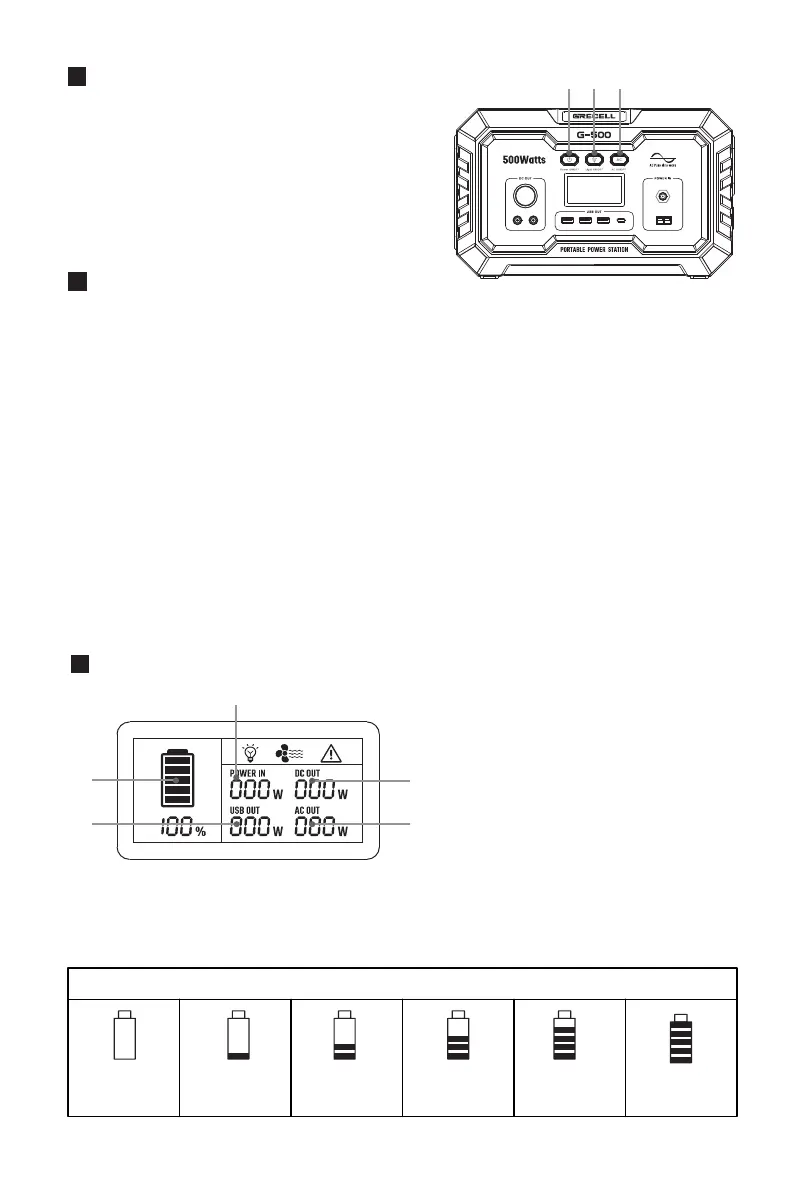
LCD Features
Button Feature
Buttons Function
Button A: Power ON/OFF
Master switch. Press Button A to turn on the power and also the DC output,
USB output and wireless charger will be activated, press it again to turn off.
Button B: SOS Mode & LED Light
This function is available no matter the Power ON/OFF button is activated
or not. Using Steps:
Firstly, press Button B once to turn on LED light mode;
Secondly, double press to turn on the SOS mode.
Thirdly, press Button B once again to go back to LED light mode, then
press it again, the light will be off.
Button C: AC Output Power ON/OFF
Please make sure the Power ON/OFF button is activated before pressing
Button C; Press Button C again to turn off.
●
●
●
The LCD Screen will enter Sleep Mode after 120s of inactivity, and will Wake
up when inputting a charging cord or when any button is pressed.
●
Note:
H: Battery Indicator
I : Input Status
J : DC Output Status
K: AC Output Status
L: USB Output Status
The Pattern of the Charge Display LCD
0%-5%
Lighting
6%-20%
Lighting
21%-40%
Lighting
41%-60%
Lighting
61%-80%
Lighting
>81%
Lighting
Total 14V 8A
QC3.0 QC3.0 QC3.0 PD 60W
A B C
A: Power ON/OFF Button
B: SOS Mode & LED Light Button
C: AC Output Power ON/OFF Button
12~26V
DC INPUT
12~26V/4A
I
H
L
K
J


 To Next Page