EasyManua.ls Logo

GRECELL T500 - Button Feature; Button Functions

GRECELL T500
13 pages
Print Icon
To Next Page IconTo Next Page
To Previous Page IconTo Previous Page
Loading...
M
Button
Feature
moow>
|
IZ'E@
)
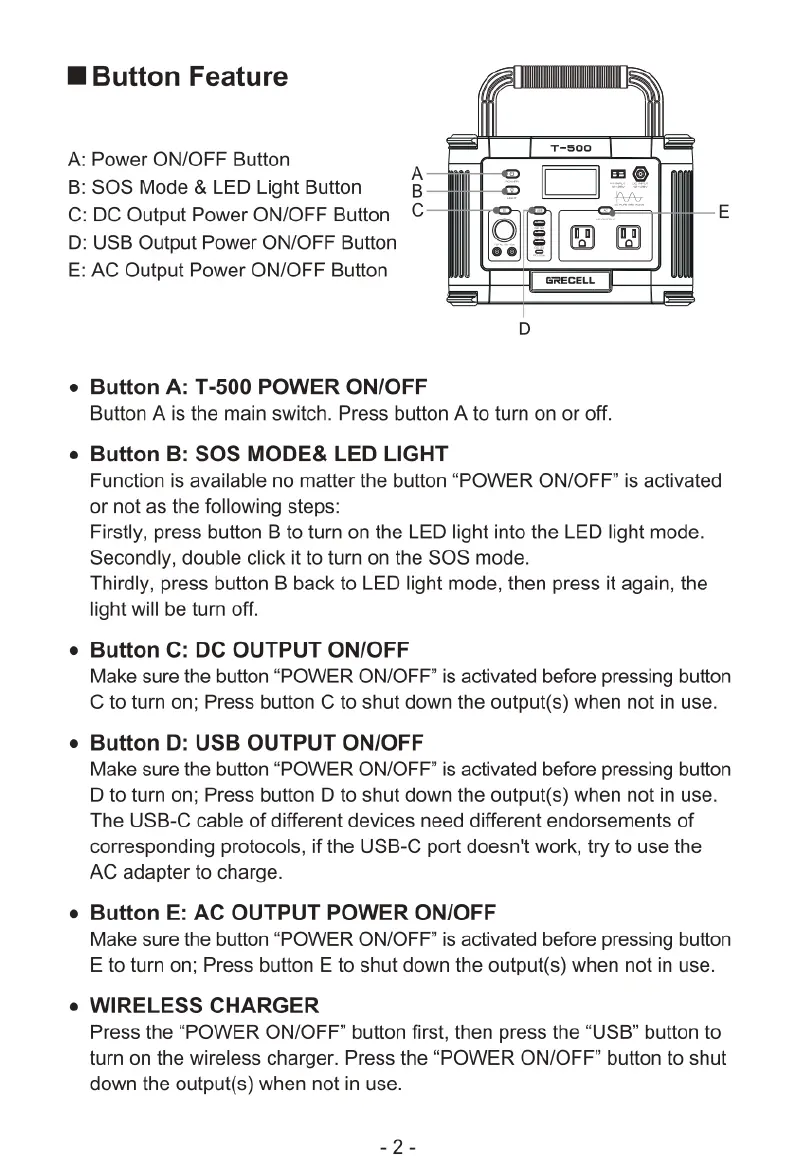
AC
Output
Power
ON/OFF
Button
Power
ON/OFF
Button
A
SOS
Mode
&
LED
Light
Button
B
DC
Output
Power
ON/OFF
Button
C
USB
Output
Power
ON/OFF
Button
=
Button
A:
T-500
POWER
ON/OFF
Button
A
is
the
main
switch.
Press
button
A
to
turn
on
or
off.
Button
B:
SOS
MODE&
LED
LIGHT
Function
is
available
no
matter
the
button
“POWER
ON/OFF”
is
activated
or
not as the
following
steps:
Firstly,
press
button
B
to
turn on the
LED
light
into
the
LED
light
mode.
Secondly,
double
click
it
to
turn
on the
SOS
mode.
Thirdly,
press
button
B
back
to
LED
light
mode,
then
press
it
again,
the
light
will
be
turn
off.
Button
C:
DC
OUTPUT
ON/OFF
Make
sure
the
button
“POWER
ON/OFF"
is
activated
before
pressing
button
C
to
turn
on;
Press
button
C
to
shut
down
the
output(s)
when
not
in
use.
Button
D:
USB
OUTPUT
ON/OFF
Make
sure
the
button
“POWER
ON/OFF"
is
activated
before
pressing
button
D
to
turn
on;
Press
button
D
to
shut
down
the
output(s)
when
not
in
use.
The
USB-C
cable
of
different
devices
need
different
endorsements
of
corresponding
protocols,
if
the
USB-C
port
doesn't
work,
try
to
use
the
AC
adapter
to
charge.
Button
E:
AC
OUTPUT
POWER
ON/OFF
Make
sure
the
button
“POWER
ON/OFF”
is
activated
before
pressing
button
E
to
turn
on;
Press
button
E
to
shut
down
the
output(s)
when
not
in
use.
WIRELESS
CHARGER
Press
the
“POWER
ON/OFF”
button
first,
then
press
the
“USB”
button
to
turn
on the
wireless charger.
Press
the
“POWER
ON/OFF”
button
to
shut
down
the
output(s)
when
not
in
use.
_2-

Related product manuals