Need help?
Do you have a question about the Gree G17-10ESHWAC-CA and is the answer not in the manual?
Explains the meaning of the hazard symbol for potential serious injury or death.
Provides crucial warnings regarding unpacking, installation, and operation of the air conditioner.
Details on safe use of power cords, grounding, and electrical connections.
Instructions for testing the power cord's integrated current detection device.
Important notes and cautions to consider before starting the installation process.
Guidelines for choosing the most suitable and safe location for the unit.
Specifies the necessary electrical connections and safety standards.
Advice on where to install the unit for optimal performance and user safety.
Instructions for proper installation when using a storm window for drainage.
A comprehensive list of all components and tools needed for installation.
Detailed steps for attaching the upper guide rail and flexible screens.
Instructions for applying seals, positioning the unit, and securing brackets.
Guidance on installing the top gasket and foam insulation for sealing.
An overview of the air conditioner's main features and functionalities.
Explains the meaning of symbols on the display and the function of control buttons.
Detailed guide on operating the air conditioner using the remote control.
How to adjust the air outlet frame for optimal air distribution.
Essential safety warnings to follow before cleaning the unit.
Step-by-step instructions for cleaning and maintaining the air filter.
Guidance on regular checks for filters, coils, and surfaces.
Instructions for replacing batteries in the remote control.
Actions to take for specific errors before contacting customer service.
Describes common operational sounds that are not indicative of a problem.
Lists malfunction codes and directs users to contact customer service.
A comprehensive guide to common problems and their resolutions.
Information regarding the warranty period, coverage, and claim procedures.
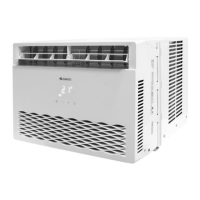
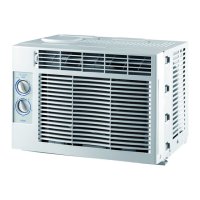
This document is an owner's manual for a Gree Window Air Conditioner, model G17-10ESHWAC-CA. It provides comprehensive instructions for installation, operation, and maintenance, emphasizing safety precautions throughout.
The air conditioner is designed for window installation and is equipped with several features to enhance user comfort and energy efficiency. It utilizes an i-Feel LCD Remote Control, which acts as a separate thermostat. This allows the unit to sense the surrounding temperature at the remote's location and cool the room until the desired temperature is met there. The remote has a maximum transmission distance of 8 meters (26 feet).
A Programmable Digital Thermostat is integrated for precise comfort control, allowing users to select an exact desired temperature. The unit also includes a 24 Hour Programmable Clock Timer. In OFF mode, this timer enables users to set a specific time for the unit to turn on, while in ON mode, it can be programmed to turn the unit off at a specific time.
For fan control, the air conditioner offers a 3 Speed Fan & Auto Fan function. This provides more settings for maximum comfort, with the Auto fan automatically adjusting its speed based on the current room temperature and thermostat setting. An Evaporative Dehumidifier (Dry Mode) is also included, which reduces and evaporates unwanted moisture without providing additional cooling.
The Sleep Mode feature automatically increases the set temperature by 2° after the first hour and another 2° after the second hour, limiting compressor usage and conserving energy. To further conserve energy, the Energy Saver Mode automatically shuts off both the compressor and fan once the desired temperature is reached. In the event of a power interruption, the Loss of Power Protection with Auto Restart feature remembers all previous settings, allowing the A/C to resume operation in the same mode, temperature, and settings once power is restored. The unit also features a Gold Shield, an anti-corrosion coating that prevents condenser fin corrosion.
The remote control offers additional functionalities. Users can switch the display between Fahrenheit (°F) and Celsius (°C) by pressing the Mode and Temp Decrease buttons simultaneously for 3 seconds when the remote is off. The remote also has buttons for Power, Mode selection (AUTO, COOL, ENERGY SAVER, DRY, FAN), Increase/Decrease temperature, Swing (to turn ON/OFF air flow oscillation), Fan Speed (AUTO, Speed 1, 2, 3), Timer (to initiate AUTO-ON/AUTO-OFF timer), i-Feel (to activate the remote's thermostat function), and Light (to turn the display light ON/OFF).
Airflow adjustment is possible by manually moving the air frame left or right, and up or down, to direct the air flow according to user preference.
Maintenance instructions emphasize safety. Before cleaning, the air conditioner must be turned off and disconnected from the power outlet to avoid electric shock. The unit should not be washed with water, and harsh cleansers should be avoided. When removing the air filter, users are cautioned not to touch the metal parts of the unit to prevent injury.
Cleaning the filter involves pulling the grooves on both sides of the panel to open it, then removing and cleaning the filter with a duster or a damp cloth. If the filter is dirty, warm water with mild soap can be used, and it should be laid flat to dry without a hairdryer or other drying device. The filter must be completely dry before re-installation, and the unit should not be operated without the filter installed. The filter should be checked monthly or every 250 hours of use, with more frequent cleaning in dusty environments. The panel surface can be cleaned with a soft dry cloth, and the coils on the outdoor side of the unit should be periodically checked for dirt or debris.
Battery replacement for the remote control involves pressing the back side marked "OPEN," pushing out the battery cover, replacing the two AAA 1.5V dry batteries, ensuring correct polarity, and then reinstalling the battery cover.
The manual also includes a troubleshooting section for common issues and malfunction codes, advising users to contact customer service if solutions fail. It also describes normal operating sounds such as high-pitched sounds from the compressor, vibrating sounds due to improper installation, gurgling or hissing sounds from refrigerant, and pinging or droplet sounds from water hitting the condenser.
 General
| Refrigerant | R410A |
|---|---|
| Type | Split System |
| Power Supply | 220-240V, 50Hz |
| Operating Temperature (Cooling) | 18°C to 43°C |
| Operating Temperature (Heating) | -7°C to 24°C |

 To Next Page