EasyManua.ls Logo

Gree YAP1F7 - User Manual

Gree YAP1F7
7 pages
Print Icon
To Next Page IconTo Next Page
Loading...
Bora X and Weka
Remote YAP1F7
Question and Answer IconNeed help?

Do you have a question about the Gree YAP1F7 and is the answer not in the manual?

Summary

Operation and Introduction of Remote Controller

Buttons on Remote Controller

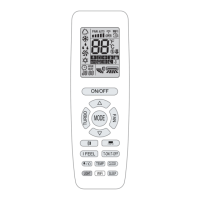
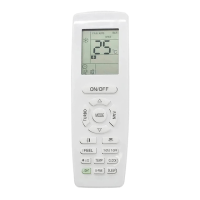
Details the various physical buttons on the remote controller and their primary functions.

Introduction for Icons on Display Screen

Explains the meaning of different icons and symbols displayed on the remote's screen.

Function Introduction for Combination Buttons

Energy-Saving Function

Explains how to activate and use the energy-saving mode for efficient operation.

8°C Heating Function

Details the 8°C heating function for maintaining a minimum temperature.

Child Lock Function

Temperature Display Switchover Function

Auto Clean Function

Power Limiting Function

Night Mode

Replacement of Batteries in Remote Controller

Overview

This document describes the operation and features of the Bora X and Weka Remote YAP1F7 remote controller for GREE air conditioners.

Function Description

The remote controller allows users to control various aspects of their GREE air conditioner, including:

  • Power Control: Turn the unit ON/OFF.
  • Mode Selection: Choose between Auto, Cool, Dry, Fan, and Heat modes.
  • Temperature Adjustment: Set the desired temperature within a range of 16~30°C (61-86°F).
  • Fan Speed Control: Adjust fan speed through Auto, Low, Medium, and High settings.
  • Swing Function: Control both left & right and up & down swing angles for optimal air distribution.
  • Timer Functions: Set Timer ON (T-ON) and Timer OFF (T-OFF) to schedule operation.
  • I FEEL Function: Enables the remote controller to detect ambient temperature and automatically adjust the indoor temperature for enhanced comfort.
  • Clock Setting: Set the current time for accurate timer operations.
  • Sleep Mode: Offers three different sleep modes (Sleep 1, Sleep 2, Sleep 3) and a cancel option, designed to adjust temperature and fan speed for comfortable sleep. Sleep 3 allows for user-defined sleep curve settings.
  • WiFi Function: Turn the WiFi function ON/OFF for smart control.
  • Health and Scavenging Functions: Activate or deactivate health and scavenging features for improved air quality.
  • Light Control: Turn the display light on or off on the indoor unit, with an auto light function available.
  • Temperature Display Switchover: Toggle between Celsius (°C) and Fahrenheit (°F) temperature display.
  • Child Lock Function: Lock the remote controller buttons to prevent accidental changes.
  • Auto Clean Function: Initiate a self-cleaning process for the evaporator.
  • Power Limiting Function: Limit the power consumption of the entire unit.
  • Night Mode: Operates the outdoor unit at low speed or quiet notch during cooling or heating for reduced noise.

Important Technical Specifications

  • Temperature Range: Set temperature from 16~30°C (61-86°F).
  • Timer Resolution: Timer adjustments are in 1-minute increments.
  • Clock Mode: 24-hour mode.
  • Battery: Requires two 7# (AAA 1.5V) dry batteries.
  • Signal Transmission: The remote controller sends a signal to the air conditioner, indicated by a blinking signal icon and an audible "di" sound from the unit.

Usage Features

  • General Compatibility: This is a general-use remote controller compatible with multifunction air conditioners. Functions not present in a specific model will not affect its operation.
  • Cold Air Prevention (Heating Mode): After starting heating mode, the indoor unit delays blowing air for 1-5 minutes to prevent cold air discharge, depending on ambient temperature.
  • X-FAN Function: In Cool or Dry mode, holding the fan speed button for 2 seconds activates X-FAN, which keeps the indoor fan running for a few minutes after the unit is turned off to dry the evaporator and prevent mold. This function is defaulted to OFF after energization and is not available in Auto, Fan, or Heat modes.
  • Turbo Function: Quickly achieve desired cooling or heating by pressing the TURBO button, which runs the unit at super-high fan speed.
  • Energy-Saving Function: In cooling mode, pressing TEMP and CLOCK buttons simultaneously activates energy-saving, automatically adjusting the set temperature for optimal energy efficiency. "SE" is displayed on the remote controller.
  • 8°C Heating Function: In heat mode, pressing TEMP and CLOCK buttons simultaneously activates 8°C heating, maintaining the indoor temperature at 8°C (46°F in Fahrenheit display) to prevent freezing.
  • I FEEL Placement: For accurate temperature detection, the remote controller should be placed near the user and away from objects that may affect temperature readings.
  • Auto Clean Process: During auto clean, the unit performs fast cooling or heating, which may produce noise or blow cool/warm air. The room should be well-ventilated during this process.
  • Power Limiting Modes: The power limiting function offers different levels of power reduction. If the current power is already below the maximum limit for a selected mode, no further limiting will occur.
  • Combination Buttons: Several functions are activated by pressing two buttons simultaneously (e.g., Energy-saving, 8°C heating, Child lock, Temperature display switchover, Auto clean).

Maintenance Features

  • Battery Replacement: Instructions are provided for replacing the two AAA 1.5V dry batteries, ensuring correct polarity.
  • Filter Cleaning Reminder: An icon reminds users to clean the filter.
  • Auto Clean Recommendation: For dusty rooms, the auto clean function is recommended monthly; otherwise, every three months.
  • WiFi Reset: Under OFF status, pressing MODE and WiFi buttons simultaneously for 1 second restores WiFi module to factory settings.

Gree YAP1F7 Specifications

General IconGeneral
BrandGree
ModelYAP1F7
CategoryRemote Control
LanguageEnglish

Related product manuals