7
CHECKING BATTERY CAPACITY (ONLY FOR LB24A020/LB24A040)
Note
: The battery is not shipped fully charged. It is recommended to fully charge before rst use to
ensure that maximum run time can be achieved. This lithium-ion battery will not develop a memory
and can be charged at any time.
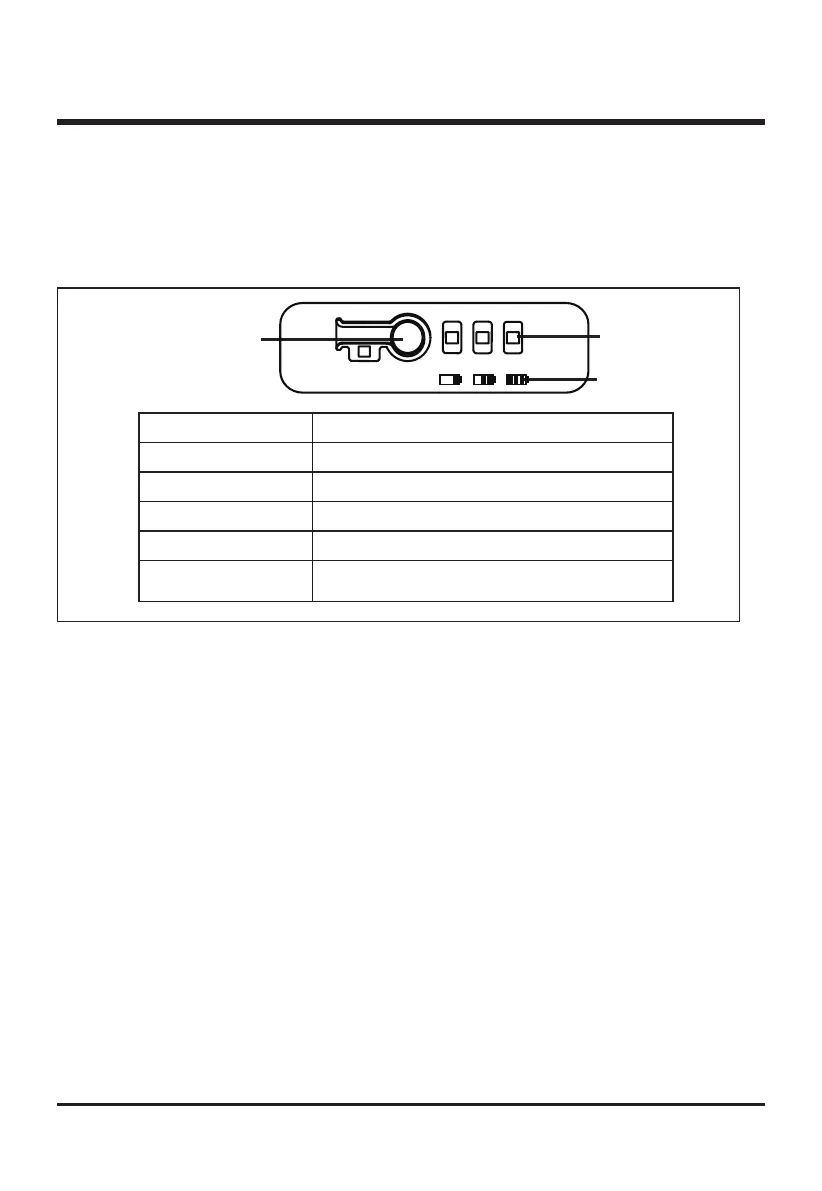
Press the battery capacity indicator (BCI) button. The lights will illuminate according to the battey
capacity level. See chart below:
Lights Capacity
3 Green Lights The battery is at 80-100% capacity
2 Green Lights The battery is at 50-80% capacity
1 Solid Green Light
The battery is at 20-50% capacity
1 Blinking Green Light
The battery is at 10-20% capacity
No Green Lights The battery is under 10% capacity and requires
charging immediately
BATTERY CAPACITY
INDICATOR (BCI) BUTTON
LED LIGHT METER
BATTERY METER
BATTERY PROTECTION FEATURES
GW 24V lithium-ion battery packs are designed with features that protect the lithium-ion cells and
maximize battery life.
If the tool stops during use, release the trigger to reset and resume operation. If the tool still does
not work, the battery needs to be recharged.
COLD WEATHER OPERATION
The lithium-ion battery pack can be used in temperatures down to -14°C (6.8°F). Put the battery
pack on a tool and use the tool in a light duty application. After about a minute, the pack will warm
up and begin operating normally.
OPERATION



 To Next Page