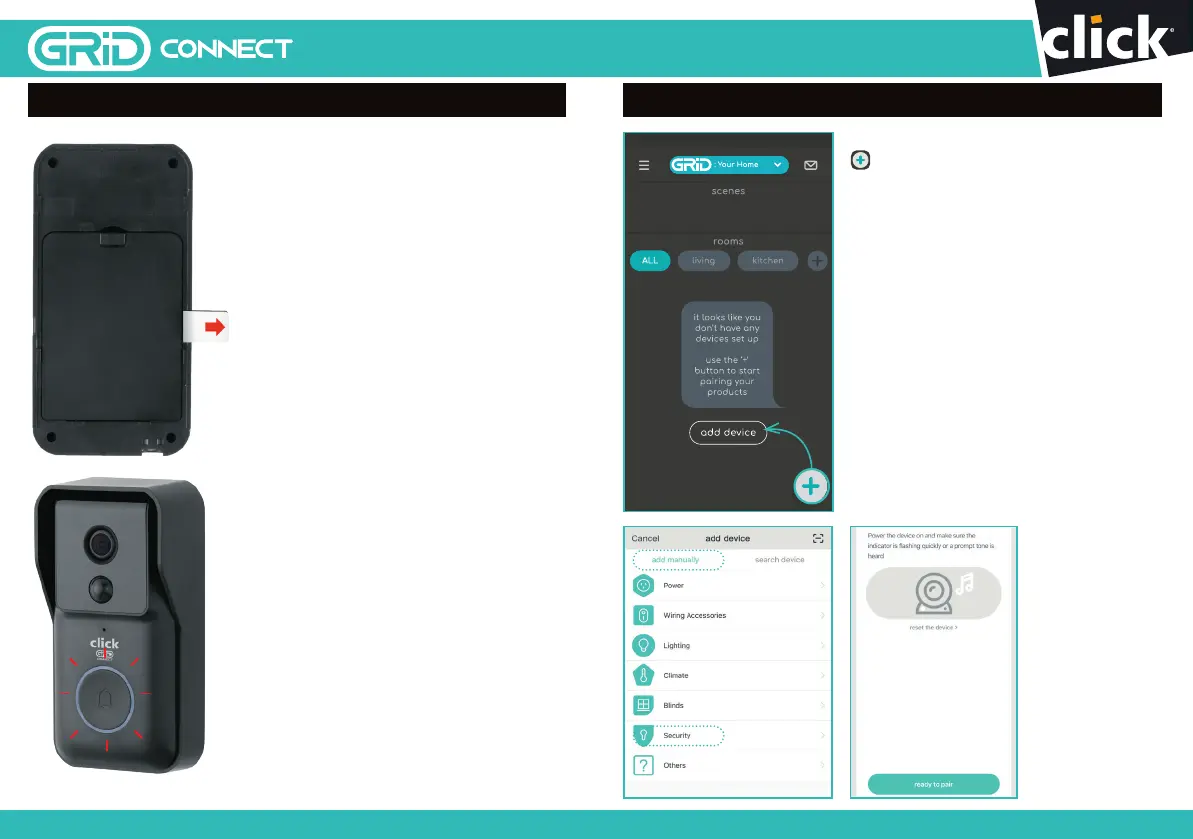
7 PREPARING YOUR DEVICE
Pull o the isolation strip to allow the
batteries to make electrical contact.
NOTE: Ensure the battery
polarity (+/-) matches the
battery compartment sign.
8.0 PAIRING YOUR DEVICE
Open the Grid Connect app. Tap
, then select
security
on the
add
device
page. Confirm the status light
around the push button is flashing
red, one flash per second before
tapping ‘ready to pair’ to proceed.
If the status light is not flashing
red, press the push button once
to activate the video doorbell then
press and hold the reset button
from the bottom of the video
doorbell for 5 seconds until a
prompt is heard. After 10 seconds,
the status light will start flashing red.
Tap ‘ready to pair’ to proceed.
76
24 pages 105mm x 148mm (A6) 160gsm Gloss Art Stock 4 colour process double sidedDC60HA - CPIN005634
SMART HOME


 To Next Page