Need help?
Do you have a question about the Griven KOLORGLOBE MK2 7000 and is the answer not in the manual?
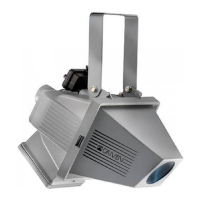
The GRIVEN KOLORGLOBE MK2 7000 (models GR0702 and GR0703) is a professional-grade, high-power discharge lamp projector designed for outdoor architectural and entertainment lighting. It features advanced DMX control, robust construction, and a range of safety and maintenance features to ensure reliable operation in demanding environments.
The KOLORGLOBE MK2 7000 is a moving head projector capable of producing powerful, uniform light projections. It utilizes an OSRAM XStage 7000W Xenon discharge lamp, offering a luminous flux of 330,000 lm. The projector's DMX control allows for precise manipulation of various parameters, including PAN (420°) and TILT (220°) movements, lamp intensity (dimmer), strobe effects, and color mixing (Yellow, Cyan, Magenta) to create a wide spectrum of colors. A frost effect is also available for beam softening. The unit is designed for both ground-level and suspended installations, with specific IP ratings depending on the orientation.
Projector Mechanical Features:
Ballast Mechanical Features:
Thermal Features:
Electrical Features:
Light Output Source:
Optics:
Control:
Construction:
Installation: The projector can be installed on the ground or suspended. For ground installation, adjustable supporting feet (11) and pedal brakes (12) on the wheels ensure stability and prevent unwanted movement. For suspended installations, an optional fixing plate (GR0530) is recommended, along with a safety chain (14) capable of bearing at least 10 times the unit's weight. The unit's IP rating varies with installation position: IP44 when the projector body is oriented vertically (position 1) and IP40 when tilted (position 2).
Lamp Installation and Alignment: The KOLORGLOBE MK2 7000 exclusively uses an OSRAM XStage 7000W lamp, which operates at high pressure and requires careful handling. Lamp replacement should be performed with the projector in a vertical position, after disconnecting power and allowing at least 30 minutes for cooling. Protective gear (gloves, mask) is essential. After installation, lamp alignment is crucial for optimal light uniformity and performance. This is done via the control panel, adjusting "LAMP," "HPOS," and "YPOS" settings. The lamp life counter should be reset after each lamp change.
DMX Control: The projector is controlled via DMX512 protocol, utilizing 13 channels. It features XLR3 IP65 connectors for DMX input and output. For optimal DMX signal integrity, a shielded RS-485 cable (minimum 0.35mm²) is required, and the last unit in the DMX chain should have a 120 Ω termination plug. The DMX address is set via the unit's control panel, allowing for individual control of multiple projectors.
Control Panel and Display: The unit's control panel, located on the projector base, includes a display and four buttons (MENU, UP, DOWN, ENTER). The display shows the DMX address, DMX signal status, and various menu options. The MENU button navigates through settings like DMX address, options (OPE), calibrations (CAL), automatic mode (AUTO), information (INFO), and test functions (TEST). UP and DOWN buttons adjust values, and ENTER confirms selections.
Electronic Ballast: The electronic ballast features its own control panel with a display, LEDs (LINE, MAN, PROG, ALARM), and keys (ESC, OK). It displays output current, power, voltage, operating temperature, and lamp working hours. The ballast includes protections against overtemperature and overload, indicated by error codes (e.g., "e 1" for overload, "e 2" for overtemperature) and an alarm LED.
Heater Power Supply: The ballast group includes an internal heater to prevent condensation at low temperatures (below 0°C/32°F). The heater can be connected directly to the projector's power supply or to an external independent power source (210-250Vac 50/60Hz). When connected to the projector, the heater activates automatically when the unit is powered on and the temperature is low, with a waiting time of 30-60 minutes depending on ambient temperature. When connected externally, the heater maintains the ballast at operating temperature continuously.
Safety First: Always disconnect the unit from mains power before performing any maintenance. The lamp is extremely hot after operation; wait at least 30 minutes before handling.
Cleaning: Regular cleaning is essential for maintaining optical performance.
Regular Checks:
Thermal Protection: An internal thermal sensor protects the projector from overheating by cutting power to the lamp if the ambient temperature exceeds safe limits. If the lamp turns off due to thermal protection, allow the fixture to cool down and ensure air vents are clear and fans are working correctly.
Troubleshooting and Error Messages: The projector's display shows error codes (e.g., E-01 for display PCB communication error, E-04 for PAN movement error) to help diagnose malfunctions. A troubleshooting guide is provided in the manual to assist in identifying possible causes and corrective actions for common issues like no power, DMX control problems, or no light output.
Spare Parts: All components are available as spare parts through Griven dealers. Exploded views, wiring diagrams, and electronic layouts are available upon request. When ordering, specify the unit's serial number and model.
 General
| Brand | Griven |
|---|---|
| Model | KOLORGLOBE MK2 7000 |
| Category | Lighting Equipment |
| Language | English |


 To Next Page