Need help?
Do you have a question about the Grosvenor GT10L and is the answer not in the manual?
Describes the GT series terminals designed for various applications like Time and Attendance.
Explains the purpose and target audience of this GT10L user guide.
Lists other relevant documents available from Grosvenor Technology.
Provides contact information for technical support in Europe and North America.
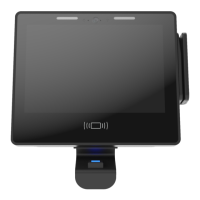
Details the 10-inch full colour capacitive multi-touch display with toughened glass.
Specifies the industrial ARM Cortex A9 Quad Core 800MHz processor.
States the operating system is Linux.
Lists optional input/output accessories available, including readers, USB, camera.
Details the terminal's memory specifications, including RAM.
Specifies 8GB high performance flash storage and SD card slot compatibility.
Outlines Ethernet and optional Wi-Fi connectivity options.
Describes power input options: 12VDC, Power over Ethernet (PoE), and battery backup.
Specifies the operating temperature range for the terminal.
Highlights fast installation and ease of fitting reader modules and peripherals.
Notes the availability of a Software Developers Kit for integration.
Details the integrated speakers and microphone.
Describes the 5-megapixel wide-angle camera supporting photo and video.
Mentions the lockable case for physical security.
Lists the CE and FCC certifications obtained by the terminal.
Provides the physical dimensions of the terminal.
Step-by-step guide on how to open the terminal and remove the front panel.
Lists compatible internal proximity reader modules and their part numbers.
Lists compatible card swipe reader modules, including barcode and mag stripe.
Lists compatible biometric reader modules.
Details the Linux operating system used by the terminal.
Highlights the ability for remote software upgrades and configuration.
Provides instructions for physically mounting the terminal unit.
Guidance on selecting an appropriate and accessible location for the terminal.
Instructions on how to securely fix the terminal's back panel to a vertical surface.
Explains how to power the terminal using an AC power outlet and adapter.
Details powering the terminal via a suitable 12VDC power supply.
Describes powering the terminal via the Ethernet cable using PoE.
Details the internal backup battery for power continuity and its usage.
General preparation steps before fitting any option modules to the terminal.
Step-by-step instructions for installing internal proximity reader modules.
Instructions for installing card swipe reader modules, including barcode and mag stripe.
A guide on how to safely remove and replace the internal battery pack.
Instructions for installing the optional Power over Ethernet (PoE) module.
Steps for safely removing the Power over Ethernet (PoE) module.
Guide for installing the Wi-Fi module and its antennae.
Describes how to access the terminal setup menu via the Cog Icon after boot.
Explains the options available from the Factory App launch screen.
Details the PIN entry process required to access terminal setup menus.
Manages installed applications: Info, Update, Remove, Backup/Restore, Install.
Manages terminal firmware: Info, Auto Update, Check, Change PIN/Password, Reset.
Enables or disables services like AssistIT, Telnet, NTP, SSH, and VNC.
Configures various terminal settings including Date/Time, Region, Sound, Network.
Sets terminal time, date, timezone, and NTP server configuration.
Controls the terminal's language and location settings for display.
Adjusts volume, microphone settings, and performs test playback.
Configures network settings: IP address, Netmask, Gateway, DNS, DHCP.
Allows adjustment of the display brightness.
Configures reader type and defines how reader data is decoded.
Manages biometric reader functions: Info, Test Sensor, Calibrate, Delete Templates.
Lists options dependent on the fitted IO board(s).
Manages USB/MMC device operations like installing firmware, applications, or backups.
Performs diagnostic tests including Network, Ping, AssistIT, and NTP.
Details methods for remote access and control of the terminal.
Connects to the terminal via Secure Shell for command-line access.
Enables remote support for interrogating terminal configuration.
Connects to the terminal via Telnet; noted as insecure.
Controls the terminal remotely using a VNC client viewer program.
Manages terminal security, including PIN and Login passwords.
Explains the purpose of the PIN and how to change it.
Explains the login password for Telnet/SSH and how to change it.
Steps for deploying and configuring the terminal using a USB memory stick.
Method for deploying and configuring the terminal via a network connection.
Describes the main system unit and its back panel features.
Lists common reader modules and their corresponding part numbers.
Details communication modules like Power over Ethernet (PoE) and Wi-Fi.
Lists available expansion modules for the terminal.
Lists associated ancillary equipment such as PSUs and PoE injectors.
Provides instructions for cleaning and maintaining the terminal unit.
 General
| Brand | Grosvenor |
|---|---|
| Model | GT10L |
| Category | Touch terminals |
| Language | English |


 To Next Page