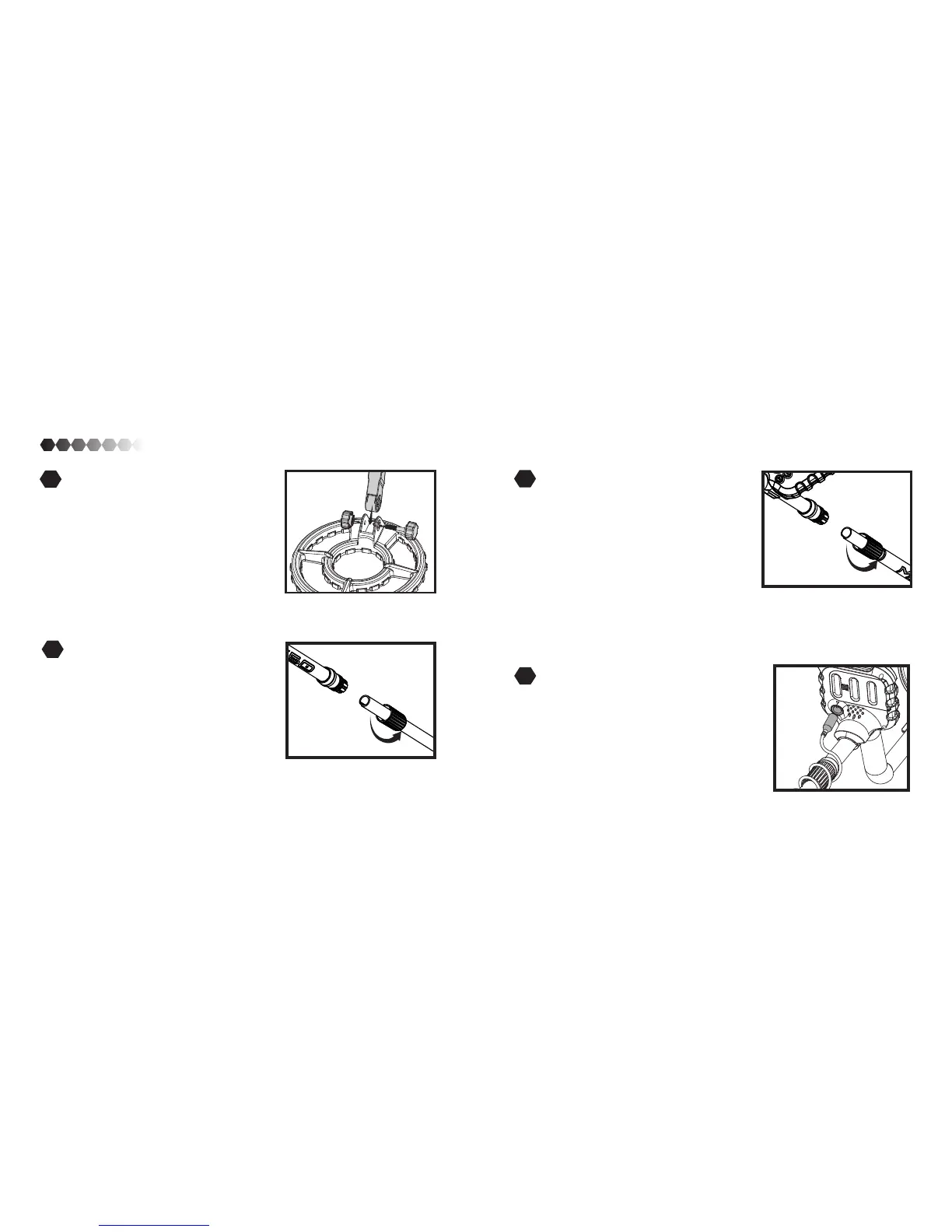
Connect The Rods
Connect the Top Rod to the Bottom Rod
by sliding the Top Rod with the Locking
Bracket end down. Note: The groove on the
Top Rod needs to face away from you. Align
grooves to one another to ensure rods stay
in place.
Slide the Top Rod to the desired length and
tighten the Locking Bracket by turning it to
the Left.
1
2
7 8
ASSEMBLY
Assembling the coil unit
Unscrew the bracket from the bottom
rod. Fit the bottom rod inside the coil and
replace the bracket. Then tighten but do
not over tighten. NOTE: The large hole
faces down.
Connecting the Wiring
Take the cord that is connected to the coil and
wrap it around the rods. Continue wrapping
up around the rods and then plug it into the
back of the LCD display.
Connecting the Handle Unit
Connect the rods to the Handle Unit by
sliding the Locking Bracket end down.
NOTE: The groove on the rods need to
face away from you. Align grooves to one
another to ensure rods stay in place.
Tighten the Locking Bracket by turning it to
the left.
4
3


 To Next Page