WWW.GFWORLDWIDE.COM | +1 (208) 664-9291
5.11 EDIT PROGRAM
The Ground Force WCS comes pre-programmed with
several example programs. The operator can edit
these programs to better reect on-site water deliv-
ery requirements.
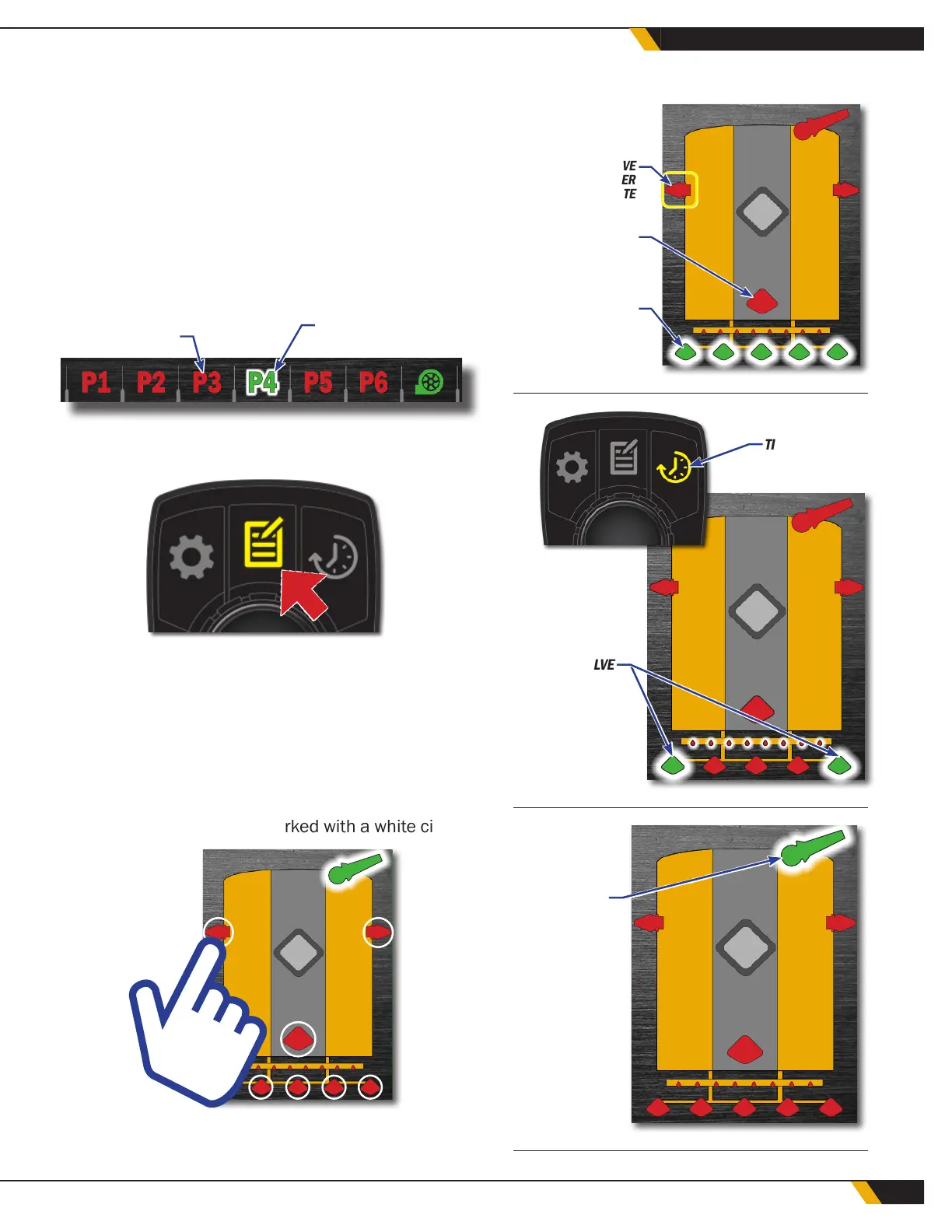
To create or edit a water control program, rst high-
light and then select the desired program number
(P1 - P6) by rotating the center button. The program
indicator should appear green, and a white highlight
should be visible at the same time.
INACTIVE PROGRAM
HIGHLIGHTED &
SELECTED PROGRAM
Next, press Button 2. The button indicator on the dis-
play screen will turn yellow.
After pressing Button 2, the operator can choose
each water spray valve to add to a program, depend-
ing on the water truck's specic conguration. Rotate
the center button to highlight available valves, mov-
ing from left to right and top to bottom. A yellow
square will indicate the current valve.
Valves can also be selected using the touch screen.
All available valves will be marked with a white circle.
EXAMPLE PROGRAMS
HIGHLIGHTED VALVE
PRESS CENTER
BUTTON TO ACTIVATE
ACTIVE VALVE
INACTIVE VALVE
TIMER MODE
ACTIVE VALVE
ACTIVE VALVE
P1
P2
P6
33
WATER CONTROL SYSTEM



 To Next Page