Need help?
Do you have a question about the Grow GM66 and is the answer not in the manual?
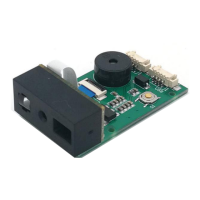
Overview of the GM66 Bar code reader module, highlighting its high performance, ability to read 1D/2D barcodes, and advanced decoding algorithm.
Details technical specifications including scan mode, read code time, reading interval, output, and interface parameters.
Provides a visual representation of the GM66 module's dimensions and details its control panel with ports and buttons.
Illustrates the scan area and presents performance data like minimum/maximum scanning distances for various barcode types.
Explains how to configure the module using setup codes, save settings, cancel operations, and perform a factory reset.
Details serial communication interface setup, default parameters, and baud rate adjustments for connecting the module.
Explains how to set the GM66 module to USB PC Keyboard or USB Virtual Serial Port modes.
Details the Continuous Mode for automatic barcode reading, including time settings for single reads and breaks between reads.
Explains Induction Mode, which reads based on brightness changes, and its time settings for single reads and image stabilization.
Describes Manual Mode for key-initiated reading and Command Triggered Mode for mainframe-initiated scanning.
Configures the headlamp function for additional lighting during barcode reads.
Describes settings for the pointing light beam used to find the best scanning distance.
Configures prompt tones, buzzer sounds, and the duration of the success tone for barcode reads.
Sets decoding prompts (S/F) and Chinese data encoding formats (GBK, UNICODE, BIG5).
Enables changing the keyboard layout for the module to support various languages and regions.
Allows the module to scan flipped or mirror images and provides an option to exit this mode.
Introduces data editing features like prefix, suffix, cut data, and Code ID for data processing.
Details how to add and change prefixes and suffixes to encoded information, including length limits.
Allows users to assign unique Code IDs to different barcode types for identification.
Explains adding tails to data and cutting out specific parts (start, center, end) of the decoded data.
Allows users to define custom output information for read failures (RF).
Configure general barcode reading settings like enabling/disabling all types and barcode rotation.
Manage settings for specific barcode types, including EAN, UPC, Code, QR, and others, with options for enabling/disabling and length.
Details the CRC_CCITT algorithm used for checking data integrity, including C code reference.
Explains command formats and examples for reading zone bit information from the module.
Details command formats and examples for writing zone bit information to the module.
Provides command format for saving zone bit settings to EEPROM and the data receive format.
Lists and describes various zone bit parameters (0x0000 to 0x0071) for configuring module functions.
Lists common serial port commands for baud rate setting, saving settlements, and module responses.
Provides a list mapping barcode types to their corresponding characters and zone bit addresses.
Presents ASCII characters with their corresponding Base 16 Hexadecimal and Decimal values.
Continues the ASCII table, mapping Hexadecimal values to characters from FS to :.
Continues the ASCII table, mapping Hexadecimal values to characters from ; to Y.
Continues the ASCII table, mapping Hexadecimal values to characters from Z to x.
Completes the ASCII table, mapping Hexadecimal values to characters from y to DEL.
Provides QR codes representing numeric digits 0-9 and hexadecimal characters A-F for data input.
 General
| Scanning Element | CMOS |
|---|---|
| Operating Temperature | 0°C to 50°C |
| Storage Temperature | -20°C to 60°C |
| Type | 2D |
| Light Source | LED |
| Interface | USB, RS232 |
| Power Supply | DC 5V |
| Humidity | 5% to 95% (non-condensing) |

 To Next Page