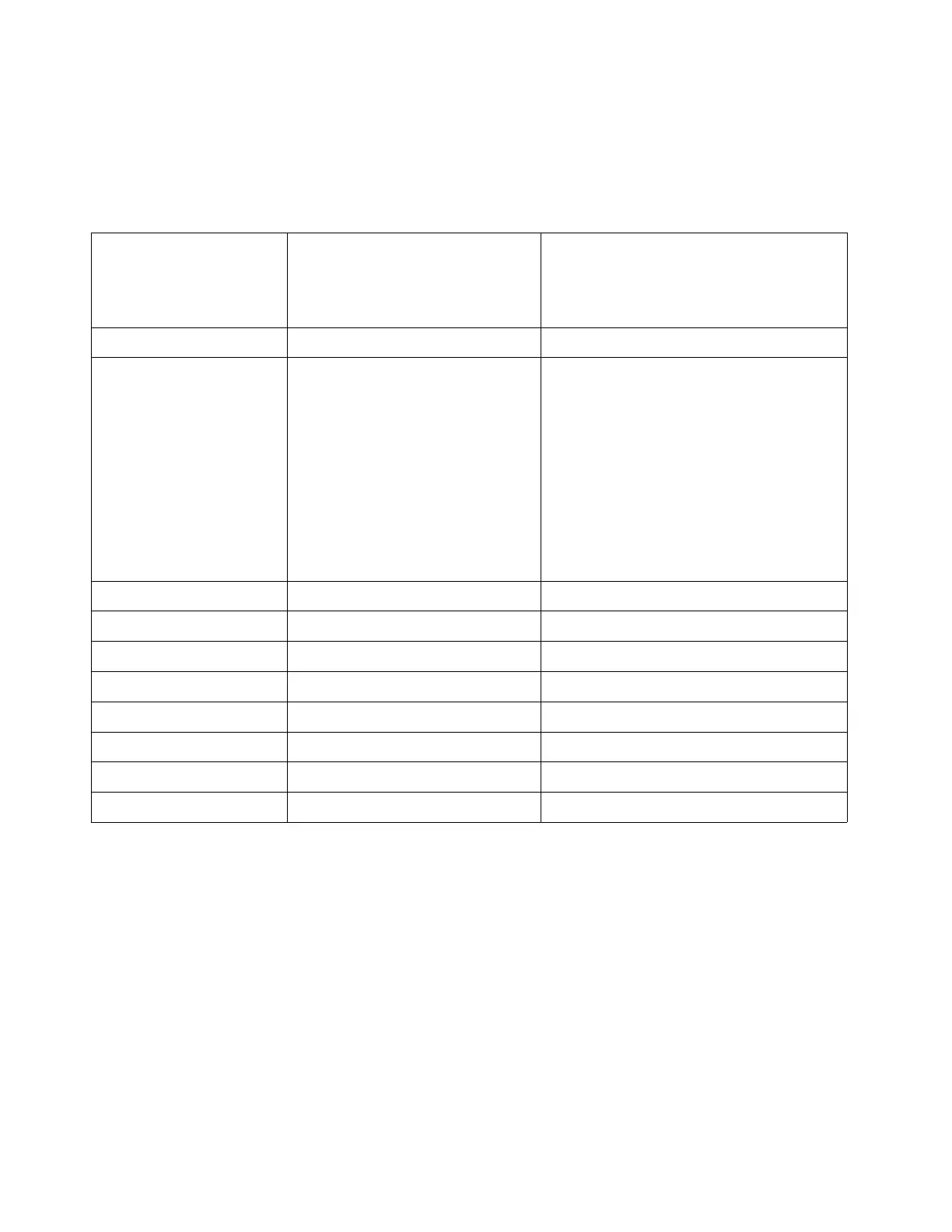
EchoUAT Settings - (Required)
These settings are accessed via wi-fi using an Android or iphone/ipad and the Echo Install app, in the
“Installation” section of the app.
Echo UAT Setting Required Setting
With EFIS controlling Safe-
Fly GPS
Required Settings*
No EFIS control of Safe-Fly
(Includes GRT Avionics WS and HS
display units)
Setup Source EFIS (COM1) App
Control Source Set to “EFIS / Panel (COM1)” if
the squawk code controlled by
this display unit, or another
GRT display unit connected to
this via the inter-display link.
Set to “Transponder Monitor” if
the squawk code is set on the
transponder or otherwise not set
by the GRT EFIS.
Transponder Monitor
GPS Source EFIS (COM1) External GPS (Com2)
Traffic/Uplink Output MFD (COM2) MFD (Com2)
COM1 Rate 38400 38400
COM1 Data 81O 81O
COM1 PHY RS-232 RS-232
COM1 Protocol: TMAP TMAP
COM2 Rate 115,200 115,200
COM2 Input Protocol Not Applicable NMEA
* Other settings are also required corresponding to airplane specific entries, such as aircraft type,
length, width, antenna offset, etc.
__________________________________________________________________________________
Safe-Fly 2020 GPS – Rev P GRT Avionics, Inc
16


 To Next Page