– 21 –
Moisture control unit:
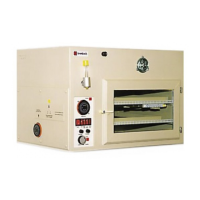
Microprocessor moisture control unit for safety breeder with LED display in rack enclosure casing
and humidity sensor Impulse control (water tank)
Voltage: 230 Volt
Frequency: 50 … 60 Hz
Rupturing capacity: 500 W
Operation:
Display mode:
After the device has been switched on, the current air humidity (actual level) is displayed in 2 digits.
When the button on the front panel is pushed briefly (< 3 seconds) the display switches to the air
humidity that is to be reached (target level). After releasing the button the display returns to the
standard reading, i.e. the current air humidity in the device.
Activity of switch output is signalled by a flashing LED bar.
Setting mode:
When the button is held longer (> 3 seconds), the display begins to flash and switches to the
setting mode of the air humidity that is to be reached (target level). After releasing the button the
display continues flashing. Now it is possible to change the target level of air humidity. If the button
is pushed briefly, the target level displayed changes by 1% each time. If the button is held longer,
this leads to quick adjustment of the target level. Rising levels are displayed. After surpassing the
maximum level the lowest possible level is displayed. When the button is released for a longer time,
the standard display (actual level) returns automatically.
Adjustment of humidity sensor:
The display can be adjusted to a reference meter with the adjustment regulator (a screwdriver is
needed). The adjustment regulator is located on the lower right side of the display.
Temperature indicator:
LED temperature indicator in rack enclosure casing Impulse control (water tank)
Operation:
Display mode:
After the device has been switched on, the current temperature (actual level) is displayed in 3 digits
with decimals. When the button on the front panel is pushed briefly (< 3 seconds), the display
switches to the temperature that is to be reached (target level). After releasing the button the dis-
play returns to the standard reading, i.e. the current temperature in the device.
Setting mode:
When the button is held longer (> 3 seconds), the display begins to flash and switches to the
setting mode of the temperature that is to be reached (target level). After releasing the button the
display continues flashing. Now it is possible to change the target level of temperature. If the button
is pushed briefly, the target level displayed changes by 0.1° each time. If the button is held longer,
this leads to quick adjustment of the target level. Rising levels are displayed. After surpassing the
maximum level the lowest possible level is displayed. When the button is released for a longer time,
the standard display (actual level) returns automatically.
Adjustment of temperature sensor:
The display can be adjusted to a reference meter with the adjustment regulator (a screwdriver is
needed). The adjustment regulator is located on the lower right side of the display.


 To Next Page
 Loading...