
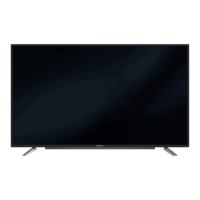
 Need help?
Do you have a question about the Grundig Bayreuth 32 GFB 6899 and is the answer not in the manual?
 General
| Screen Size | 32 inches |
|---|---|
| Smart TV | Yes |
| HDR | No |
| Refresh Rate | 50 Hz |
| HDMI Ports | 3 |
| USB Ports | 2 |
| Display Technology | LED |
| Built-in Wi-Fi | Yes |
| Resolution | 1920 x 1080 |
Covers intended TV use, electrical safety risks, and fire prevention measures.
Addresses risks from falling TVs, operating temperature, furniture care, and environmental protection advice.
Outlines TV capabilities, digital station reception, and connectivity requirements.
Covers SCR system, environmental protection, and tips for image display quality.
Lists standard included items and optional accessories available for purchase.
Guides on connecting TV to antenna, power, and home network via wired connection.
Instructions for setting up the TV with a stand, VESA mount, and inserting remote batteries.
Details all available input/output sockets on the television set for external devices.
Explains physical TV buttons and their primary operational uses for navigation and control.
Covers main and all functions of the remote control for comprehensive TV operation.
Introduces the installation assistant, basic settings, and network connection steps.
Details tuning various TV channels (DVB-S, DVB-C, DVB-T) and the overall setup overview.
Provides a detailed walkthrough for initial TV setup and configuration steps.
Explains basic and advanced picture settings for optimal display quality.
Covers sound modes, DTS TruSurround, equalizer, volume, and audio output settings.
Details restoring default settings and concluding configuration changes.
Covers turning TV on/off, selecting modes, channels, volume, and muting.
Explains managing audio language, subtitles, and using the zap function for channel switching.
Details options for changing picture format and zooming for enhanced viewing.
Covers subtitle formats, panorama, overscan, audio presets, and picture modes.
Explains setting a sleep timer and using the zoom feature for picture enlargement.
Provides information on accessing and navigating the TV's electronic programme guide.
Explains how to adjust the font size for better readability of the TV guide.
Explains what HbbTV is, its requirements, and how it functions.
Covers using HbbTV, video index functions, and activating/deactivating HbbTV and digital teletext.
Describes different Teletext modes and how to navigate pages.
Details functions like character size, page stop, split screen, and hidden answers.
Lists supported video, image, and audio file formats for USB playback.
Provides instructions for safely connecting and disconnecting external data media via USB.
Explains how to use the file browser, its settings, and basic playback controls.
Covers slide show duration, subtitle settings, and additional playback functions.
Guides on playing media files from a network server using DLNA.
Explains how to play media, pause, resume, and navigate playback options.
Covers accepting terms, initial operations, and managing accepted content.
Details using internet apps, USB peripherals, and navigating the application portal.
Explains selecting, displaying, and adding internet applications to favorites.
Explains the browser menu, tabs, navigation, and address bar functions.
Guides on accessing the web browser and entering URLs for internet access.
Covers changing the TV's menu language and the connected keyboard language.
Details setting primary and secondary audio and subtitle languages for digital channels.
Explains how to switch subtitles on/off and select modes for deaf/hard of hearing.
Guides on enabling audio description for visually impaired users and adjusting volume.
Covers automatic TV standby settings and controlling the display of feature logos.
Details adjusting LED brightness and configuring power-saving modes.
Allows setting a timer for the TV to automatically switch to standby.
Guides on setting the TV to automatically turn on or off at specified times.
Covers setting parental ratings for content and locking menu access.
Details how to block channels, change PIN codes, and manage access.
Explains how to watch blocked channels and reset the PIN if forgotten.
Configures the TV to automatically set date and time from broadcast signals.
Allows manual setting of time zone and daylight saving for accurate time display.
Provides details on product info and guides for updating software via OAD, Internet, or USB.
Explains how to connect various accessories and view their status.
Guides on resetting the TV to factory defaults and deleting channel history.
Explains DIGI LINK functionality, device control, and switching external devices.
Guides on connecting digital, analogue, S-Video, and Euro/AV devices.
Covers headphone connection, Hi-fi system integration, and wireless screen sharing.
Guides on establishing and configuring a wired network connection.
Details automatic, manual, and WPS methods for wireless network connection.
Covers connecting to hidden Wi-Fi networks and changing the TV's network name.
Guides on automatic and manual satellite channel tuning with antenna settings.
Details searching for digital channels from cable providers and terrestrial broadcasts.
Covers tuning analogue channels, updating services, and managing stored channels.
Explains creating favourite lists and displaying signal strength for digital channels.
Details specifications for Wireless LAN and Bluetooth modules.
Outlines product compliance with EU directives and provides dealer information.
Covers product disposal, environmental impact, and explanation of device symbols.
Provides solutions for problems like screen issues, sound, color, and remote control malfunctions.
Addresses issues related to network connection, DMS device detection, and internet speed.
Explains various technical terms used in the manual for better understanding.
Provides an alphabetical index for quick navigation to topics within the user manual.



 To Next Page