
 Need help?
Do you have a question about the Grundig Davio 37 and is the answer not in the manual?
Connect the telescopic antenna and the mains power cord to the television set.
Insert batteries into the remote control, observing correct polarity.
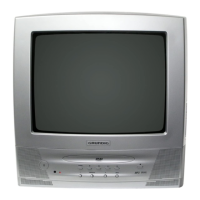
Identify and understand the controls and indicators on the front of the television set.
Details the functions of each button on the television's remote control.
Scan and assign TV stations automatically from antenna or cable connection.
Manually arrange the order of television channels after an automatic search.
Remove unwanted or duplicate television channels from the list.
Modify brightness, color, contrast, sharpness, and tint for optimal picture.
Restore all picture settings to their original factory-configured state.
Learn how to turn the television on, switch to standby, and fully power it down.
Methods for changing channels, adjusting volume, and muting sound.
Show time, channel number, and utilize the zap function for quick channel switching.
Navigate and use TOP/FLOF text mode and normal text mode for information.
Utilize functions like overriding wait time, enlarging pages, and calling sub-pages.
Control scrolling of sub-pages within teletext and stop or cancel functions.
Access and display hidden answers or information on specific teletext pages.
Set a time for the television to automatically switch to standby mode.
Activate, briefly switch off, or fully deactivate the parental lock feature.
Connect satellite receivers, VCRs, or DVD players using EURO/AV cables to AV 1.
Connect camcorders via AUDIO IN/VIDEO IN to AV 2 for playback.
Manually assign channels, tune stations, and name them for specific positions.
Re-scan all available television channels, for example after moving to a new location.
Details on mains voltage, power consumption, sound output, reception ranges, and preset positions.
Notes on mains cables, EU directives, standards, and X-ray emission safety.
Detailed list of pin functions for the EURO-AV socket connections.
Information on UK power plug compatibility, fuse ratings, and wire color coding.
Lists common faults like no picture, poor contrast, no sound, and teletext issues with remedies.
This document outlines the setup, operation, and maintenance of the Grundig DAVIO 37, DAVIO 51, and DAVIO 55 color televisions. It covers everything from initial installation to advanced features and troubleshooting.
The Grundig DAVIO series color televisions are designed to receive and display video and audio signals. They offer a range of functionalities for a comprehensive viewing experience, including automatic and manual channel tuning, picture adjustments, teletext, and connectivity for external devices. The televisions are equipped with an integrated seven-page TOP/FLOF teletext operating function, allowing users to access information quickly and efficiently. A key feature is the ability to save preferred television stations and switch between them using the "Zap" function. The devices also incorporate convenience functions such as a sleep timer and a parental lock, providing control over viewing times and content access.
Initial Setup and Channel Management: Upon first use, the television guides you through an automatic channel search (ATS) to find and store available stations. This process involves selecting your preferred language and country. After the search, you can sort the television channels into your desired order of preference, delete unwanted channels, or move them to different positions. For specific situations, such as adding a new channel or retaining a particular channel sequence, manual tuning is available. This allows for precise adjustment of channel frequency, fine-tuning of the picture, and naming of stations. The television also supports re-tuning all stations, which is useful when moving to a new location.
Picture and Sound Settings: Users can customize their viewing experience by adjusting various picture settings, including brightness, color, contrast, sharpness, and tint (for NTSC reception). These settings can be accessed through the "Picture" menu. If personal adjustments lead to an undesirable outcome, there is an option to reset all picture settings to their factory defaults via the "Dialog Center" menu. For audio, the volume can be adjusted using dedicated buttons on the remote control, and a mute function is available to temporarily silence the sound. The television also features a headphone jack, which automatically deactivates the loudspeakers when headphones are connected.
Teletext Operation: The teletext mode offers both TOP/FLOF and normal text modes. Users can switch to teletext, select pages directly using numerical buttons, or navigate step-by-step. Color-coded buttons on the remote correspond to text fields on the screen, allowing for easy navigation through pages, chapters, and topics. Advanced teletext features include overriding wait times for page loading, enlarging pages for better readability, and calling up sub-pages. There's also a "Page stop" function for multiple-page teletext broadcasts and a "Reveal answer" feature for pages containing hidden information.
External Device Connectivity: The DAVIO series televisions are designed to connect with various external devices. For satellite receivers, video recorders, or DVD players, a EURO-AV socket is provided on the rear panel. This allows for the reception and display of content from these sources. For camcorders, dedicated AUDIO IN and VIDEO IN sockets are available on the front (for T 51, T 55) or side (for P 37) of the device, enabling easy connection and playback of camcorder content. Switching to external device input is done by selecting the appropriate AV channel position.
Convenience Functions: To enhance user convenience, the televisions include a sleep timer, which allows you to set a specific time after which the television will automatically switch to stand-by mode. This is useful for falling asleep while watching TV. Another important feature is the parental lock, which provides control over content access. This function can be activated by setting a four-digit code, blocking all television functions until the code is entered. The parental lock can be temporarily switched off for a single viewing session or permanently deactivated.
Remote Control and On-Device Controls: The television can be operated using both the remote control and buttons on the front of the set. The remote control offers comprehensive control over power, channel selection, volume, menu navigation, teletext functions, and special features like "zapping" and screen format switching. On-device controls provide basic functionalities such as switching to stand-by mode, selecting channels, and adjusting volume, ensuring operation even if the remote control is unavailable.
General Care and Safety: The manual emphasizes the importance of proper setup and safety to ensure the longevity and safe operation of the television. It advises placing the television on a solid, level surface with sufficient clearance for ventilation, away from heating units and direct sunlight. The device is designed for use in dry rooms and should be protected from moisture. Users are warned against placing liquid-filled vessels on the television to prevent spills and potential safety hazards. For cleaning, the screen should be wiped with a soft, damp cloth using only plain water.
Battery Replacement: The remote control requires two 1.5 V Mignon (R6/UM3/AA) batteries. The manual provides instructions for inserting batteries, stressing the importance of observing polarity. It also advises removing flat batteries promptly to prevent damage from leakage and highlights the environmental responsibility of disposing of used batteries in an environmentally sound manner, adhering to local regulations.
Troubleshooting Minor Problems: The manual includes a section dedicated to rectifying minor problems that users might encounter. This covers common issues such as a lit screen with no station visible, poor picture contrast, interference, ghosting, lack of color, inappropriate colors, picture with no sound, missing or faulty teletext, and a non-functional remote control. For each problem, possible causes and remedies are suggested, ranging from checking antenna cables and picture settings to moving interfering devices or replacing remote control batteries. If these remedies do not resolve the issue, users are advised to consult an authorized GRUNDIG dealer. The manual also notes that malfunctions can sometimes be caused by external devices like video recorders or satellite receivers.
Service Information: For more complex issues or repairs, the manual directs users to authorized dealers. It also provides specific service information for dealers, including details about the mains cable and compliance with EU directives and standards, ensuring that any professional servicing adheres to the manufacturer's guidelines and safety regulations.
 General
| Screen Size | 37 inches |
|---|---|
| Display Technology | LCD |
| Aspect Ratio | 16:9 |
| Refresh Rate | 50 Hz |
| USB Ports | 1 |
| Sound Output | 20 W |



 To Next Page
