Allgemeiner Teil / General Section STR 110 micrSAT
1 - 8 GRUNDIG Service
Operating Hints Note: This chapter contains excerpts from the operating instructions. For further particulars please refer to the appropriate user instructions the part number of which is indicated in the
relevant spare parts list.
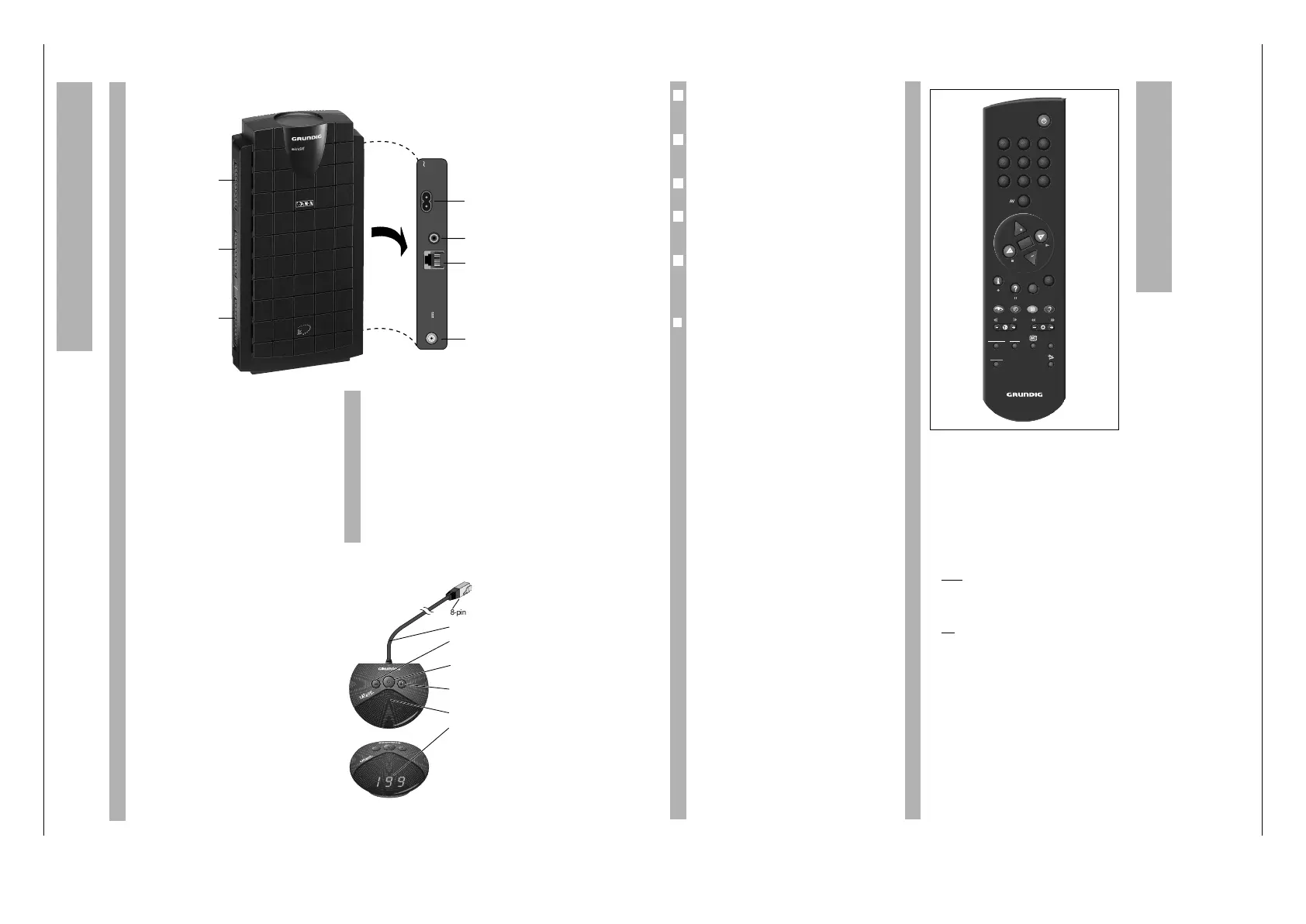
The SAT Receiver
The unit is only disconnected from the mains
when the 230 V plug is removed!
EURO-AV connectors
TV EURO-AV socket (output only) for TV set,
with RGB transfer from the decoder
socket.
DEC EURO-AV socket (input/output) for
PAL/MAC decoders or a second video
recorder.
VCR EURO-AV socket (input/output) for a video
recorder or further PAL decoder.
The SAT Mouse
The SAT mouse receives the infrared signals from
the remote control unit and sends commands to the
receiver via the cable. Therefore mount the SAT
mouse somewhere where there are no obstacles
between it and the remote control unit. Instead
of using the remote control unit, you can also
switch the programme positions with the SAT
mouse keys.
When switching on from stand-by, the receiver
switches to the last selected programme position
(Last Station Memory).
The Receiver at a Glance
All operating functions and basic settings can be
carried out using the TP 820 SAT universal remote
control unit.
The remote control unit can also be used to control
TV sets from GRUNDIG and many other makes (see
chapter on “Universal Remote Control”).
Several keys on the remote control have special
functions in the menu (see page 11).
Please insert the batteries supplied observing cor-
rect polarity! Markings on the base of the compart-
ment indicate this. Close cover.
Please change used batteries promptly. The on-
screen display “Batterie Telepilot” signals when the
batteries must be changed. We can accept no
liability for damage caused by leaking batteries!
❒
Key Functions
b
Switch receiver to stand-by.
0…9 The required programme position is
selected directly by pressing the digit
keys, e.g. P 123.
When selecting a multi-digit pro-
gramme position, the digits are
entered in order from left to right. So,
in the example, you would enter 1, 2
and 3.
In this way you can select up to 199
SAT programme positions (SAT TV
and SAT radio).
– Switch receiver on from stand-by.
Switch through programme positions
step by step and switch on from
stand-by to the last programme posi-
tion selected (Last Station Memory).
O Display name of station on screen;
when in a menu: save.
– In SAT mode: alter volume (at very
low volume, “SAT Mute” is displayed
on the screen.
.
MENUE Display on-screen menu guide.
¢
D
Without function
¢
TXT
EXIT Exit menu (without saving).
¢
A/B
TV-GUIDE Without function
k
(red) Socket switching (see chapter
“The STR 110… as Second Receiver”,
page 21).
h
(green) Display Timer menu.
j
(yellow)Switch between stereo, right and left
sound channel.
5
4
3
2
1
g
RADIO Switch between SAT-TV and SAT
(blue) radio mode.
™ – In TV mode*: alter contrast setting of
TV set.
® – In SAT mode: display menu for picture
and sound improvements (see chapter
“Using the Receiver”).
– In TV mode*: alter brightness setting of
TV set.
¢
SAT 1/TV TV mode*.
Control a TV set by pressing this key
and the desired function key simul-
taneously*.
¢
SAT 2 Control a second SAT receiver
(IR level 2) by pressing this key and the
desired function key simultaneously*.
¢
C
Without function.
¢
PERI Certain TV sets switch automatically
from terrestrial mode to AV mode
when the SAT receiver is switched on.
The
¢
PER key can be used to switch
the TV set back to terrestrial mode.
* See also chapter “Universal Remote Control”.
The Remote Control
]
x
“
c
|
]
¢
“
¢
|



 To Next Page