EasyManua.ls Logo

Grundig STR 310 - Page 15

Grundig STR 310
39 pages
Print Icon
To Next Page IconTo Next Page
To Previous Page IconTo Previous Page
Loading...
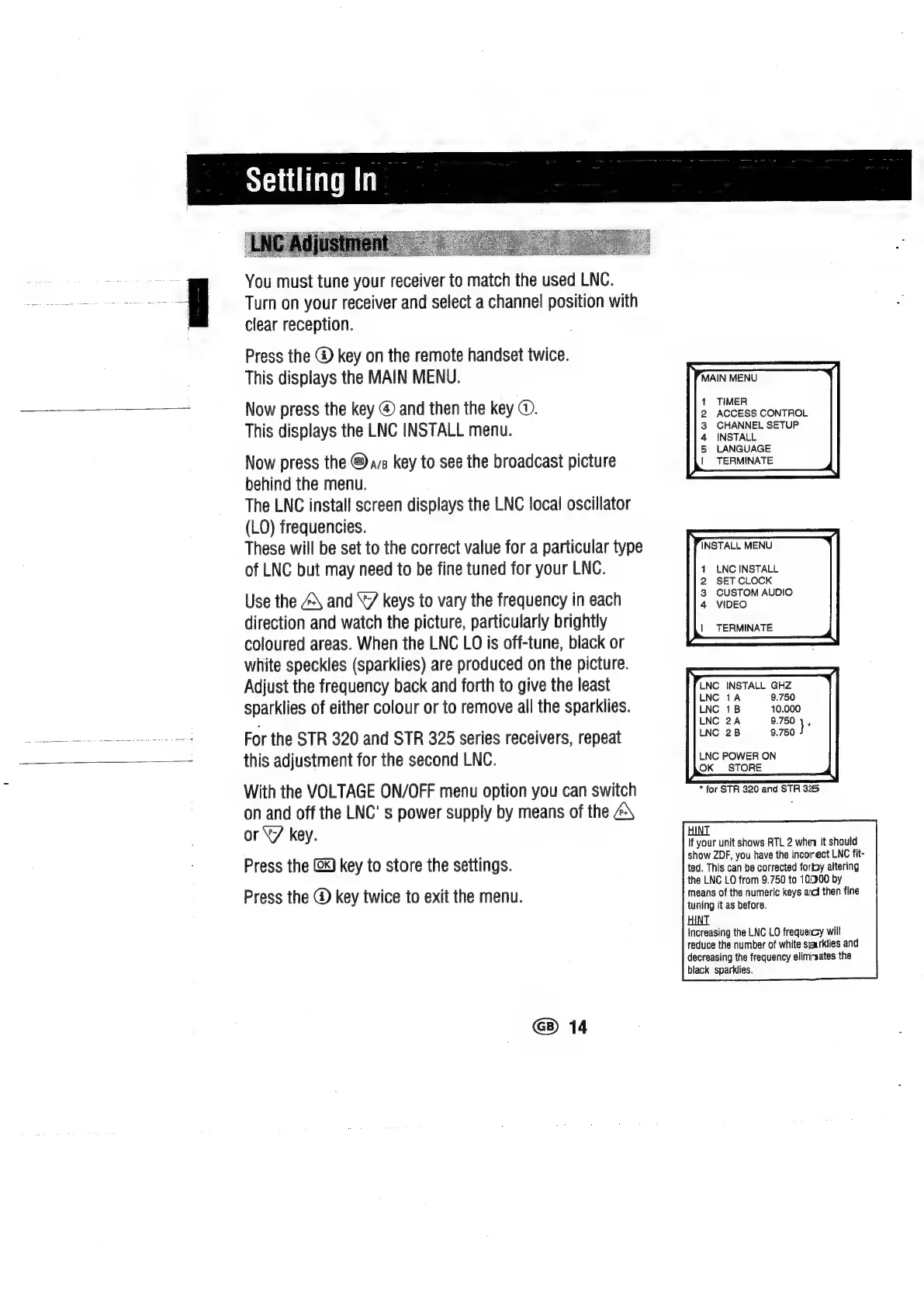
You
must
tune
your
receiver
to
match
the
used
LNC.
Turn
on
your
receiver
and
select
a
channel
position
with
clear
reception.
Press
the
@
key
on
the
remote
handset
twice.
This
displays
the
MAIN
MENU.
Now
press
the
key
@
and
then
the
key
@.
This
displays
the
LNC
INSTALL
menu.
Now
press
the
©
ava
key
to
see
the
broadcast
picture
behind
the
menu.
The
LNC
install
screen
displays
the
LNC
local
oscillator
(LO)
frequencies.
These
will
be
set
to
the
correct
value
for
a
particular
type
of
LNC
but
may
need
to
be
fine
tuned
for
your
LNC.
Use
the
\
and
“7
keys
to
vary
the
frequency
in
each
direction
and
watch
the
picture,
particularly
brightly
coloured
areas.
When
the
LNC
LO
is
off-tune,
black
or
white
speckles
(sparklies)
are
produced
on
the
picture.
Adjust
the
frequency
back
and
forth
to
give
the
least
sparklies
of
either
colour
or
to
remove
all
the
sparklies.
For
the
STR
320
and
STR
325
series
receivers,
repeat
this
adjustment
for
the
second
LNC.
With
the
VOLTAGE
ON/OFF
menu
option
you
can
switch
on
and
off
the
LNC'
s
power
supply
by
means
of
the
or
“7
key.
Press
the
(x)
key
to
store
the
settings.
Press
the
@
key
twice
to
exit
the
menu.
G)
14
MAIN
MENU
1
TIMER
2
ACCESS
CONTROL
3
CHANNEL
SETUP
4
INSTALL
5
LANGUAGE
|
TERMINATE
INSTALL
MENU
1
LNC
INSTALL
2
SET
CLOCK
3
CUSTOM
AUDIO
4
VIDEO
|
TERMINATE
LNG
INSTALL
GHZ
LNC
1A
9.750
LNC
1B
10.000
LNC
2A
9.750
1,
LNC
2B
9.750
LNC
POWER
ON
OK
STORE
*
for
STR
320
and
STR
325
HINT
If
your
unit
shows
RTL
2
when
it
should
show
ZDF,
you
have
the
incorrect
LNC
fit-
ted.
This
can
be
corrected
forfoy
altering
the
LNC
LO
from
9.750
to
10000
by
means
of
the
numeric
keys
aii
then
fine
tuning
it
as
before.
HINT
Increasing
the
LNC
LO
frequeicy
will
reduce
the
number
of
white
sjaurklies
and
decreasing
the
frequency
elimrsates
the
black
sparklies.

Related product manuals