EasyManua.ls Logo

Grundig VCR 6230 - User Manual

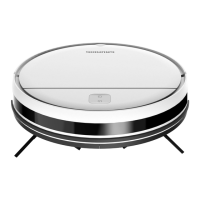
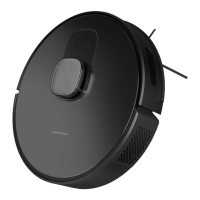
Grundig VCR 6230
226 pages
Go to English
Print Icon
To Next Page IconTo Next Page
Loading...
User Manual
DE - EN - FR - IT - RO - HR - SV - NO
Robot Vacuum Cleaner
VCR 6230
01M-GMS3770-1822-01

Table of Contents

Questions and Answers

  • A
    Amy FitzgeraldAug 19, 2025
    What to do if my Grundig VCR 6230 Vacuum Cleaner cleaning performance is low?
    • D
      Devin HansonSep 12, 2025
      If your Grundig Vacuum Cleaner's cleaning performance is low, it might be due to a full dust container, a clogged filter, or foreign materials stuck in the main brush. You should clean the dust container, clean or replace the filter, and clean the main brush.
  • J
    Jose ParrishAug 21, 2025
    How to fix Grundig VCR 6230 that cannot be operated?
    • J
      Jennifer BrownAug 21, 2025
      If your Grundig Vacuum Cleaner cannot be operated, it may be due to a low charge level, an unsuitable ambient temperature (under 0 °C or above 50 °C), or the on/off button being in the wrong position. Place the vacuum on the charging dock, ensure the ambient temperature is between 0 and 40 °C, and make sure the on/off button is in the “I” position.
  • L
    Lauren BrayAug 23, 2025
    Why is my Grundig VCR 6230 Vacuum Cleaner not charging?
    • B
      Bryan MorrisonAug 25, 2025
      If your Grundig Vacuum Cleaner battery is not charging, it could be due to several reasons. First, remove the robot vacuum cleaner and check if the indicator light on the charging dock station is illuminated and ensure that both ends of the power adaptor of the charging dock are connected. There might be loose contact, so clean the spring contacts on the charging dock and the charging contacts on the robot vacuum cleaner. Also, ensure that the on/off button on the side of the robot vacuum cleaner is in the “I” position.
  • W
    Wendy RaymondAug 26, 2025
    What to do if Grundig VCR 6230 Vacuum Cleaner operates with abnormal noise?
    • A
      Ashley ShieldsAug 26, 2025
      If your Grundig Vacuum Cleaner operates with abnormal noise, foreign materials may have entered the main brush, side brushes, or the wheels. Please turn off the robot vacuum cleaner and clean it.
  • H
    halexanderAug 27, 2025
    Why Grundig VCR 6230 does not return to the dock/ station for charging?
    • B
      Barbara BergerAug 27, 2025
      If your Grundig Vacuum Cleaner does not return to the dock/station for charging, it might be because there are too many obstacles around the charging dock. Please place the charging dock in an area free of obstacles. Also, bring the robot vacuum cleaner closer to the charging dock and try again. Make sure that the charging stand station is plugged in and has power.
  • J
    John BaxterAug 29, 2025
    How to fix Grundig VCR 6230 Error 4: Main motor error?
    • S
      Sandra BerryAug 30, 2025
      To address Error 4 (Main motor error) on your Grundig Vacuum Cleaner, check whether there is any foreign material stuck at the rear of the rotating brush (in the air flow path) and restart the vacuum cleaner. Also, check the dust container and the filter, and restart the vacuum cleaner.
  • D
    denniswilliamsSep 1, 2025
    How to fix Grundig VCR 6230 Error 2: Wheel error?
    • C
      Colleen MorenoSep 1, 2025
      To fix Error 2 (Wheel error) on your Grundig Vacuum Cleaner, check for any foreign material stuck in the wheels and restart the vacuum cleaner.
  • W
    Walter AlexanderSep 3, 2025
    What to do if Grundig VCR 6230 timed cleaning feature does not operate?
    • K
      Katie EatonSep 3, 2025
      If the timed cleaning feature on your Grundig Vacuum Cleaner does not operate, the charge level may be too low. Timed cleaning can only be started when the charge level is higher than 20%.
  • R
    Robert PorterSep 5, 2025
    How to fix Grundig VCR 6230 Error 3: Side brush error?
    • M
      morgandanielSep 5, 2025
      To resolve Error 3 (Side brush error) on your Grundig Vacuum, check for any foreign material stuck in the side brush and restart the vacuum.
  • O
    Olivia CrawfordSep 7, 2025
    Why my Grundig VCR 6230 Vacuum Cleaner cannot connect to the Wi-Fi network?
    • M
      Michelle BarkerSep 8, 2025
      If your Grundig Vacuum Cleaner cannot connect to the Wi-Fi network, the Wi-Fi signal may be weak. Ensure that the Wi-Fi signal in the location of the robot vacuum cleaner is strong. Also, there may be a cutoff in Wi-Fi connection, so please reset Wi-Fi, download the latest mobile application and try again. Check if the password is not entered correctly or the router used is a model that operates in 5G frequency band (this robot vacuum supports the 2.4G frequency band only).

Summary

Symbols and their meanings

Important Safety and Environmental Instructions

General Safety

Essential safety precautions and general usage guidelines for the appliance.

WEEE Regulations and Waste Disposal

Information on product compliance with WEEE and proper disposal methods.

Packaging Information

Details about the recyclable materials used in the product's packaging.

Waste Batteries

Guidelines for the disposal of used batteries according to environmental regulations.

Energy Saving Tips

Tips on optimizing energy usage during operation.

Box Content

Overview

Checks and Components

Identifies and describes the various components and parts of the robot vacuum.

Technical Data

Presents detailed technical specifications of the robot vacuum cleaner.

Installation

Remove Protective Sponges

Step to remove protective sponges before initial use.

Install Charging Station

Guide on how to properly install the charging station.

Operation

Intended Use

Specifies the intended purpose and application of the robot vacuum cleaner.

Charging the Appliance

Detailed instructions on how to charge the robot vacuum cleaner.

Operation

General instructions for operating the robot vacuum cleaner.

Starting the Cleaning

Step-by-step guide on how to initiate the cleaning process.

Pausing Operation

Instructions on how to pause the robot vacuum cleaner during operation.

Point Cleaning Mode

How to use the point cleaning mode for specific areas.

Vacuum Power Selection

Options for selecting different vacuum power levels for cleaning.

Remote Controlled Cleaning

How to control the robot vacuum remotely via the application.

Sleep Mode and System Reset

Explains sleep mode and the procedure for resetting the system.

Application Operation

Guide for using the mobile application for enhanced control and features.

Wi-Fi Connection Error

Troubleshooting steps for resolving Wi-Fi connectivity issues.

Operation Modes

Details various cleaning operation modes available for the robot vacuum.

Map Management

Information on how the robot creates and manages house maps for navigation.

Room Cleaning Mode

How to select specific rooms for the robot to clean.

Regional Cleaning Mode

How to define and clean specific regions within the house.

Operation of the Mop

Instructions for operating the mopping function of the robot vacuum.

Installation of Wet Mopping Unit

Steps for installing the wet mopping attachment.

Wet Mopping Setting

How to adjust settings for the wet mopping operation.

Cleaning and Maintenance

Cleaning Dust Container and Filters

Procedures for cleaning the dust container and filters.

Cleaning the Brush

How to clean the main brush and remove debris.

Cleaning and Installing Side Brush

Instructions for cleaning and installing the side brush.

Cleaning the Sensors

Guide on cleaning the robot's sensors and charging contacts.

Cleaning the Mopping Unit

How to clean the mopping unit after use.

Troubleshooting

General Error Conditions

Addresses common operational failures and their remedies.

Wi-Fi Connection Issues

Troubleshooting steps for Wi-Fi connection problems.

Failure List and Audible Warnings

Lists specific error codes, warnings, and their corresponding solutions.

Grundig VCR 6230 Specifications

General IconGeneral
ShapeRound
Product colorBlack
Number of wheels3 wheel(s)
Dust container typeBagless
Brush typeRoller brush & Side brush
Noise level73 dB
Wet moppingYes
Navigation typeLaser Distance Sensor (LDS), Mapping
Number of brushes2
Number of programs4
Water tank capacity0.3 L
Dust capacity (total)0.4 L
Base station functionsCharging
Dirt separating methodFiltering
HEPA filtration system-
Mobile operating systems supportedAndroid, iOS
Charging time5 h
Battery capacity3200 mAh
Package typeBox
Warranty period3 year(s)
Weight and Dimensions IconWeight and Dimensions
Weight3300 g

Related product manuals