EasyManua.ls Logo

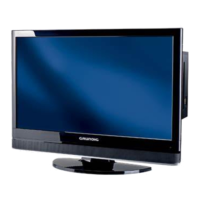
Grundig VISION 2 16-2830 T - User Manual

Grundig VISION 2 16-2830 T
42 pages
Print Icon
To Next Page IconTo Next Page
Loading...
COLOR TELEVISION
VISION 2 16-2830 T
VISION 2 19-2830 T

Table of Contents

Questions and Answers

  • S
    Shelly EllisAug 15, 2025
    Why is my Grundig VISION 2 16-2830 T TV remote control not working?
    • O
      olsonjudyAug 15, 2025
      If your Grundig TV remote control isn't working, ensure you're pointing it directly at the TV. Then, check and replace the batteries if needed. As a last resort, power off the TV using the main power button for about 2 minutes.
  • S
    sarahortizAug 18, 2025
    What to do if my Grundig TV has picture but no sound?
    • M
      Mary FigueroaAug 18, 2025
      If your Grundig TV shows a picture but has no sound, the first thing to check is the volume. Make sure it isn't set to the minimum or muted. Simply turn up the volume or switch it on.
  • J
    James BrewerAug 22, 2025
    How to fix a Grundig TV that shows snow but no station?
    • C
      Craig KellyAug 22, 2025
      If your Grundig TV screen shows snow but no station, verify that the antenna cable is securely connected. If it is, try initiating the station search function to program available channels.
  • J
    Joseph BartlettAug 26, 2025
    Why does my Grundig TV have poor picture contrast?
    • J
      Jaime ParkerAug 26, 2025
      If you're experiencing poor picture contrast on your Grundig TV, the picture settings may be off. Try adjusting the brightness, contrast, or color settings. If the issue persists, test with another channel to rule out a problem at the broadcast station.
  • M
    meyersalanAug 28, 2025
    Why is there no color on my Grundig VISION 2 16-2830 T TV?
    • R
      ricky67Aug 28, 2025
      If your Grundig TV has no color, first, ensure the color intensity isn't set to minimum; increase it. If available, check the TV standard setting and select the correct color standard. If problems persist, test with another channel to see if the issue is with the broadcast.
  • S
    Sarah LeonSep 1, 2025
    How to remove ghosts or reflections on my Grundig VISION 2 16-2830 T TV screen?
    • D
      David WhiteSep 1, 2025
      To address ghosts or reflections on your Grundig TV screen, try performing an automatic or manual channel setting, or FINE TUNE. Also, have your antenna cable or system checked for any issues.
  • A
    Amanda BenitezSep 4, 2025
    Why is teletext missing or faulty on my Grundig VISION 2 16-2830 T?
    • M
      Mark ConwaySep 4, 2025
      If the teletext feature is missing or faulty on your Grundig TV, test another channel. This will help determine whether the issue is with the broadcast signal or your antenna system. Also check the antenna system.
  • K
    Kathy MorganSep 7, 2025
    How to stop interference to picture and sound on Grundig TV?
    • Y
      Yvonne KingSep 7, 2025
      If you're experiencing interference to the picture and sound on your Grundig TV, it might be due to other devices. Try changing the position of the interfering device.
  • C
    cynthia92Sep 12, 2025
    Why is the picture dark on my Grundig TV in PC mode?
    • J
      Jim StevensSep 12, 2025
      If the picture appears dark on your Grundig TV while in PC mode, the picture resolution and frequency settings on your PC might be incorrect. Adjust these settings on your PC; for example, set the picture resolution to 1280 x 768 and the picture frequency to 60Hz.

Summary

GENERAL INFORMATION

CONNECTION;PREPARATION

Connecting the antenna and the mains cable

Instructions for connecting the antenna and power cable.

OVERVIEW

The remote control

Explains the functions of each button on the remote control.

SETTINGS

Searching for television stations

Guide for automatic tuning of digital and analogue channels.

TELEVISION OPERATION

Basic Operations

Covers switching on/off, channel selection, AV inputs, and volume control.

Picture and Sound Settings

Adjusting picture parameters, audio, and subtitle languages.

TELETEXT MODE

FLOF text and normal text mode

Basic operation for accessing and viewing teletext pages.

CONVENIENCE FUNCTIONS

Resetting the television to its original state

Procedure for restoring the TV to factory default settings.

Settings for digital channels

Configuration options specific to digital TV channels.

Parental control

Setting up PIN-based access restrictions for content.

Access control for CI module and smart card

Managing access to Pay-TV channels via CI module and PIN.

USING EXTERNAL DEVICES

DVD player, DVD recorder, video recorder or set-top box

General guide for connecting and using external AV equipment.

Connecting a DVD player, DVD recorder, video recorder or set-top box

Specific instructions for connecting various external devices.

Decoder or satellite receiver

Connecting and operating external decoders or satellite receivers.

Camcorder

Connecting and operating camcorders for video playback.

PC MONITOR MODE

Connecting a PC

Instructions for connecting a computer to the TV using VGA and audio cables.

Settings for the PC

Adjusting PC display settings like resolution and position.

OPERATION WITH COMMON INTERFACE

Inserting the Common Interface module

Steps for installing a CI module and smart card into the TV.

Access control for CI module and smart card

Managing access to Pay-TV channels via CI module and PIN.

SPECIAL SETTINGS

Tuning digital television stations

Guide for automatic and manual tuning of digital channels.

Tuning analogue television stations

Procedures for tuning analogue channels, including auto-search.

INFORMATION

Troubleshooting

Diagnosing and resolving common faults and issues.

Grundig VISION 2 16-2830 T Specifications

General IconGeneral
Screen Size16 inches
Aspect Ratio16:9
HDMI Ports1
USB Ports1
Resolution1366 x 768 pixels
Weight2.5 kg

Related product manuals