EN
53
8.3.2.2.- Options context menu
• Powering:
- VDC: Selects the preamplier powering.
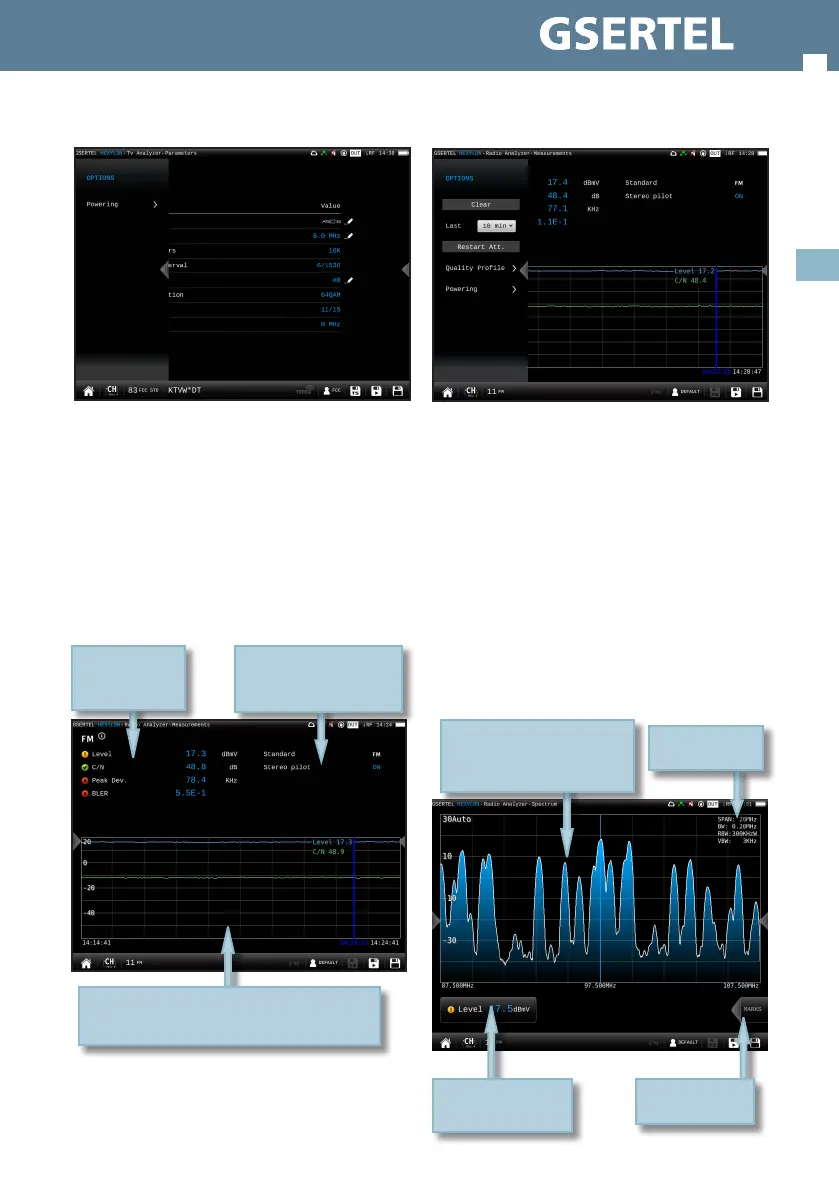
8.4.4.- Measurements
This feature shows the measurements of the
selected channel: Level, C/N, Peak deviation, and
BLER.
8.4.4.1.- Main window
History of the measurements during an interval
selected by the user. Drag to move the blue mark
List of
measurements of
the channel
List of signal parameters
8.4.4.2.- Options context menu
• Clear: restarts the graph.
• Last: 5 min, ½ hour, ½ day, 1 day, 1 week. Allows
select the time interval shown in the graph
• Restart Att: restarts the control attenuation.
• Quality prole: allows to select the quality prole
• Powering:
- VDC: Selects the preamplier powering.
8.4.5.- Spectrum
This feature shows a graph representing the
services distribution.
8.4.5.1.- Main Window
Power or C/N
measurement.
Tap to change
Swipe to tune next/previous
channel
Drag to tune any channel
Spread/Pinch to change span
Spectrum
parameters
Tap to enable/
disable the marks


 To Next Page
 Loading...