
 Need help?
Do you have a question about the GT GT8 and is the answer not in the manual?
Instructions for navigating the terminal's touch screen interface.
Steps to initiate a shutdown process or perform a re-boot.
Procedure for resetting the device to factory settings via the system menu.
How to access and use the recovery menu via the RECOVERY button.
Details about the GT8 terminal's certifications for various markets.
Information on the lifespan of the main battery and RTC backup battery.
Guidelines for terminal cleaning and recommended battery checks.
Safety precautions for indoor installation and ambient operating conditions.
Instructions for proper disposal of the GT8 clock according to WEEE directive.
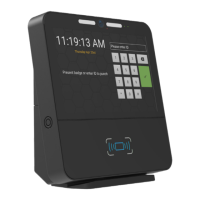
Overview of the GT8 terminal's features and integration capabilities.
Purpose and scope of the user guide, including installed firmware/apps.
References to other technical documents available from Grosvenor Technology.
Contact details for technical assistance in different regions.
Details the 8-inch full colour capacitive multi-touch display and its resolution.
Specifies the processor as a 1.6GHz Quad Core.
Indicates the operating system is Android 10.0.
Lists internal USB ports and mentions facial recognition capability.
Specifies the terminal's memory as 3GB.
Details the internal storage as 16GB high performance flash storage.
Describes Ethernet, Wi-Fi (optional), and Bluetooth (optional) connectivity.
Outlines power options: 12VDC, PoE+, and internal lithium ion battery backup.
Specifies the operating temperature range (0-35°C) and humidity (5-90% non-condensing).
Highlights fast installation, easy module fitting, and VESA mount compatibility.
Mentions support for Android/HTML5 apps and SDK availability.
Notes integrated stereo speakers and microphone.
Details the 5 Megapixel camera with front illumination for photo/video.
Describes metal wall-mount bracket and optical tamper detection.
Provides physical dimensions in mm and inches.
States a 7-year design life and minimal footprint.
Lists available reader modules like 125KHz, iClass SE, Barcode, Magnetic Stripe, etc.
Details IO Relay, External Reader Relay, and Temperature modules.
Lists the WiFi Comms Module (CM-WIFI-M2-22).
Specifies Lumidigm and Suprema SF Slim biometric modules.
Overview of OS, app support, and remote management capabilities.
Instructions on how to mount the GT8 terminal to a wall bracket.
Guidance on selecting an optimal location for terminal viewing and access.
Details powering the terminal via AC adapter with interchangeable plugs.
Explains using a 12VDC power supply with specific requirements.
Describes powering the terminal via PoE+ using an Ethernet cable.
Information on the 2-hour Li-ion battery backup, charging, and service life.
Describes the different front plate options, with or without a fingerprint aperture.
Step-by-step guide to installing the fingerprint reader module.
Instructions for installing proximity or card swipe reader modules.
Guide for installing the Wi-Fi module and connecting antennae.
Instructions for navigating the terminal's touch screen interface.
Steps to initiate a shutdown process or perform a re-boot.
Procedure for resetting the device to factory settings via the system menu.
How to access and use the recovery menu via the RECOVERY button.
Steps to enter setup mode using the Admin icon and the default PIN.
Guide for configuring wired and Wi-Fi network connections.
Instructions to enable Wi-Fi and connect to available networks.
Steps to set up wired network connections and IP settings.
Explains setting up reader types and decoders for credential formats.
Details on creating custom decodes using Wiegand bitmasks.
Explanation of parity masks for Wiegand data validation.
Utility to test reader functionality and display output.
How to activate and use the terminal's camera for live viewing.
Procedure to test the biometric reader and display fingerprint results.
How to check system status, part number, tamper state, and PCB temperature.
Steps for deploying firmware, applications, and settings via USB.
Guide to configuring the application after initial installation.
Cleaning procedures and recommendations for prolonging terminal life.
 General
| Display | 8-inch TFT LCD |
|---|---|
| Operating Temperature | 0°C to 50°C |
| Storage Temperature | -20°C to 60°C |
| Weight | 1.2 kg |
| Communication | Ethernet |
| Protection Rating | IP65 |

 To Next Page