Page 7
Preface
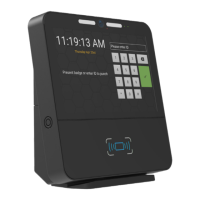
About the GT8 Terminal
GT8 is more than just a next generation time and attendance terminal - it’s designed to open up a world of
possibilities for wider integration with Human Resources Management Systems (HRMS) and a myriad of
potential new applications beyond workforce management.
About this Guide
This User Guide is intended for users who will be responsible for installing and conguring the GT8 terminal.
This guide was written with the following rmware, application and optional modules installed.
Firmware: v2.0.0
Application: GTEasyClock v2.0.0
RM-LUM-M320-GT8 Fingerprint reader
RM-HID-B Prox/card reader
CM-WIFI-M2-22 Wi-Fi module
Related Documents
You should also refer to the following documents, available from Grosvenor Technology:
GT API Reference Manual - This document is targeted at software developers writing Android applications
for the GT8 terminal.
Application User Guide - Relevant to your application.
Technical Support
Technical Support can be obtained from Grosvenor Technology from the following points of contact:
Europe, Middle East and Africa
Phone: +44 (0)1202 627611
E-mail: HCM-EMEAsupport@grosvenortechnology.com
Website: www.grosvenortechnology.com
North America
Phone: +1 800.989.5197
E-mail: HCM-USsupport@grosvenortechnology.com
Website: www.gtclocks.com
Care should be taken when installing the clock to ensure that it does not present any possible hazards to
people or property within its vicinity. The clock should be installed at a height that ensures compliance with
any local disability legislation
WEEE
In accordance with EN 50419 the GT8 clock must be disposed at the end of its life by returning to a
designated recycling organisation for waste electrical and electronic equipment as dened within the WEEE
directive. The clock must not be disposed of in normal domestic waste.
Batteries should be carefully removed from the clock prior to disposal taking care to prevent short-circuits,
crushing or damage to the battery housing.


 To Next Page