E-8
INSTALLING & REMOVING UV-C BULB
CHANGE BULB INDICATOR
The UV-C light will begin to flash continuously when it’s time to replace the UV-C bulb.
Replace the bulb according to the directions then press the UV-C control button and hold
for 5 seconds to reset the UV-C indicator light.
CHANGING THE UV-C BULB
1. The UV-C bulb is located in a compartment
in the center of the purifier. To access, first
follow the instructions to remove the filter.
2. After removing the Filter use a Philips head
screw driver to remove two (2) Screws and
detach the UV-C cover.
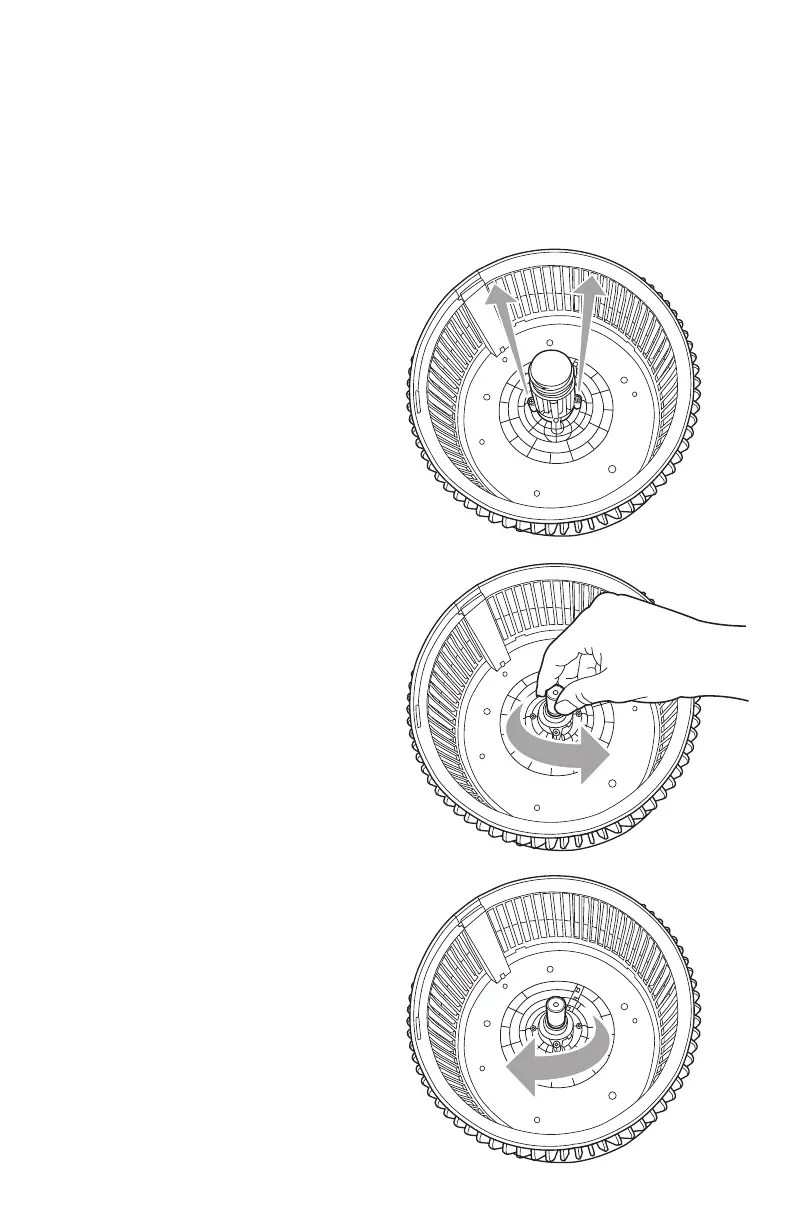
3. Hold the unit in place with one hand.
Locate the bulb and reach into the cylinder.
4. Turn the bulb in a counter-clockwise direction
(left) to loosen from the socket.
5. Take new bulb and screw into unit using
a clockwise motion. Wipe off fingerprints
with a dry cloth.
6. Reassemble by reversing steps 1&2.
Turn the unit back on and hold the UV-C
control button for 5 seconds to reset
UV-C indicator light.
IMPORTANT: The UV-C bulb should be
replaced every 10 months depending
on use.
Looking down inside of unit.



 To Next Page