Guardian Telecom Inc.
Installation and Operation
Model WRT
Setting Dialing Mode
The WRT is shipped from the factory set for DTMF (Tone) dialing mode. If loop
disconnect (Pulse) dialing is required proceed as follows.
• Loosen the five captive screws in the faceplate and swing the faceplate to
the left. If the set is on a vertical surface the faceplate will stay open like a
book in this position. Take care not to disturb the internal wiring.
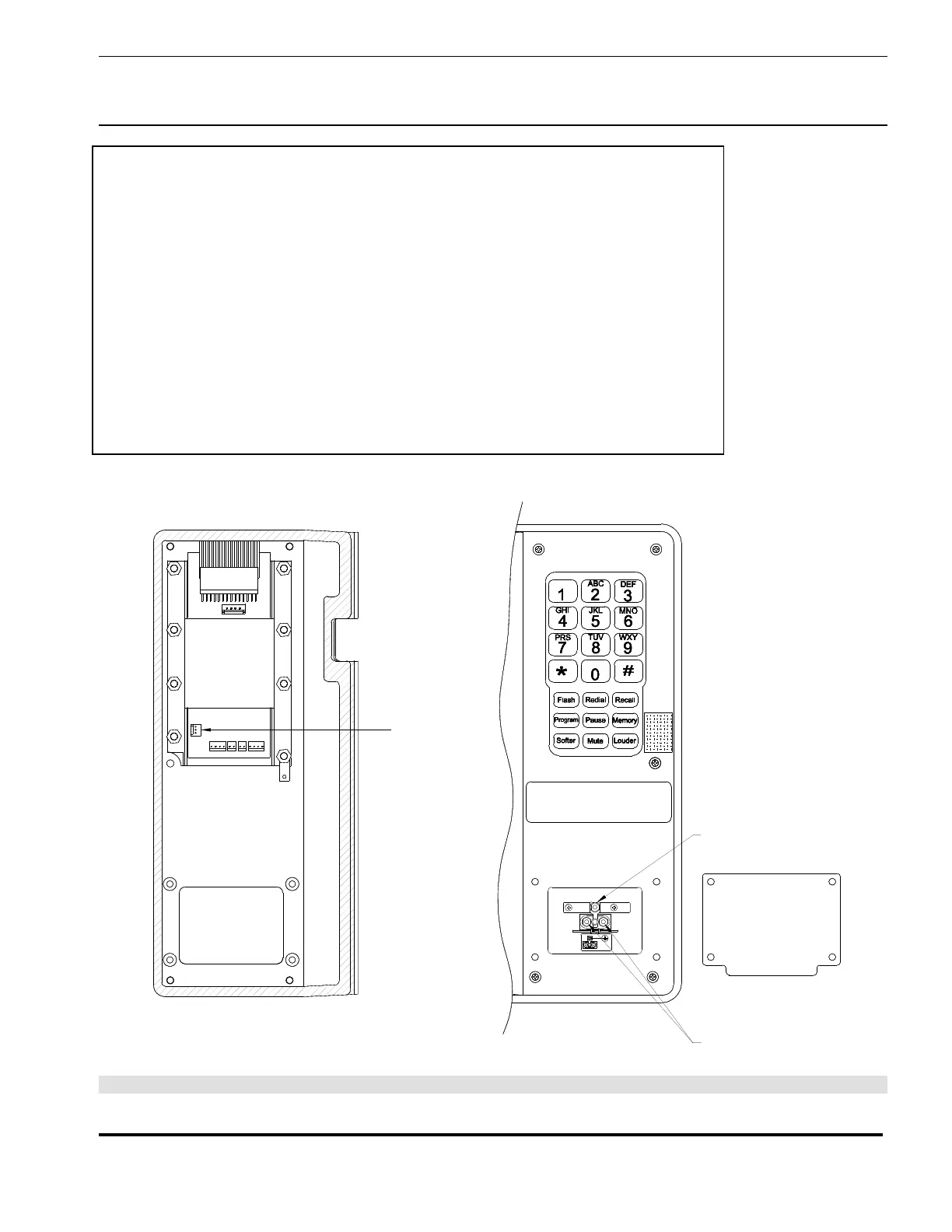
See: Figure 5 - Setting
Dialing Mode &
Installation
• Change the position of the Tone/Pulse jumper on the circuit board to Pulse,
as indicated on the label.
• The set will now be in pulse dialing mode, it can be returned to tone mode
by changing the position of the jumper back to the Tone position.
• Carefully replace the front plate and install all five screws. Do not over
tighten the cover screws, there is a flexible gasket between the cover and
the body. Excessive tightening of the screws deforms the gasket and
reduces the weather resistance of the set.
TONE/PULSE
JUMPER
GROUNDGROUND
GROUND
CONNECTION
TIP & RING
CONNECTION
Figure 5 - Setting Dialing Mode & Installation
Page 8



 To Next Page