5
Red
Green
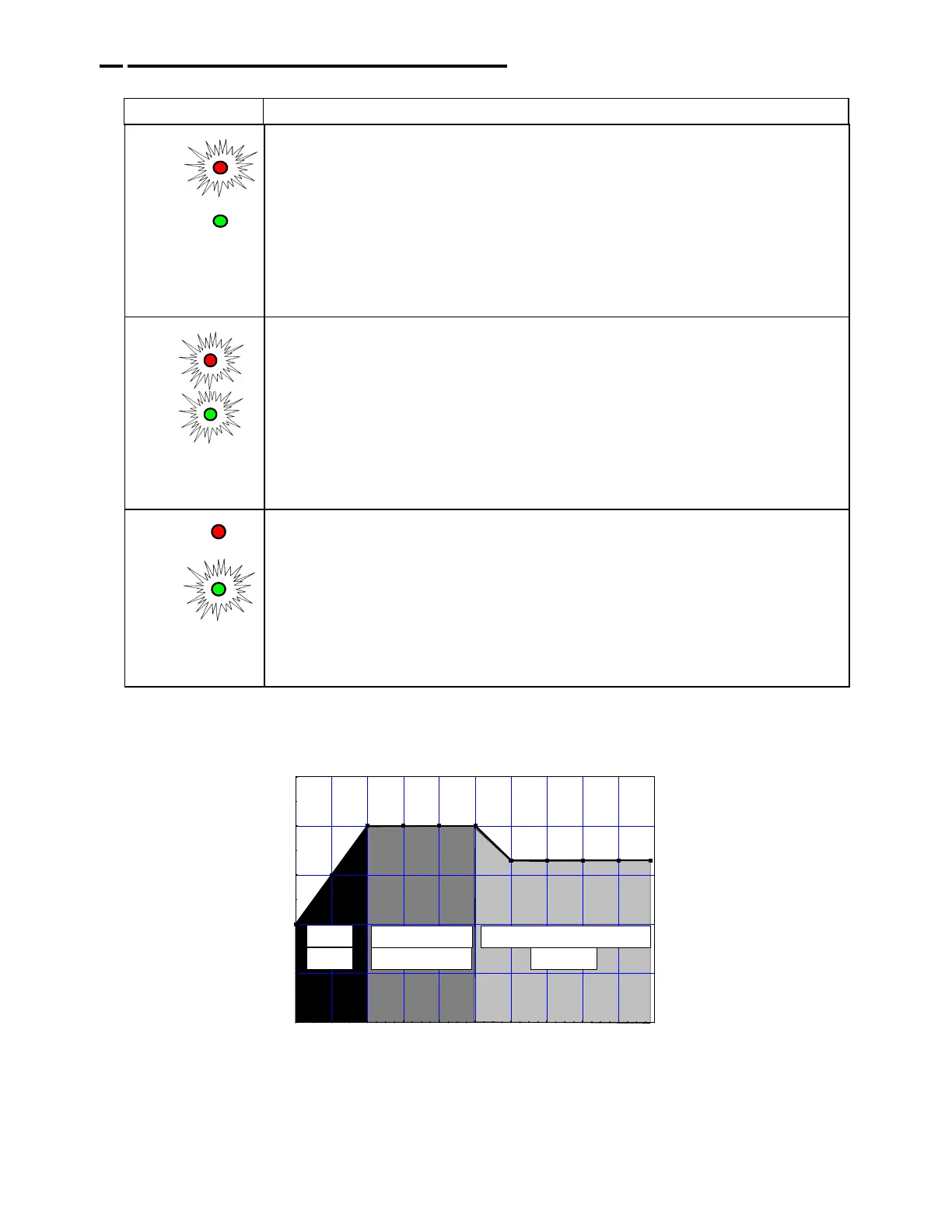
When the red LED is on, it indicates that your battery is discharged
and the 2612A is recharging at the "BULK" rate (stage 1). This
charging rate is 6 Amps.
While the red LED is on, the voltage measured (with the charger on)
will be 11.8 to 14 Volts.
If the red LED stays on for more than 24 hours, refer to Problem 1 in
the troubleshooting section in this manual.
Red
Green
When both the green and the red LED’s are on, the 2612A is charging
at an "ABSORPTION" rate of between 1.5 and 5 Amps (stage 2). This
mode of charging gradually "tops off" your battery, and reduces
harmful sulfating. While both LED’s are on, the voltage measured
(with the charger on) should be approx. 14.0 to 14.5VDC.
If both LED’s stay on longer than 24 hours, refer to Problem 2 in the
troubleshooting section in this manual.
Red
Green
When the green LED is on, the 2612A is charging at a "FLOAT” or
“MAINTENANCE" rate of less than 1.5 Amps, (stage 3). Your battery is
now 90% charged and ready for use. This "float" charging current will
gradually decrease to as low as 0.1 Amps as the battery reaches
100% charge. It will now be kept at full charge without over-charging.
If the green LED stays on when your battery is known to be low, refer
to Problem 3 in the troubleshooting section in this manual.
012345678910
Charging Current - Amps
10
11
12
13
14
15
Output Voltage to Battery - VDC
Guest Model 2612A Charging Modes
BULK
(RED)
ABSORPTION
(RED/GREEN)
(GREEN)
FLOAT / MAINTENANCE
4. OPERATING THE CHARGER
The LED Function Chart below describes the charging process.
Display Operating condition



 To Next Page