9
MAKING CONNECTIONS
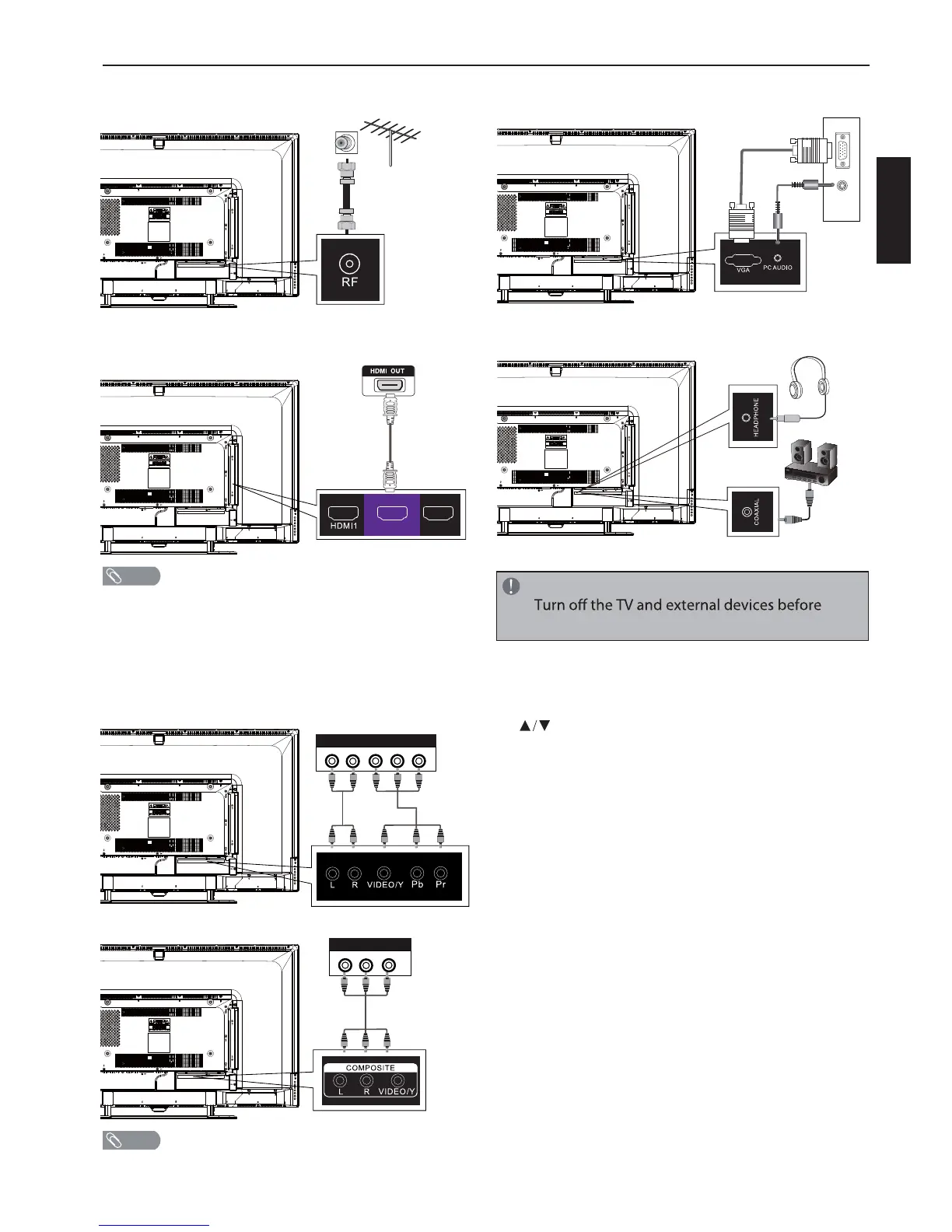
CONNECTING TO AN ANTENNA/CABLE WALL
JACK
CONNECTING EXTERNAL AUDIO/VIDEO DEVICE
Using HDMI cable (best)
t
t
An HDMI cable carries both video and audio. You do not
need to use any audio cables.
You can connect MHL devices, such as the Roku Streaming
Stick and compatible mobile phones and tablets to the
HDMI2(MHL) port. A USB to HDMI cable is required to
connect a mobile phone or tablet to the TV. Please check
the documentation of your device.
Using component cables (better)
Using composite cable (good)
t Cables are often color-coded to match color-coded jacks.
CONNECTING PC
CONNECTING HEADPHONES
To play from the external device:
1. Turn on the TV and the connected device.
2. Press INPUT to open the input source list, then press
to highlight the input to which the device was
connected and press OK to switch.
t Select TV to watch TV from the RF input.
t Select HDMI1, HDMI2(MHL), or HDMI3 to play
from a device connected to the HDMI1,
HDMI2(MHL), or HDMI3 input.
t Select Composite to play from the device
connected to the COMPOSITE input.
t Select Component to play from the device
connected to the COMPONENT input.
t Select VGA to play from the PC connected to the
PC AUDIO inputs.
NOTE
COMPONENT OUT
LR YP
B
P
R
COMPOSITE OUT
L R VIDEO
NOTE
NOTE
making connections.
RGB
AUDIO
(L/R)
PC
English
HDMI2
MHL
HDMI3


 To Next Page