GUIDE TO OPERATION
13
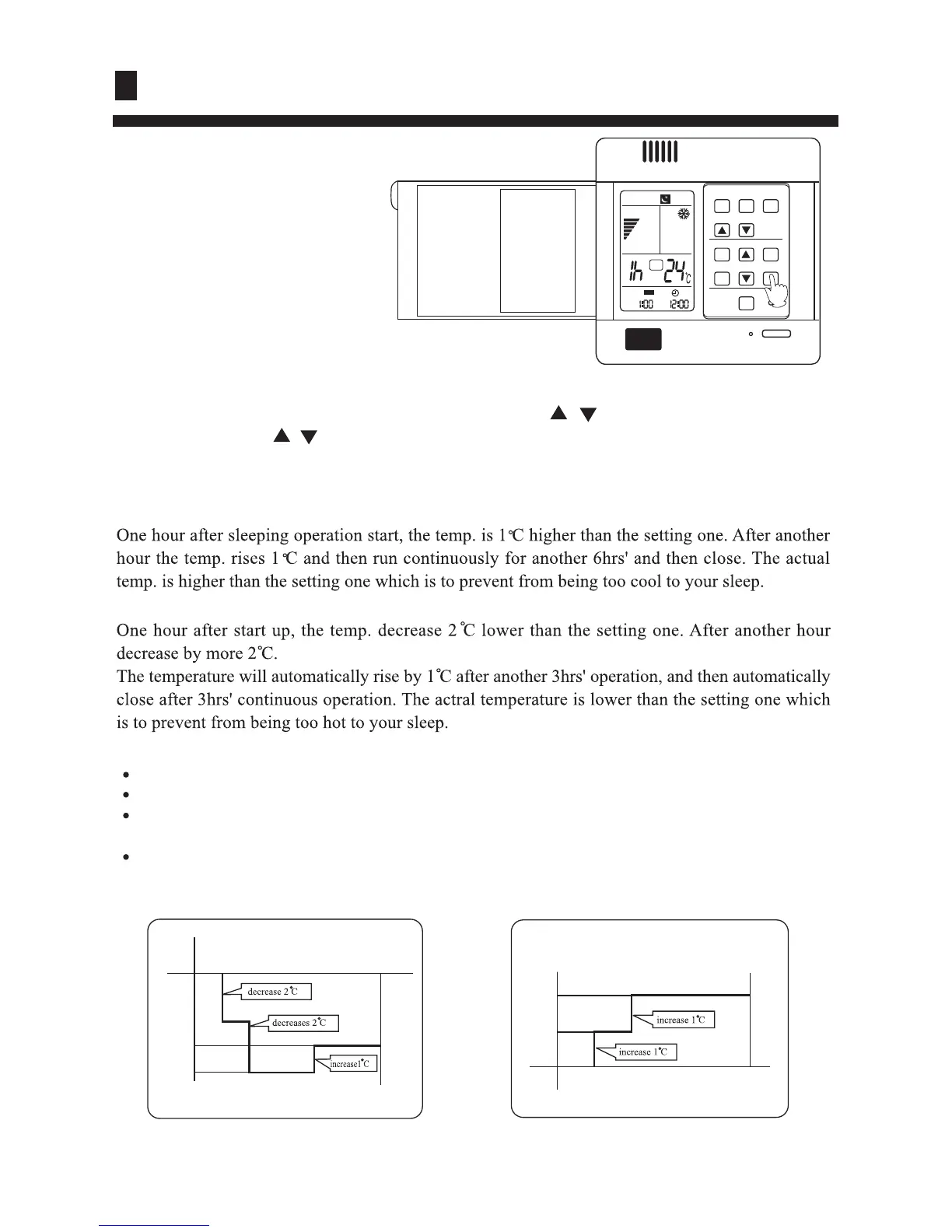
At night, before going to bed you
can press down the SLEEP button
on the controller and the air-
conditioner will run by the
comfortable sleeping mode to
make you sleep more comfortable.
In cooling, dehumidifying mode
In heating mode
Comfortable Sleep
Note:
In AUTO mode, unit will run in SLEEP function according to the operation mode.
After setting SLEEP function, it is forbidden to calibrate clock.
If the set sleep-time does not reach 8 hours, the unit will stop operation automatically after set
time is complete.
Set "TIMER-OFF" function first, then set SLEEP, and the sleep-set is performance; set TIMER-
ON function first, the sleep function can only be set before TIMER-ON; if set theSLEEP function
first, the TIMER function can not be set.
Press SLEEP button once to make the air conditioner have the previous-set sleep time (first power-
on is "1h"), the sleep symbol will appear. Press time button / , you can choose the time in 1~8
hours. Each press of / , the time increases/reduces 1 hour and "xh" appears in the humidity
setting part, "OFF" appears in "TIMER OFF" display part and timer-off time; press SLEEP button
again to cancel sleep function, the sleep symbol diappears.
SETTING T
SLEEP RUN BEGINS SLEEP RUN STOPS
1 hr
1 hr
3 hrs
about 3 hrs
SHUT DOWN
Heat mode
about 6 hrs
1 hr
1 hr
SLEEP RUN STOPS
SLEEP RUN BEGINS
SETTING T
SHUT DOWN
Cooling mode
MODE
FAN SWING
TEMP
CLOCK SET
TIMER SLEEP
RESET
FILTER RESET
ON/OFF
AM
SET
OFF
AM




 To Next Page