Operation
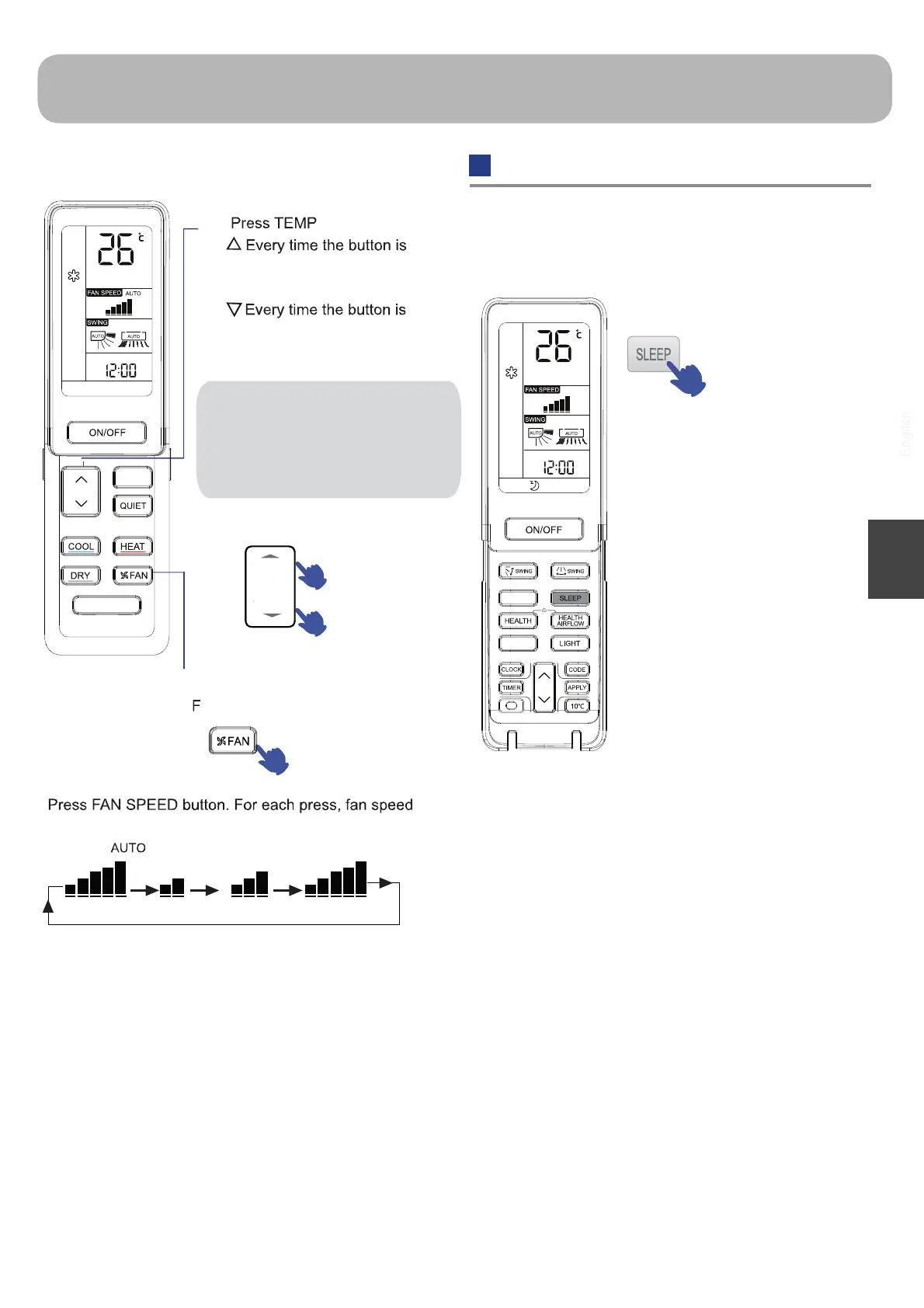
Before going to bed, you can simply press the SLEEP
button and unit will operate in SLEEP mode and bring you
a sound sleep.
Press SLEEP
button.
Operation Mode
Comfortable SLEEP
1.When the sleeping signal is received, the air conditioner
runs according to the system's preset sleep temperature
curve.
2.After setting the SLEEP mode, if the setting temperature
is adjusted manually, the temperature will be operated
according to the manual setting.
3.
In SMART mode
4. In FAN mode
It has no SLEEP function.
The unit operates in corresponding sleep mode
adapted to the automatically selected operation mode
5. Set the SLEEP mode, the air conditioner will
automatically shut down after 8 hours.
14
English
Unit will start running to reach the
temp. setting on LCD.
AN Operation
changes as follows:
Unit will run at selected fan speed.
button.
pressed, temp. setting
increases 1ºC.
pressed, temp. setting
decreases 1ºC.
1
2
Hint:
You can control the unit temp. by the
panel "<"">" independently . Every
time the button is pressed, temp.
setting increases/ decreases 0.5ºC.
The range of setting temperature is
16℃-30℃.
TURBO
SELF CLEAN
BNT
SMART




 To Next Page