41
3) Function setting
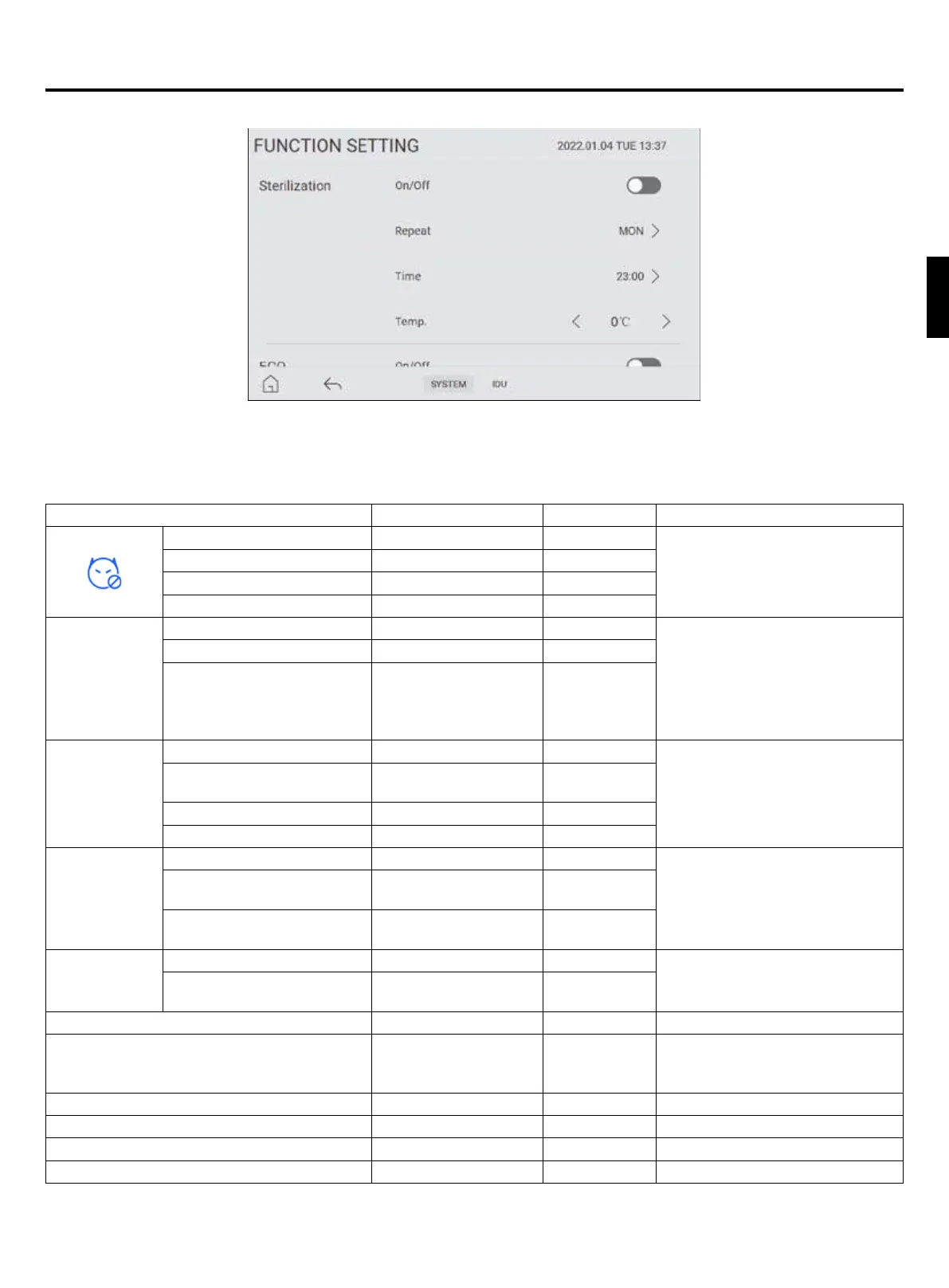
Picture 20
Press “FUNCTION” icon to enter the function setting interface, shown in Picture 20. In this interface, you can turn on or off
some common functions, and adjusting its working hours. In this interface, you can set following functions.
System functions of user setting
Function Parameter Range Default Remarks
Sterilization
Operation On/Off Off
When the unit is sterilizing,
the sterilization icon is ashing
displayed in the main interface
Week Monday ~ Sunday Monday
Time 00:00~24:00 23:00
Temp. 50°C~75°C 75°C
ECO (economy)
Mode
Operation On/Off Off
It’s only valid at heating mode.
During the energy-saving
operation of the unit, the outlet
water temperature is
△
T lower
than the set temperature.
Time 24 hours 22:00~07:00
△
T
(Difference between energy
saving temperature and
actual temperature.)
-15°C~0°C -5°C
Holiday Mode
Operation On/Off Off
To save energy, a holiday
period may be set to lower the
temperature during the period.
Date Start date ~ End date
Current date~
Current date
Setting Temp. of Zone1 0°C~30°C 15°C
Setting Temp. of Zone2 0°C~30°C 15°C
Quiet
Operation On/Off Off
To operate quietly during the
preset period.
Time1 Start time ~ End time
Current time~
Current time
Time2 Start time ~ End time
Current time~
Current time
Turbo
Operation On/Off Off
Turbo mode is use to increase the
capacity of heat pump to achieve
higher target temperature.
Timer
30min/60min/90min/
Continuous
60min
Fast DHW On/Off Off /
DHW Priority On/Off On
No matter what mode the unit is
in, the domestic hot water shall be
heated rst.
Dry Concrete of Zone1 On/Off Off /
Dry Concrete of Zone2 On/Off Off /
IDU Antifreeze Protection On/Off On /
IDU Antifreeze Temp. 0~15°C 5°C /
Operation instructions for controller
English


 To Next Page