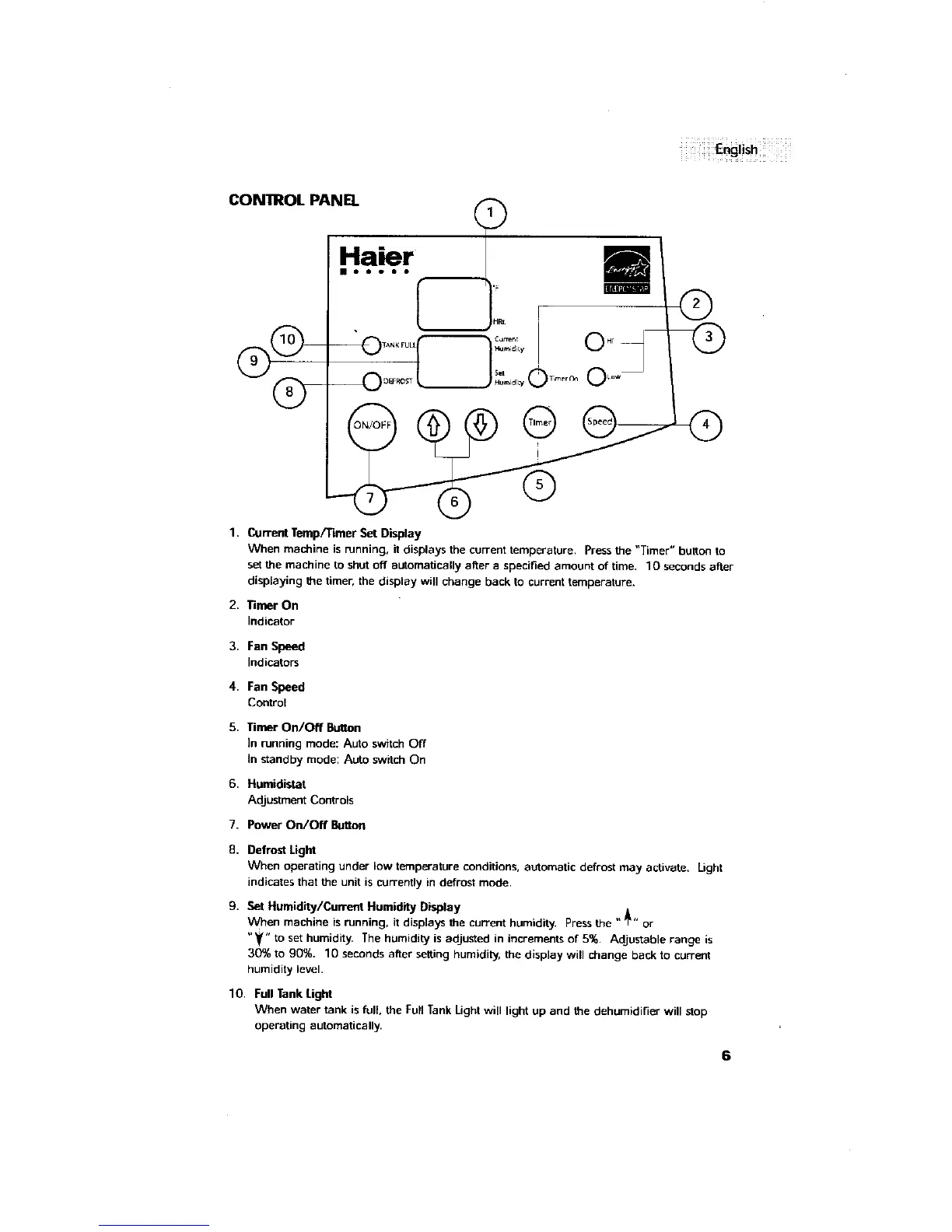
CON'IROL PANE].
H.. .rl t __m
I Oir
(D
OFF Q
1. Current Temp/Timer Set Display
When machine is running, it displays the current temperature. Press the "Timer" button to
set the machine to shut off automatically after a specified amount of time. 10 seconds after
displaying the timer, the display will change back to current temperature.
2. Timer On
Indicator
3. Fan Speed
Indicators
4. Fan Speed
Control
5. Timer On/Off Button
In running mode: Auto switch Off
In standby mode: Auto switch On
6. Humidistat
Adjustment Controls
7. Power On/Off Button
8. Defrost Light
When operating under low temperature conditions, automatic defrost may activate. Light
indicates that the unit is currently in defrost mode.
9, Set Humidity/Current Humidity Display
When machine is running, it displays the current humidity. Press the " _" or
"_" to set humidity. The humidity is adjusted in increments of 5%, Adjustable range is
30% to 90%. 10 seconds after setting humidity, the display will change back to current
humidity level.
10, Full Tank Lignt
When water tank is full, the Full Tank Light will light up and the dehumidifier will stop
operating automatically.



 To Next Page