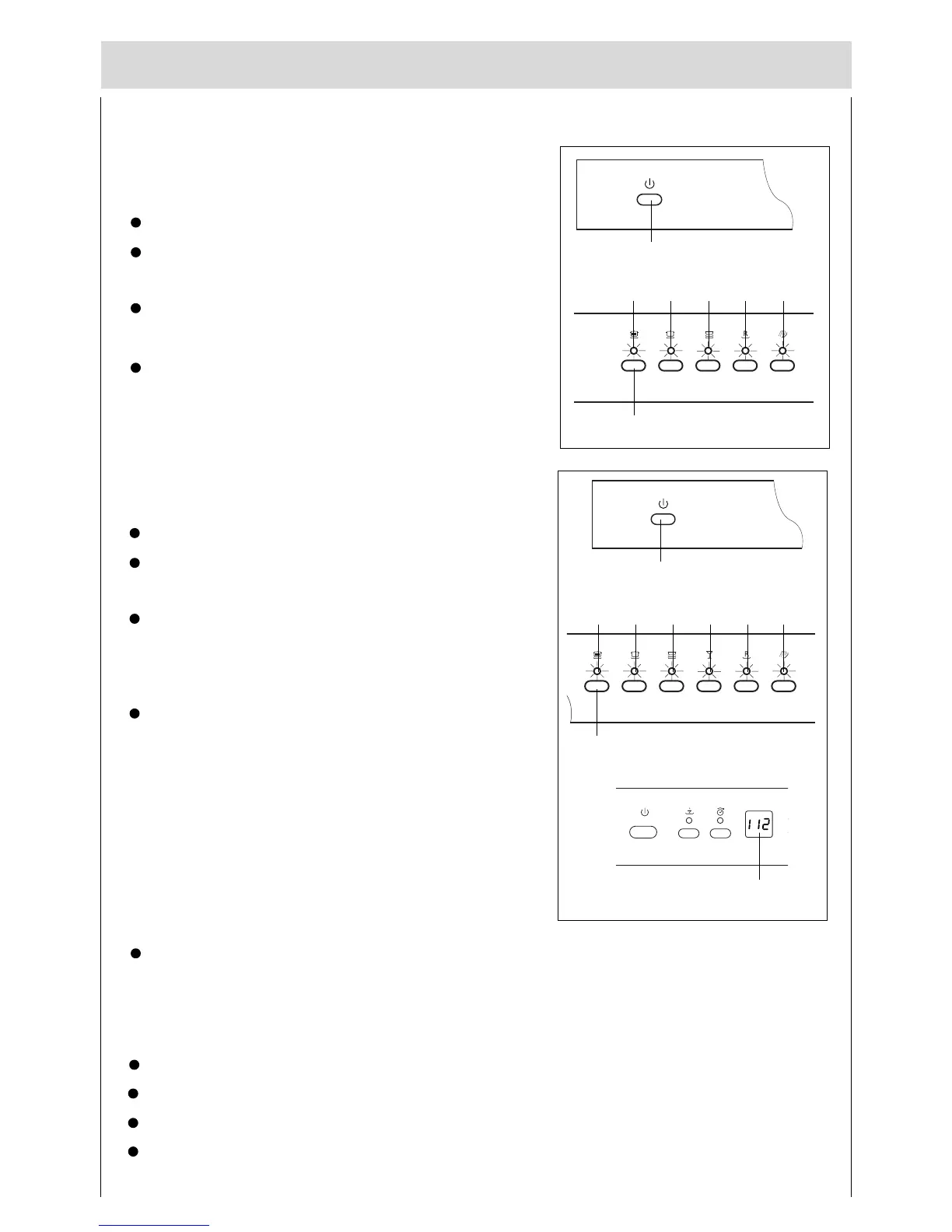
Switching the dishwasher ON
Turn on the tap.
Set ON-OFF button “ A ” to ON. All the programme
indicators “K1,K2,K3,K5,K6 ” light .
Press programme button “J1” , programme indicator
“ K1” blinks.
If the door is closed, after 5 seconds, the programme
indicator “ K1” bcomes to light and the dishwasher
beeps one time , then the programme starts
automatically.
A
J1
K1
End of programme
Six beeps will indicate that the wash cycle has finished and all the programme indicators light.
Switching the dishwasher OFF
Several minutes after the programme has ended:
Set main switch “A” to OFF.
Open the door .
Turn the water tap off. (Does not apply when Aquastop unit has been fitted)
Remove dishes, etc. when they have cooled down.
For DW15-PFE1**
Turn on the tap.
Set ON-OFF button “ A ” to ON. All the programme
indicators “K1,K2,K3,K4,K5,K6 ” light .
Press programme button “J1” , programme indicator
“ K1” blinks and the time-remaining indicator “ F ”
displays the time of the programme..
If the door is closed, after 5 seconds, the programme
indicator “ K1” bcomes to light and the dishwasher
beeps one time , then the programme starts
automatically.
For DW15-PFE2**
A
J1
K2 K3 K5 K6
K1 K2 K3 K4 K5
K6
F
19





 To Next Page