EasyManua.ls Logo

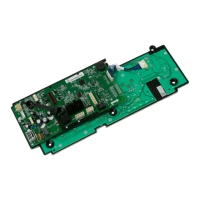
Haier GE WH18X26217 - User Manual

Haier GE WH18X26217
2 pages
Print Icon
To Next Page IconTo Next Page
Loading...
WH00X26332
Part Install Instructions
Overview – Procedure for programming new control boards
when all LED’s are flashing.
WH18X26217, WH18X26234, WH18X26794, WH18X26795,
WH18X27754 And WH18X26796 Washer Control Boards
!
IMPORTANT SAFETY NOTICE
The information in this part instruction is intended for use by
individuals possessing adequate backgrounds of electrical,
electronic and mechanical experience. Any attempt to repair a
major appliance may result in personal injury and property damage.
The manufacturer or seller cannot be responsible for the
interpretation of this information, nor can it assume any liability in
connection with its use.
!
WARNING
To avoid personal injury, disconnect power before servicing this
appliance. If electrical power is required for diagnosis or test
purposes, disconnect the power immediately after performing the
necessary checks. RECONNECT ALL GROUNDING DEVICES If
grounding wires, screws, straps, clips, nuts, or washers used to
complete a path to ground are removed for service, they must be
returned to their original position and properly fastened.
Parts Included:
Control Board Instruction Sheet
HTW200**K0 / K1
MTW200**K0
GTW685**L0 and higher
GTW220**K0 / K1 / K2
HTW240**K0 / K1
HTW200**K3 and higher
GTW330**K0 / K1
GTW750**L0 and higher
HTW200**K2
GTW460**J0 / J2
GTW680**J5 and higher
GTW680**L0 and higher
GTW330**K3 and higher
GTW680**J0 /J1 /J2
GTW220**K3
HTW240**K2
GTW485**J0 / J1
Model Number ID
ID
ID
Model Number
Model Number
GTW330**K2
GTW460**J1 / J3 / J4 / J5 / J6
GTW460**J7
GTW220**K4 and higher
HTW240**K3 and higher
GTW490**J0 / J1
12
02
05
01
07
00
10
11
06
09
08
GTW485**J2 / J3
14
GTW490**J2 and higher
GTW460**J8 and higher
GTW680**J3 / J4
03
04
GTW485**J4 and higher
1. Press Start button. LED’s will stop flashing and the personality ID can be selected.
Models with seven segment display will show the personality ID number in the display.
Models without seven segment display will show the personality ID number on the
status LED’s using binary coding. (See binary chart on reverse side)
2. Press and release the Start button to increment to the next personality ID number. The first
personality may be 0. All cycle status LED’s will be off. When the end of the ID list is reached
the control will wrap around to the beginning of the personality ID number list.
3. When the correct personality ID number is in the display or if the correct status LED’s are lit
for the personality ID number needed, press and hold the Start button for three seconds. This
will save the personality ID number and the control; will go to an idle state.
If an error is made in programming the control or if the LED’s are not flashing, enter Field Service
Mode as shown on the back of these instructions and use service mode test 17 to correct.
13
GTW755**M0 and higher
Question and Answer IconNeed help?

Do you have a question about the Haier GE WH18X26217 and is the answer not in the manual?

Summary

Washer Control Board Installation

Appliance Installation Safety

Key safety precautions for installation and servicing to prevent injury and property damage.

Control Board Personality Programming

Procedure for programming new control boards when LEDs flash, including personality ID selection.

Washer Service Mode Diagnostics

Entering Field Service Mode

Procedure to enter Field Service Mode for diagnostics, involving button presses and knob rotation.

Test 17: Changing Personality ID

How to use Test 17 to select and save the correct personality ID for the control board.

Personality ID Binary Representation

Visual guide showing personality numbers represented in binary code using status LEDs.

Overview

This document provides installation instructions for GE Appliances washer control boards, specifically models WH18X26217, WH18X26234, WH18X26794, WH18X26795, WH18X27754, and WH18X26796. It outlines the procedure for programming new control boards, particularly when all LEDs are flashing, and details how to enter and exit Field Service Mode, including a specific test for changing the personality ID.

Function Description:

The primary function of these control boards is to manage the operation of GE washers. When a new control board is installed, it needs to be programmed with the correct "personality ID" to match the specific washer model it's installed in. This programming ensures that the washer operates with the correct cycles, features, and settings. The instructions detail a process to select and save this personality ID, which is crucial for the proper functioning of the appliance. The control board also facilitates diagnostic and maintenance procedures through a "Field Service Mode," allowing technicians to test various components and reconfigure settings.

Important Technical Specifications (Implied):

While explicit technical specifications like voltage or current ratings are not provided, the document implies several key aspects:

  • Compatibility: The control boards are designed for a wide range of GE washer models, indicated by the extensive list of model numbers and their corresponding personality IDs.
  • User Interface: The control boards interact with the user through LEDs and, in some models, a 7-segment display. The "Start" button and the "cycle selection knob" are primary input mechanisms for programming and service mode navigation.
  • Programming Mechanism: The programming involves incrementing through personality IDs using the Start button and then holding it to save the selection. This suggests an internal memory for storing the selected ID.
  • Diagnostic Capabilities: The "Field Service Mode" with various "tests" (e.g., Test 17 for changing personality) highlights the diagnostic and re-configuration capabilities embedded in the control board's firmware.
  • Binary Coding: For models without a 7-segment display, personality IDs are communicated via binary coding using the status LEDs, indicating a structured internal logic for status representation.

Usage Features:

  • New Board Programming:
    • Upon installation, if all LEDs are flashing, press the "Start" button to stop flashing and enable personality ID selection.
    • Personality IDs are displayed either as numbers on a 7-segment display or via binary coding on status LEDs.
    • Press and release the "Start" button to cycle through personality IDs. The list wraps around.
    • Once the correct ID is displayed, press and hold the "Start" button for three seconds to save it. The control board will then enter an idle state.
    • A table is provided mapping specific washer model numbers (e.g., GTW220K0, HTW240K0) to their corresponding personality IDs (00 through 14). This table is essential for correct programming.
  • Error Correction: If an error occurs during programming or if LEDs are not flashing, the user is directed to enter "Field Service Mode" and use "service mode test 17" to correct the personality ID.

Maintenance Features:

  • Field Service Mode Entry:
    • From an idle state (all LEDs off), press and hold the "Start" button while rotating the "cycle selection knob" 180 degrees (7 clicks), then release the "Start" button.
    • Upon entry, all LEDs will flash. 7-segment display models will show (0) for Test (0); models without a 7-segment display will have all status LEDs above the cycle knob lit.
    • The cycle selection knob is used to navigate the test menu: clockwise to increment test numbers, counter-clockwise to decrement.
    • Models without a 7-segment display use binary format on status lights to show test numbers.
    • Pressing "Start" begins the selected test. Turning the knob during a test terminates the current state.
  • Field Service Mode Exit:
    • The mode times out after 30 minutes of inactivity.
    • For models without a 7-segment display, press and hold the "Start" button for 3 seconds.
    • For models with a 7-segment display, press the "Power" button.
  • Service Mode Test 17 (Change Personality):
    • This specific test allows for changing the personality ID.
    • Press "Start" to begin the test.
    • Press "Start" again to display the next valid personality.
    • Press and hold "Start" to select and save the correct personality. The control will then go to an idle state (all LEDs off).
    • A crucial note: if the same personality ID is re-entered, the control will NOT go to an idle state, emphasizing the need to ensure a different or correct personality ID is being entered.
    • Another note indicates that for certain models (GTW220K0, K1, K2, HTW240K0, K1, and HTW200**K3 and higher), the cycle status LEDs will not be lit for personality 0 when entering Test 17.

Safety Information:

  • Important Safety Notice: The instructions are intended for individuals with adequate electrical, electronic, and mechanical experience. Attempting repairs without proper background can lead to personal injury and property damage. The manufacturer or seller disclaims responsibility for misinterpretation or liability.
  • Warning: Always disconnect power before servicing to prevent personal injury. If power is needed for diagnosis, disconnect it immediately after checks. Reconnect all grounding devices (wires, screws, straps, clips, nuts, washers) to their original positions and ensure proper fastening.

Haier GE WH18X26217 Specifications

General IconGeneral
BrandHaier
ModelGE WH18X26217
CategoryControl Unit
LanguageEnglish

Related product manuals