Need help?
Do you have a question about the Haier YR-H 71 and is the answer not in the manual?
Lists various controllers and their starting pages.
Details how to select operation modes like AUTO, COOL, DRY, HEAT, FAN.
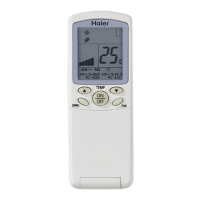
Explains functions of TEMP, SWING, Power ON/OFF, HEALTH, CLOCK, FILTER buttons.
Explains various displays like TIMER OFF, CLOCK, FILTER, TEMP, SWING, etc.
Details how to load and replace batteries in the remote controller.
Step-by-step guide to setting the remote controller's clock.
Explains how to select fan speed (LOW, MID, HIGH, AUTO).
Covers Unit start/stop, selecting AUTO, COOL, DRY, HEAT, FAN modes.
Details how to adjust temperature and fan speed.
Explains how to use the SWING button for airflow direction control.
How to activate and use the sleep function for comfortable sleeping.
Describes how sleep mode adjusts temperature in COOL, DRY, HEAT, and AUTO modes.
Visual representation of sleep mode temperature adjustments over time.
Step-by-step guide to setting timer ON or OFF functions.
Detailed steps for setting TIMER ON and TIMER OFF.
Important notes and tips regarding timer settings and clock display.
Instructions for using the filter up/down function.
Explanation of the "High Mode" for rapid cooling/heating.
Details the "Soft Mode" for quieter operation.
Steps to enable and disable the auto restart feature.
Notes on using YR-H71 with remote receivers.
Guidelines for installing the receiver display.
Describes the functions of the YR-H65 controller, especially swing.
Brief overview of YR-H50 and YR-H49 controllers.
Covers initial power connection and default display.
Explains SELECT, Read, Lock, Machine number buttons and reset.
Lists and explains the function of each button on the YR-E06 controller.
Step-by-step guide to calibrate the clock on the wired controller.
Suggests modes for summer, winter, and damp climates.
Details unit start, mode selection, temperature, and fan speed adjustment.
Steps to select TIMER mode (ON or OFF).
How to confirm timer settings and cancel the mode.
Detailed procedure for setting the timer ON function.
Detailed procedure for setting the timer OFF function.
How to set and use the sleep function.
Explains temperature changes during sleep mode in different operations.
Method to set and cancel the auto-restart function.
General safety precautions for remote control operation.
How to use the health function and its cautions.
Methods for using wired controllers with remote controls.
Steps for mounting the wired remote controller.
Details switch settings and connection methods.
Table listing error descriptions and corresponding codes.
Explains the purpose of each button on the YR-E12 controller.
Lists and defines various operation modes and functions.
Steps for operating in Fan Only mode.
How to set and manage timer operations.
Explains filter elevation and trial running modes.
How to check for past malfunctions and clear history.
Explains the purpose and settings of dip switches.
Details wiring methods and communication specs.
Explains how to set the indoor PCB for wired controller compatibility.
Lists failure descriptions and their corresponding codes.
Explains various display elements and key functions.
Details operations like SELECT, ON/OFF, LOCK, MODE, TEMP/TIME, FAN, TIMER, CLOCK.
Explains communication protocols and LCD information display.
How to set unit numbers and implement central control.
Illustrates various central and group control system setups.
Explains the use of SW1 and SW2 dip switches for central control.
Steps for wiring and installing the central controller.
Provides front and side views with dimensions.
Lists common error codes and their meanings.
Details the physical appearance and LCD display of the ICR01.
Shows how to install the ICR01 and its external size.
Specifies communication wire requirements and dip switch settings.
Details dip switch settings for addresses and grouping units.
Explains control functions and provides a summary of connections.
Lists error codes related to outdoor master unit components.
Additional error codes for outdoor master unit sensors and protection.
Explains the purpose and features of the weekly timer.
Details the icons displayed on the weekly timer's LCD.
How to configure the weekly timer for auto-changeover.
Using weekly timer with central controller for group control.
How to set programs and holidays on the weekly timer.
Adjusting timing parameters like date, hour, and minute.
Procedures for adjusting time and setting timing data.
How to set holidays and interpret trouble codes.
Principles for designing the group control network and installation methods.
Details on connecting detectors and the group control bus.
Steps for connecting detectors to air conditioners and communication bus.
Specifications and recommended parts for the system.
Important safety warnings and instructions for the detector.
Procedures for cleaning and maintaining the detector.
How the detector communicates and controls units.
Explains power failure resume and two-unit switchover.
Setting unit numbers and understanding status indicators.
Time delay control and types of units compatible with detector.
How to implement the two-unit switchover function.
Using central controller for group and switchover control.
How to inspect detector running status and operation indicator.
Physical dimensions and interface port descriptions.
Power supply, consumption, dimensions, weight, and accessories.
Methods for fixing detectors and principles for network layout design.
Details on connecting detectors and the group control bus.
Steps for connection, debugging, and setting detector dialing switches.
Table correlating dialing settings with unit configurations and times.
Continues the table of dialing settings for unit configurations.
Completes the table of dialing settings for unit configurations.
Details the appearance, PCB, and dip switch settings of the IGU04.
Refers to central controller manual for installation details.
 General
| Brand | Haier |
|---|---|
| Model | YR-H 71 |
| Category | Control Unit |
| Language | English |

 To Next Page