Need help?
Do you have a question about the Haier HSU-12CG03 and is the answer not in the manual?
Proper disposal methods for used air conditioners and their components.
Essential safety guidelines for operation, installation, and general use of the unit.
Guidelines for the environmentally sound disposal of air conditioner packaging materials.
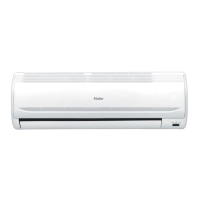
Identification and explanation of the various parts and indicators of the indoor unit.
Details on the outdoor unit's components, specifications, and installation aspects.
Explains remote control buttons, display, clock setting, and battery loading.
Guides on battery loading, confirmation, hints, and controller handling.
How to start, select modes (AUTO, COOL, DRY, HEAT, FAN), and adjust fan speed.
Setting desired temperature, fan speed, and adjusting air flow direction for optimal comfort.
Instructions for using Timer (ON/OFF) and Comfortable Sleep modes for automated operation.
Guide to Emergency Operation, Test Operation, and removal of restrictions.
Explains the unit's behavior and resume process after a power interruption.
Steps for cleaning the unit casing, remote controller, and air filters for optimal performance.
Instructions for detaching, replacing, and attaching electrostatic air filters.
Tips for efficient use, energy saving, and general warnings to observe.
Addresses common issues like delayed restarts, noises, smells, mist/steam, and performance checks.
Troubleshooting steps for when the unit doesn't work or provides poor cooling.
This document describes a split-type room air conditioner, providing comprehensive information on its functions, usage, and maintenance. The air conditioner is designed to offer a comfortable indoor environment through various operating modes and user-friendly controls.
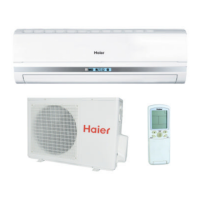
The split-type room air conditioner is primarily designed for cooling, heating, and dehumidifying indoor spaces. It features an indoor unit and an outdoor unit, working in conjunction to regulate room temperature and air quality. The indoor unit is equipped with an inlet grill, an air filter, and a vertical flap to control airflow direction. The outdoor unit houses the compressor and other components necessary for the refrigeration cycle.
The device offers several operational modes:
A key feature of some models is the Healthy Function, which incorporates an anion generator. This generator produces anions to balance positive and negative ions in the air, kill bacteria, and accelerate dust settlement, thereby improving indoor air quality. When the healthy function is active, a "ion" display appears on the remote controller, and the health lamp on the indoor unit lights up. However, the anion generator only releases anions when the indoor unit's fan is operating.
The air conditioner also includes a Timer Operation feature, allowing users to schedule the unit to start or stop automatically at specific times. This is useful for pre-cooling or pre-heating a room before arrival or for turning off the unit after falling asleep. The timer can be set for "TIMER ON," "TIMER OFF," or "TIMER ON-OFF" to manage both start and stop times.
For situations where the remote controller is lost or defective, an Emergency Operation mode is available. This mode allows the unit to run continuously in either cooling or heating mode at a preset temperature and auto fan speed. A "Pi" sound confirms the start of this operation. Similarly, a Test Operation mode is available for technical checks, particularly when the room temperature is below 16°C.
The Comfortable SLEEP function is designed to optimize temperature settings for a good night's sleep. In COOL mode, the temperature gradually rises by 1°C per hour for the first two hours, then maintains the temperature for approximately six hours before automatically stopping. In HEAT mode, the temperature gradually decreases by 2°C per hour for the first two hours, maintains that temperature for three hours, then increases by 1°C before automatically stopping. This function ensures that the room temperature remains comfortable throughout the sleep cycle.
A Power Failure Resume Function is present in some models. If power is interrupted, the unit will automatically resume operation with its previous settings once power is restored. A three-minute delay is incorporated before the compressor restarts to protect the system.
The air conditioner is controlled primarily via a wireless remote controller, which features an LCD display showing the current mode, temperature, fan speed, and timer settings.
Key controls on the remote controller include:
The remote controller operates by sending signals to a receiver on the indoor unit. For optimal performance, the signal transmission head should be pointed directly at the receiver, and there should be no obstacles within a 7-meter range. Users are advised to replace batteries with two new, same-typed R-03 batteries when needed. After battery replacement, the clock needs to be reset, and the remote controller will perform a self-check, displaying all information on the LCD before returning to normal operation.
Airflow direction can be adjusted both vertically and horizontally. The vertical flap is controlled by the SWING button on the remote controller, opening automatically according to the selected mode. Horizontal airflow can be manually adjusted using a knob on the air conditioner itself. It is recommended to adjust horizontal airflow to optimize air circulation, especially in COOL mode (downward cold air) and HEAT mode (upward warm air).
Regular maintenance is crucial for the efficient and long-lasting operation of the air conditioner.
Key maintenance tasks include:
General recommendations for better use and maintenance include:
The manual also emphasizes safety instructions, such as proper grounding, unplugging the unit before opening the inlet grill, and ensuring all electrical repairs are performed by qualified electricians. It also warns against damaging refrigerant-carrying parts and obstructing ventilation grilles. Children should not be allowed to play with or sit on the outdoor unit.
 General
| Refrigerant | R410A |
|---|---|
| Dimensions (Indoor Unit) | 805 x 194 x 292 mm |
| Dimensions (Outdoor Unit) | 700 x 245 x 544 mm |
| Power Supply | 220-240V, 50Hz |
| Type | Split System |
| Cooling Capacity | 12000 BTU/hr |
| Operating Temperature (Cooling) | 18°C to 43°C |


 To Next Page