This document provides an operation manual for the Haier Transport Cooler, models HZY-8Z and HZY-15Z. It includes safety precautions, product features, installation instructions, usage methods, maintenance guidelines, and troubleshooting information.
Function Description
The Haier Transport Cooler is designed for the temporary storage and transport of articles requiring temperature control, such as blood, drugs, specimens, reagents, and other biological products. It utilizes semiconductor active refrigeration to maintain a stable internal temperature. The device features a computer control system with dual sensors for precise temperature display and multiple fault alarms to ensure the safety of stored items.
Important Technical Specifications
Model HZY-8Z
- External dimensions (W x D x H): 300×265×260 mm
- Internal dimensions (W x D x H): 230×140×170 mm
- Insulating material: High-density foam
- Cooling mode: Semiconductor active refrigeration
- Casing/liner: ABS/aluminum plate
- Temperature control mode: Computer control system
- Net weight: 3.5 kg
- Range of temperature in storage/transport: 2℃~6℃ / 2℃~10℃
- Rated power supply: 220V (can be connected to 12V cigarette lighting plug)
- Rated power: 60W
- Alarm type: Overtemperature alarm, sensor fault alarm, and power off alarm
- Power-off temperature keeping time: 2 hours (at 28°C environmental temperature with load)
- Chargeable battery: Chargeable lithium battery
- NFC clock-in function: None
Model HZY-15Z
- External dimensions (W x D x H): 520×300×270 mm
- Internal dimensions (W x D x H): 430×150×180 mm
- Insulating material: Hard polyurethane foam
- Cooling mode: Semiconductor active refrigeration
- Casing/liner: ABS/aluminum plate
- Temperature control mode: Computer control system
- Net weight: 6 kg
- Range of temperature in storage/transport: 2℃~6℃ / 2℃~10℃
- Rated power supply: 220V (can be connected to 12V cigarette lighting plug)
- Rated power: 95W
- Alarm type: Overtemperature alarm, sensor fault alarm, and power off alarm
- Power-off temperature keeping time: 2 hours (at 28°C environmental temperature with load)
- Chargeable battery: Chargeable lithium battery
- NFC clock-in function: None
Usage Features
- Temperature Control: The cooler maintains a storage temperature of 2~6°C and a transport temperature range of 2~10°C. Temperature display accuracy is 0.1°C.
- Safety System: Features multiple fault alarms including high-low temperature, sensor fault, and power-off alarms. Alarms are indicated by sound buzzer and display flicker. A backup battery allows real-time temperature display even during power failure. A double lock structure prevents accidental opening and ensures item safety.
- Refrigeration System: Employs semiconductor active refrigeration and PCM cold storage material for zero freeze and long thermal insulation. Uses imported brand fans.
- Initial Power-on: The cooler is preset to run below 4 ±2°C from the factory. An overtemperature alarm may sound upon power-on, which is normal and can be cancelled by pressing any key. The temperature stabilizes within the set range after a period of operation. Articles should be gradually introduced after thorough inspection.
- Overtemperature Alarm Function: Default alarm limits are 10°C (high) and 2°C (low). Exceeding this range triggers a buzzer alarm, which can be cancelled. If the condition persists for 30 minutes, the alarm reactivates until the temperature sensor reaches the 2-10°C range.
- Adjusting Set Temperature: Long press the "Set" key for 10 seconds to enter temperature setting mode. Press "Set" again to display the current setting, then use "+" or "-" to adjust. The system saves the new setting after 10 seconds of inactivity.
- Power Failure Prompt: During a power cut, the temperature display darkens and flashes at intervals (10 seconds On, 3 seconds Off) to indicate power-off status. This allows for transport during the thermal insulation period.
- Backup Alarm & Display: In power-off mode, pressing "set" and "add" buttons simultaneously for 5 seconds turns off the left screen and the cooler.
- Restore Factory Settings: To restore default parameters, press and hold the "+" and "-" buttons for 20 seconds. The left display will show "CL".
- Power Cord: Connect to a dedicated socket. If lengthening is required, the cord section area must be at least 2mm² and not longer than 3m.
- Grounding: The cooler has a three-wire (grounding wire) plug and requires a standard 10A three-wire socket. Ensure proper grounding to prevent electric shock.
- Environmental Conditions: Optimal operation requires an environmental temperature of 10-28°C and humidity below 85% RH. Avoid excessive dust, mechanical sway, vibration, and direct sunlight. The working altitude should be below 2000m.
- Power Supply: Supports 12V and 220V switching. If voltage is unstable (below 198V or above 242V), an automatic manostat is required.
- Placement: Must be on solid, flat ground in a well-ventilated space, not narrow or airtight. Ensure sufficient space for maintenance. Do not share a socket with other equipment.
Maintenance Features
- Safety First: Always cut off power before any repair or maintenance to prevent electric shock or casualties. Avoid inhaling medicine or suspended particles around the storage box during maintenance.
- Cleaning: Clean the transport cooler monthly to maintain its appearance. Use a dry cloth for dust. For dirtier surfaces, use a mild detergent with a wet cloth, then wipe with a dry cloth. Do not pour water directly onto the cooler to avoid electrical insulation damage.
- Internal Components: The compressor and other machinery parts are sealed and do not require lubrication.
- Long-term Storage: If the cooler will be out of service for an extended period, power it off, open the door, clean it thoroughly, air it out, then close the door and seal it in a plastic bag.
- Prohibited Items: Do not store corrosive articles (acid, alkali) inside, as they can damage internal components.
- Children Safety: Keep packing plastic bags away from children to prevent suffocation. If the cooler is left unused in an unattended area, ensure children cannot access it and the door is not completely closed.
- Physical Safety: Do not climb on the cooler or place heavy objects on it to prevent overturn and personal injury. Do not insert metal objects into any orifices or air vents to avoid electric shock or injury from moving parts.
- Restarting: After a power failure or power-off, check the cooler's settings before restarting to prevent damage to stored articles.
- Handling: Wear gloves during maintenance to avoid injury from sharp edges. Be careful when moving the cooler to prevent tripping or damage.
- Internal Appliances: Do not use any electric appliance inside the cooler unless recommended by the manufacturer.
- Grounding Restrictions: Do not ground the cooler via gas piping, water supply pipes, telephone lines, or lightning rods.
- Accessibility: After installation, the power plug must be easily accessible for emergencies. Ensure no articles block the air vent.

 Need help?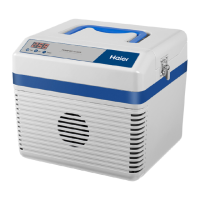

 To Next Page
 General