-6-
INSTALLATION
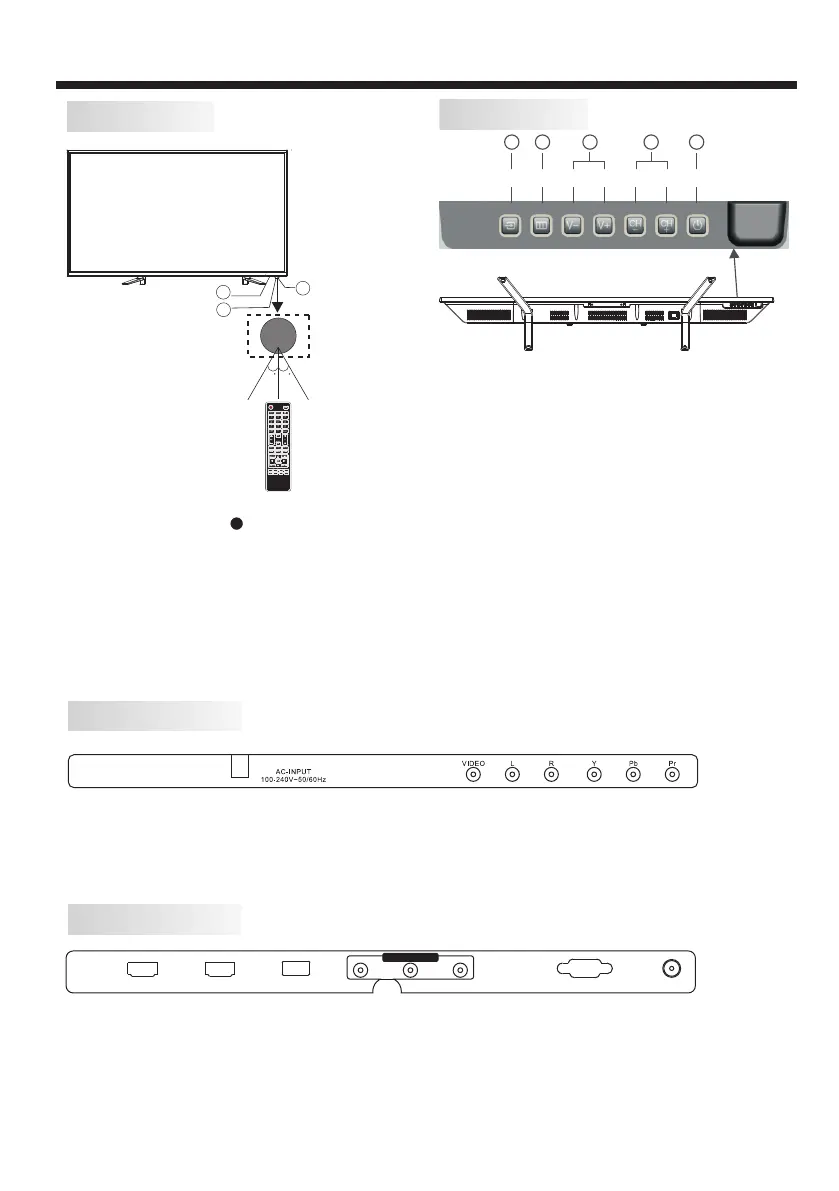
Front panel
KEYBOARD
1: Remote control sensor.
2: Indicator LED: RED STANDBY.
3: Key board
1.SOURCE:
Display the input source menu.
2.MENU:
Display main MENU.
3.V-/V+
Adjust sound level.
In MENU mode, press“V+”or“V-”to
adjust the item that you selected.
4.CH-/CH+
In TV mode,press“CH+”or“CH-”to change
the channel up and down.
In MENU mode, press “CH+”or“CH-”to select
items.
5. STANDBY
Press this button to turn the unit ON from
STANDBY mode.
Press it again to turn the set back to STANDBY.
SOURCE MENU V- V+ CH- CH+ Standby
1 2 3 4 5
3
2
30 30
1
All the terminals are (from left to right):
AC POWER SOCKET, AV INPUT, YPbPr INPUT.
Note: VIDEO and YPbPr share one audio channel.
All the terminals are (from left to right):
HDMI2, HDMI1, USB, AV OUTPUT, VGA, RF.
Note: When HDMI port get DVI signal, the audio signal receives from the AV Audio channel.
HDMI2 HDMI1 USB R FVGAVIDEO L R
AV OUTPUT
REAR AV Connections
REAR AV Connections (SIDE)



 To Next Page