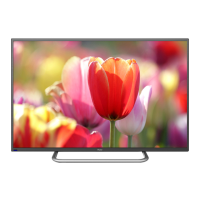
This document is an owner's manual for a Haier LED LCD TV, specifically models LE40B50 and LE42B50. It provides detailed information on the TV's features, installation, operation, and troubleshooting.
Function Description
The Haier LED LCD TV serves multiple functions, acting as a television, a display terminal, and a PC display. It is equipped with features to enhance user experience across these modes. The TV can store up to 200 TV programs, allowing for a wide range of channel access. It includes an HDMI interface for high-definition connectivity and a Multi-Media player (USB) for playing various media files directly from a USB device.
Important Technical Specifications
The manual provides key technical specifications for both models:
Viewing Picture Size (Diagonal):
- LE40B50: 39 inches
- LE42B50: 42 inches
Resolution: 1920x1080, indicating Full HD capability.
Aspect Ratio: 16:9, a standard widescreen format.
TV System: Supports multiple PAL and SECAM standards (PAL/BG, PAL/I, PAL/DK, SECAM/BG, SECAM/DK).
Video Signal System: Compatible with PAL/NTSC/SECAM.
Receiving Channel: 1-200.
Input Power Voltage: AC 100-240V, 50/60Hz, providing broad compatibility with electrical grids.
Power Consumption:
- LE40B50: 70W
- LE42B50: 80W
Audio Output Power (THD≤7%): 2x8W, indicating stereo sound output.
Signal Input/Output:
- Analog RGB (VGA): 1 input for PC display.
- High-Definition Multimedia Interface (HDMI): 2 inputs for high-definition audio/video.
- Composite Video Input: 2 inputs.
- Composite Video Output: 1 output.
- Audio Input: 3 inputs.
- YCb(Pb)Cr(Pr): 1 input for component video.
- USB: 1 input for multimedia playback.
- RF: 1 input for antenna/cable connection.
Horizontal Definition (TV line):
- Composite Video input: >=350
- Y Cb(Pb) Cr(Pr): >=400
The TV boasts high luminance and a wide viewing angle, ensuring a clear and vibrant picture from various positions.
Usage Features
Installation:
The manual details the physical connections for various inputs:
- Rear AV Connections: Includes AC power, AV input (Video, L, R), and YPbPr input (Y, Pb, Pr). Note that Video and YPbPr share one audio channel.
- Side AV Connections: Features HDMI1, HDMI2, USB, AV OUT/AV2 IN, PC AUDIO, and VGA, RF. It's noted that when an HDMI port receives a DVI signal, the audio signal is received via the PC Audio channel.
- Antenna Connection: Instructions for connecting to an outdoor antenna, twin-lead feeder (300Ω), or an indoor antenna/CATV net.
- PC Connection: A specific sequence is recommended: power off TV and computer, connect VGA and audio cables, connect power cord, power on TV and switch to PC mode, then power on PC.
- AV Equipment Connection: The TV supports VCR, multi-disc players, DVD, camcorders, video game consoles, or stereo systems. YPbPr supports video formats like 480i, 576i, 480p, 576p, 720p, 1080i, 1080p. It clarifies that Video and YPbPr share one audio channel, and HDMI audio for DVI signals uses the PC Audio channel. It also warns that some devices with nonstandard signals might not be supported and that AV OUT signal availability depends on the current source.
Front Panel and Keyboard:
- Remote Control Sensor: For receiving signals from the remote.
- Indicator LED: Blue for power on, Red for standby.
- Keyboard Controls:
- SOURCE: Displays input source menu.
- MENU: Displays main menu.
- CH+/CH-: Changes channels in TV mode, selects items in MENU mode.
- VOL+/VOL-: Adjusts sound level, adjusts selected items in MENU mode.
- STANDBY: Powers the unit ON from standby or back to standby.
Remote Controller:
The remote control requires batteries to operate and should be aimed at the TV's remote control sensor. Key functions include:
- POWER: Turns TV on/off.
- Media Playback Controls: ◄◄◄ (reverse), ►► (forward), II (play/pause), ■ (stop), I (next), I (previous) for USB mode.
- Input Source Selection: USB, VGA, YPbPr, TV buttons for direct switching.
- Navigation: (menu), CURSOR (move), OK (confirm/open submenu), CH.LIST (open channel list), EXIT (exit OSD).
- Audio/Picture Settings: S.M (switch audio modes), VOL+/VOL- (volume), ASPECT (change picture aspect ratio), P.M (select picture mode).
- Other Functions: MUTE (sound on/off), DISPLAY (TV status info), SLEEP (sleep timer), NUMBER KEY (change channel), RECALL (last viewed channel).
- Program Edit Buttons (Red, Green, Yellow, Blue): Used for Delete, Rename, Move, and Skip functions in program edit mode.
On-Screen Display (OSD) Menus:
- PICTURE MENU: Adjusts contrast, brightness, color, sharpness, tint (NTSC only), picture mode, aspect ratio, and color temperature.
- SOUND MENU: Adjusts volume, balance, digital tone, surround sound, and auto volume. Auto volume is only available when input signal volume is too large or distorted.
- CHANNEL MENU (TV source only): Allows auto tuning, program editing (Delete, Rename, Move, Skip), and channel selection.
- FUNCTION MENU: Adjusts OSD language, menu timeout, DNR (Digital Noise Reduction), background, and reset to factory defaults.
- ADJUST MENU: Adjusts horizontal size, vertical size, image position, auto adjust, clock, and phase. Image position, auto adjust, clock, and phase are only available for PC source.
- TIME MENU: Adjusts clock, power on/off time, and remind time.
- USB FUNCTION: Accesses the multimedia player. Users select media type (photo, music, movie, text) and navigate files. Special notes on audio synchronization during fast-forward/rewind in movie mode and page up/down in text mode.
Hotel Mode:
This mode is accessed by pressing SOURCE then "1001". It offers control over various TV settings for hospitality environments:
- Hotel Mode Operation: On/Off.
- Panel Key Lock: Locks keypad.
- Max Volume: Sets a maximum volume limit.
- Start Source: Selects default input source (TV, YPbPr, PC, HDMI1, HDMI2, AV1, AV2, USB).
- Start Channel: Sets default TV channel.
- Setup Menu Display: Locks main menu display.
- Input Source Change: Locks input source selection.
- Save To USB: Backs up all TV settings to a USB disk (DATABASE.bin).
- Load: Restores settings from a USB disk, causing the TV to reboot.
- Volume Default: Sets the default power-on volume.
Maintenance Features
Safety and Warnings:
The manual emphasizes several safety instructions:
- Read and retain instructions.
- Heed all warnings and follow instructions.
- Do not use near water, clean only with a dry cloth.
- Ensure proper ventilation; do not block openings.
- Avoid heat sources (radiations, heat registers, stoves, amplifiers).
- Do not defeat polarized plug safety.
- Protect power cord from being walked on or pinched.
- Use only manufacturer-specified attachments/accessories.
- Unplug during lightning storms or long periods of disuse.
- Refer servicing to qualified personnel for any damage.
- Mains plug is the disconnect device and must remain readily operable.
- No naked flame sources (e.g., lighted candles) on the apparatus.
- Attention to environmental aspects of battery disposal.
- Use in moderate climates.
- No dripping or splashing; no liquid-filled objects (e.g., vases) on the apparatus.
- CAUTION (Electric Shock Risk): Do not open the cover; no user-serviceable parts inside. Refer to qualified service personnel.
- WARNING (Fire/Electric Shock): Do not expose to rain or moisture.
- WARNING (Batteries): Do not expose to excessive heat (sunshine, fire).
- Double Insulation Symbol: Indicates double insulation between hazardous mains voltage and user-accessible parts; use identical replacement parts for servicing.
- WEEE Symbol: Indicates product should not be disposed of with other household waste in the EU; promote sustainable reuse and recycling.
- General Safety: Avoid high voltages, do not remove cabinet back. Do not stand/lean/push the TV or its stand, especially with children. Do not place on unstable surfaces. Do not drop objects or spill liquids into openings. Disconnect AC power cord when not in use for extended periods. Avoid direct sunlight or other heat sources. Maintain minimum distances (10cm top/sides, 5cm back, 20cm front) if built into a compartment to prevent heat build-up. Do not trap power supply cord.
Troubleshooting:
A table is provided to diagnose common issues:
- Snow (Picture) / Noise (Audio): Check antenna position, direction, or connection.
- Ghost (Picture) / Normal audio (Audio): Check antenna position, direction, or connection.
- Interfere (Picture) / Noise (Audio): Caused by electronic equipment, car/motorcycle, fluorescent light.
- Normal Picture / Mute (Audio): Check if mute function is active on remote or if audio system is correct.
- No picture / Mute (Audio): Check if power cord is inserted, power switch is open, contrast/brightness/volume setup, or press standby key on remote.
- No color (Picture) / Normal audio (Audio): Check color control settings.
- Scramble (Picture) / Normal audio or weak (Audio): Retune channel.
- No color (Picture) / Noise (Audio): Check audio system.
Special Explanation: The manual states that accessories such as the remote control are not covered by the guarantee.



 To Next Page
 General