EasyManua.ls Logo

Haier PDVD770 - User Manual

Haier PDVD770
12 pages
Print Icon
To Next Page IconTo Next Page
Loading...
VIDEO
USER MANUAL
PDVD770
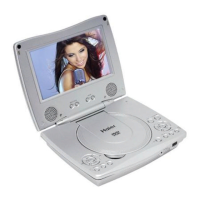
PORTABLE DVD PLAYER
WITH 7" TFT LCD SCREEN
IMPORTANT
READ THESE INSTRUCTIONS
BEFORE USE AND RETAIN
FOR FUTURE REFERENCE.
HDCD
VIDEO

Questions and Answers

Summary

SAFETY INFORMATION

General Safety Instructions and Warnings

Key safety guidelines, warnings, and precautions for operating the DVD player.

REGION CODE SETTING

DVD Region Coding Explained

Information on DVD region coding and the player's factory setting.

PRODUCT FEATURES

Audio, Video, Display, and Battery

Details on audio/video converters, display, battery life, and multi-system support.

Playback and Content Capabilities

Features like GUI, multi-audio/subtitle/angle, parental lock, and disc formats.

OPERATING PRECAUTIONS

Safety, Placement, and Handling

Guidelines for power cord, placement, water, objects, stacking, condensation, and non-use.

Interference and Maintenance Advice

Handling TV interference and lens cleaning recommendations.

SYSTEM OVERVIEW

DVD Player Unit Components

Identification of the numbered parts on the DVD player.

Remote Controller Layout

Identification of the numbered buttons on the remote control.

CONNECTING EXTERNAL DEVICES

Video and Audio Output Connections

Details on S-Video output and Coaxial digital audio output.

CAR ADAPTOR CONNECTION

Vehicle Power Usage Guidelines

Instructions and cautions for connecting and using the car adaptor.

BASIC OPERATION

Disc Playback and Controls

Steps for inserting discs and using basic playback controls like volume, skip, pause, and stop.

ADVANCED PLAYBACK AND FEATURES

Playback Modes and Navigation

Covers repeat, search, program play, zoom, VCD PBC, MP3, and photo playback.

Language and Display Functions

Changing audio/subtitle languages and viewing on-screen information.

PHOTO AND DISPLAY SETTINGS

Photo Playback Operations

Photo modes, navigation, and picture rotations for slideshows.

LCD Screen Adjustments

How to adjust color and brightness on the player's LCD screen.

INITIAL SETTINGS AND CONFIGURATION

System and Language Setup

Procedures for setting up TV system, LCD mode, languages, and other system parameters.

Audio Output Configuration

Setting digital audio output formats for sound systems.

VIDEO AND SPEAKER SETUP

Video Picture Adjustments

Fine-tuning brightness, contrast, hue, and saturation.

Speaker and Audio Output Settings

Configuring speaker downmix options for audio output.

DISC HANDLING AND TROUBLESHOOTING

Disc Care and Maintenance

Guidelines for handling discs to prevent damage and ensure playback.

Problem Solving Guide

Solutions for common issues like power, remote, picture, and sound problems.

WARRANTY INFORMATION

Product Warranty Terms and Service

Details on warranty coverage, limitations, exclusions, and how to obtain service.

Summary

SAFETY INFORMATION

General Safety Instructions and Warnings

Key safety guidelines, warnings, and precautions for operating the DVD player.

REGION CODE SETTING

DVD Region Coding Explained

Information on DVD region coding and the player's factory setting.

PRODUCT FEATURES

Audio, Video, Display, and Battery

Details on audio/video converters, display, battery life, and multi-system support.

Playback and Content Capabilities

Features like GUI, multi-audio/subtitle/angle, parental lock, and disc formats.

OPERATING PRECAUTIONS

Safety, Placement, and Handling

Guidelines for power cord, placement, water, objects, stacking, condensation, and non-use.

Interference and Maintenance Advice

Handling TV interference and lens cleaning recommendations.

SYSTEM OVERVIEW

DVD Player Unit Components

Identification of the numbered parts on the DVD player.

Remote Controller Layout

Identification of the numbered buttons on the remote control.

CONNECTING EXTERNAL DEVICES

Video and Audio Output Connections

Details on S-Video output and Coaxial digital audio output.

CAR ADAPTOR CONNECTION

Vehicle Power Usage Guidelines

Instructions and cautions for connecting and using the car adaptor.

BASIC OPERATION

Disc Playback and Controls

Steps for inserting discs and using basic playback controls like volume, skip, pause, and stop.

ADVANCED PLAYBACK AND FEATURES

Playback Modes and Navigation

Covers repeat, search, program play, zoom, VCD PBC, MP3, and photo playback.

Language and Display Functions

Changing audio/subtitle languages and viewing on-screen information.

PHOTO AND DISPLAY SETTINGS

Photo Playback Operations

Photo modes, navigation, and picture rotations for slideshows.

LCD Screen Adjustments

How to adjust color and brightness on the player's LCD screen.

INITIAL SETTINGS AND CONFIGURATION

System and Language Setup

Procedures for setting up TV system, LCD mode, languages, and other system parameters.

Audio Output Configuration

Setting digital audio output formats for sound systems.

VIDEO AND SPEAKER SETUP

Video Picture Adjustments

Fine-tuning brightness, contrast, hue, and saturation.

Speaker and Audio Output Settings

Configuring speaker downmix options for audio output.

DISC HANDLING AND TROUBLESHOOTING

Disc Care and Maintenance

Guidelines for handling discs to prevent damage and ensure playback.

Problem Solving Guide

Solutions for common issues like power, remote, picture, and sound problems.

WARRANTY INFORMATION

Product Warranty Terms and Service

Details on warranty coverage, limitations, exclusions, and how to obtain service.

Haier PDVD770 Specifications

General IconGeneral
BrandHaier
ModelPDVD770
CategoryPortable DVD Player
LanguageEnglish