After connection is firmed and securely done, plug AC
ADAPTER to an applicable wall outlet and turn on the player.
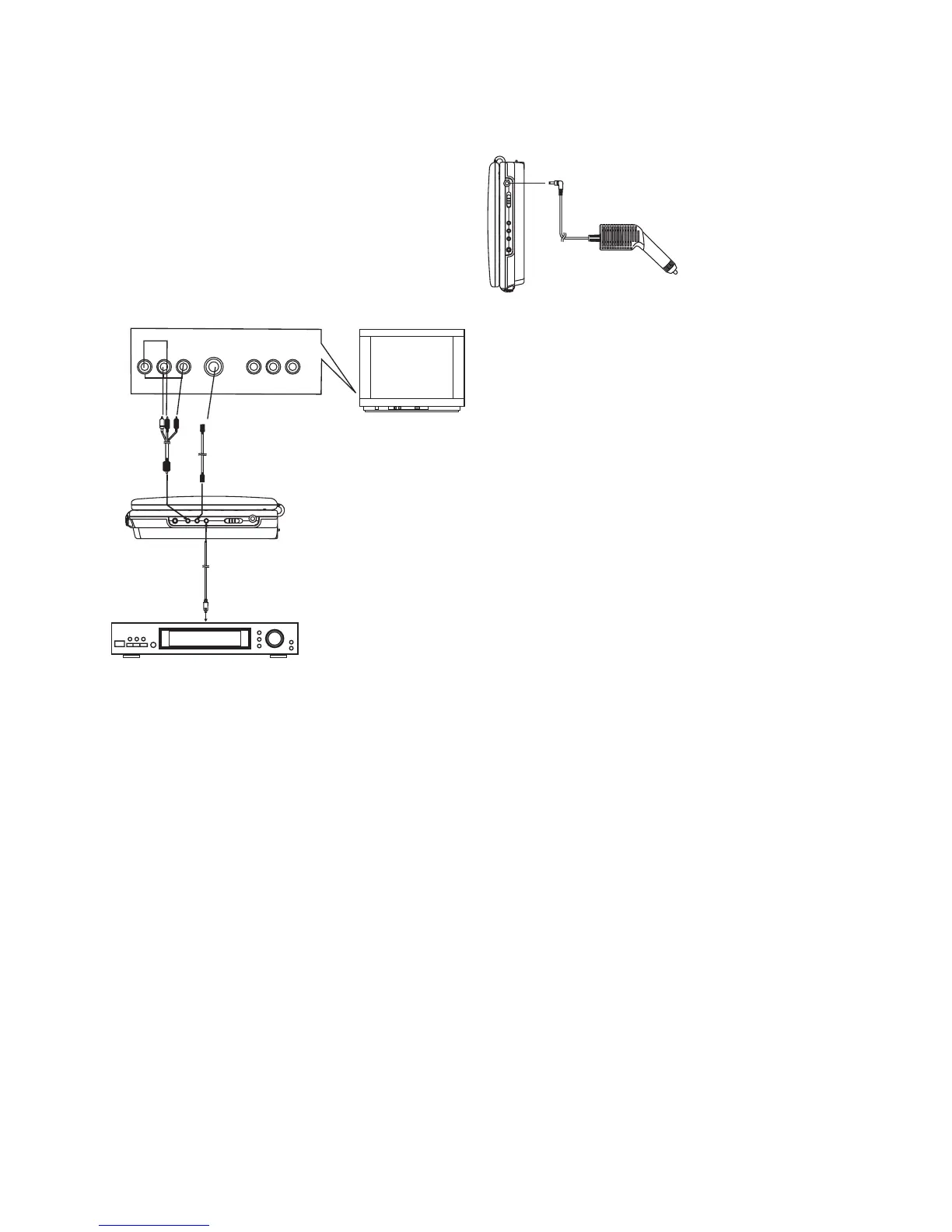
The S (separate) video output connector separates the color
(C) and luminance (Y) signals before transmitting them to the
TV set in order to achieve a sharper picture.
Use the S-video cable when connecting the player to a TV set
equipped with an S-Video input connector for the best picture
clarity possible.
When a DVD recorded in Dolby Digital is played, Dolby digital
bitstream is output from the player's COAXIAL digital audio
output connector. When the player is connected to a Dolby
Digital decoder , you can enjoy theater-like audio quality at your
home. [A coaxial audio cable (not included) is required when an
optional Dolby digital decoder is used.]
1. S-VIDEO OUTPUT CONNECTORS
2. COAXIAL DIGITAL AUDIO OUTPUT
GETTING STARTED
PREPARATION
Power on the TV set and select video input mode.
Power on the audio system which is connected to the player.
1. Press POWER switch to turn on the player.
2. Press CD cover Open/Close to open the disc tray.
3. Place a disc onto the disc tray.
4. Press CD cover Open/Close to close the disc tray and the
playback starts automatically.
5. When a menu screen appears on the TV, move the navigation
buttons or press the numeric buttons to select a preferred
track number, then press OK/ENTER button to start playback.
CONNECTING YOUR DVD PLAYER
TO OTHER EQUIPMENT
It is recommended you connect the player to a multi-system
TV.
Ensure that this player and other equipments (TV set and
amplifier) that will be connected to the player are set to OFF
mode and that the AC cords are disconnected from the wall
outlet.
Avoid blocking ventilation holes of the connected equipments
and make sure air around there can circulate freely.
Read carefully and follow the instructions before connecting
other equipments.
Observe the color coding when connecting audio and video
cables.
A/V cable
S-video cable
(optional)
AUDIO R
AUDIO L
VIDEO IN
S-VIDEO
YUV INPUT
AVAUDIO/VIDEO INPUT
Decoder or Amplifier with Dolby
(AC-3) processing
(All sold separately)
Digital
To coaxial digital audio
input connector
Coaxial digital audio cable
TV SET
CAUTIONS:
! Use the unit only with 12V car power adaptor, use with
other car power adaptor could damage the unit.
!
!
!
!
!
The recommended 12V car power adaptor is for use with
this unit only. Do not use it with other equipment.
In the interests of road traffic safety, do not operate the unit
or view video software while driving a vehicle.
Make sure the unit is fastened securely to prevent from
moving outside of the vehicle in an accident
When the inside of the cigarette lighter socket is dirty with
ashes or dust, the plug section may become hot due to
poor contact. Be sure to clean the cigarette lighter socket
before use.
After use, disconnect the 12V car power adaptor from both
the unit and cigarette lighter socket.
BASIC PLAYBACK
ADJUST THE VOLUME
SKIP AHEAD OR BACK
Press the VOLUME+ button to increase or VOLUME- button
to reduce the volume.
Press NEXT SKIP or PREV SKIP button once during play to
skip a chapter(DVD) or a track (Video CD/CD) ahead or
backwards.
During playback, press F.FWD button or F. BWD button
several times on the remote control or press and hold this
button on the main unit to scan the disc forward or backward
at X2, X4, X8, X20 normal speed.
Press PLAY button to resume normal play.
During playback, press PAUSE/STEP button to pause; in
pause mode, each time the PAUSE/STEP button is pressed,
the player will only play one frame; to resume normal play,
press PLAY button again.
Press STOP button during playback to stop playback; the
player activates its resume function when STOP is pressed in
STOP mode; press PLAY button again, playback resumes at
the point it stopped previously; open the disc tray or press the
STOP button one more time to clear the resume function.
RAPID ADVANCE/REVERSE
PAUSE OR STEP PLAY
STOP PLAYBACK
a. Switch the Power button on the unit to ON.
b. Push the open button to open the cover.
c. Place the disc into the disc compartment.
d. Close the disc cover.
After closing the disc cover, the player starts to read the disc
immediately and the play begins.
UNDERSTANDING THE CONTROL
BUTTONS
6
CONNECTING TO A CAR ADAPTOR
The 12V car power adaptor is designed for use with vehicles
that have a 12V, negative ground electrical system.
To the cigarette lighter socket
WARNING:
Disconnect the car power adaptor when not in
use. Not in use in 24V vehicles.


 To Next Page