This document is an operation manual for a Haier Visicooler, a commercial-use cooler designed for storing food and beverages.
Function Description:
The Haier Visicooler is a commercial refrigeration unit primarily used for storing food and beverages. It features an elegant design, fast refrigeration capabilities, and is suitable for use in various commercial settings such as shopping malls, supermarkets, hotels, and cold drinks shops. The cooler is equipped with a double-layer anti-condensation glass door, which provides good heat insulation and high transparency, allowing for a clear view of the stored items. A top light canopy display is included to enhance advertisement and brand awareness. The unit utilizes an air-cooling system for fast and uniform temperature distribution within the interior. The food racks inside are freely adjustable to accommodate different sizes of stored items. For security, a lock slot is provided on the bottom left of the door, allowing users to secure the stored food with a lock. The cooler is specifically designed for commercial use and, in accordance with national standards, is intended only for storing food. It should not be used for other purposes such as storing live animals, flowers, medicine, vaccines, chemical reagents, blood products, or biological products.
Important Technical Specifications:
- Power Supply: Designed for use with 220-240V/50Hz AC power supply. A special socket with reliable earthing is required.
- Temperature Range: The electronic control panel allows for temperature adjustment within a range of 0 to 8°C. The default temperature is 5°C.
- Climate Type Temperature: The ambient temperature should not exceed the climate type temperature specified on the nameplate (ST: 16-38°C, T: 16-43°C).
- Power Cord: If the power supply cord needs to be extended, the additional line cross-section area should not be less than 0.75mm².
- Compressor Protection: After power off, the cooler should be switched on after waiting for at least 5 minutes to avoid damage to the compressor or system.
- Power Off Memory: The product features a power off memory, allowing it to resume operation with the previous settings after a power outage.
Usage Features:
- Unpacking and Placement: All packaging, including the foam base, should be removed. The cooler should be placed on a horizontal and stable surface, with an inclination angle not exceeding 45° during movement to reduce vibration and noise.
- Feet Adjustment: The adjustable feet should be set to ensure the cooler is horizontal, further reducing vibration and noise.
- Initial Setup: After unpacking and placing the cooler, it should stand upright for at least 30 minutes before being switched on. A trial testing period of half an hour is recommended before storing food or beverages.
- Temperature Control: The storage temperature is adjusted via a thermostat located on the fan motor board at the back of the cooler. The internal temperature decreases as the thermostat position is moved from "1" to "7", with "7" being the lowest temperature and "0" being the off point. The factory setting is "4". In summer, the knob should be rotated counter-clockwise to "2" for higher ambient temperatures, while in colder weather, it should be rotated clockwise to "3-4". The temperature controller knob should not be frequently adjusted.
- Electronic Control Panel (Optional): Some models feature an electronic control panel with a temperature display (B), temperature setting buttons (A1 for decrease, A2 for increase), and a lock icon (C).
- Startup: Upon plugging in, the display screen lights up and unlocks, showing the actual cooler temperature.
- Display Lock/Unlock: To unlock for temperature setting, press A1 and A2 concurrently for 3 seconds. The display will lock automatically after 30 seconds of inactivity or by pressing A1 and A2 concurrently for 3 seconds again.
- Temperature Setting: While unlocked, temperature can be adjusted between 0 and 8°C using A1 and A2. The setting is stored automatically after 5 seconds of no action.
- Sensor Failure: If the display flashes "F3", it indicates a sensor failure, requiring contact with after-sales service.
- Light Canopy and Interior Light: The cooler comes with both interior and top display canopy lights. The light canopy is optional and can be used for brand logo advertisement. The main switch for both lights is located inside the cooler on the top right. "I" indicates switch on, "O" indicates switch off.
- Food Storage Instructions:
- Ensure foods are dry before storage.
- Maintain a 1-3cm gap between food and the back chamber for better air circulation.
- Do not store biological products, medicine, or flowers requiring specific temperatures.
- Leave space between food items for better air circulation.
- Seal food before placing it in the cooler to prevent moisture loss and odor mixing.
- Use aseptic, fragrance-free, air-proof, and water-proof packaging materials.
- Classify storage food, especially cooked food. Avoid storing meat and fish for too long.
- Note the food expiry date on product packaging.
- Safety Notices:
- Do not store inflammable or explosive substances, strong corrosive salt, alkali, medicine, or biological products with strict temperature requirements.
- If coal gas or inflammable gas is leaking, close the valve, open doors and windows for ventilation, and do not pull or insert the power plug.
- Children should be supervised to prevent them from playing with the appliance.
- Do not store inflammable materials around the cooler.
- Place the cooler in a well-ventilated room, maintaining a 10cm distance from walls.
- Avoid direct sunlight or external heating sources.
- Do not place the cooler in overly humid areas or where it might be splashed with water. Clean any splashes immediately.
- Avoid placing the cooler near acute corner angles to prevent contact with the glass door.
Maintenance Features:
- Cleaning:
- Always disconnect the cooler from the power supply before cleaning.
- Clean the cooler with a soft cloth or sponge using warm water or mild detergent.
- Wipe off water droplets with a dry cloth to prevent rusting.
- Do not spray water directly on the cooler or clean with hard brushes or steel wire brushes.
- Do not use organic solvents, boiled water, washing powder, or acid for cleaning.
- Interior Light Replacement: Turn off power, unscrew the lampshade, replace the bulb, and reinstall.
- Light Canopy Replacement (Optional): Turn off power, unscrew the canopy connection strip, pull out the canopy plate, replace the bulb, and reinstall. Note: Light replacement must be performed by professional staff.
- Long-Term Storage: If the cooler will not be used for a long time, disconnect it from power supply, clean it, leave the door open to air dry the inner part, and then seal it for storage.
- Troubleshooting (Normal Observations):
- Liquid fluid sound: Normal, caused by refrigerant flow in tubes.
- Refrigerant system inactive but cabinet still cold: Normal, indicates good temperature protection and low cold loss, especially if ambient temperature is low.
- Condensed water on glass door: Occurs if the environment is too moist/humid or internal temperature setting is too low. Wipe with a towel.
- After-Sale Service: In case of malfunction, check the electric circuit (safety fuse, plug/socket contact, input/control circuit, voltage, temperature display). For weak cooling, check for overfill, hot food, insufficient space, direct sunlight/heat sources, frequent/incomplete door opening. For loud noise, check if the cooler is on a flat surface or too close to a wall.
- Disposal: Before discarding the cooler, remove the seal to prevent children from playing with it and causing accidents.

 Need help?
 General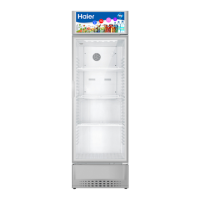

 To Next Page