9
Connecting to a PC
FG-465 measurement data can be saved
to a PC by connecting to a PC via the USB
cable (provided).
The ID of the person performing
measurement also can be entered by
connecting an ID input device (USB (HID)
type) to a PC.
Download the exclusive software from the following URL. The exclusive software is also supplied with
an Instruction Manual.
https://doc.hakko.com
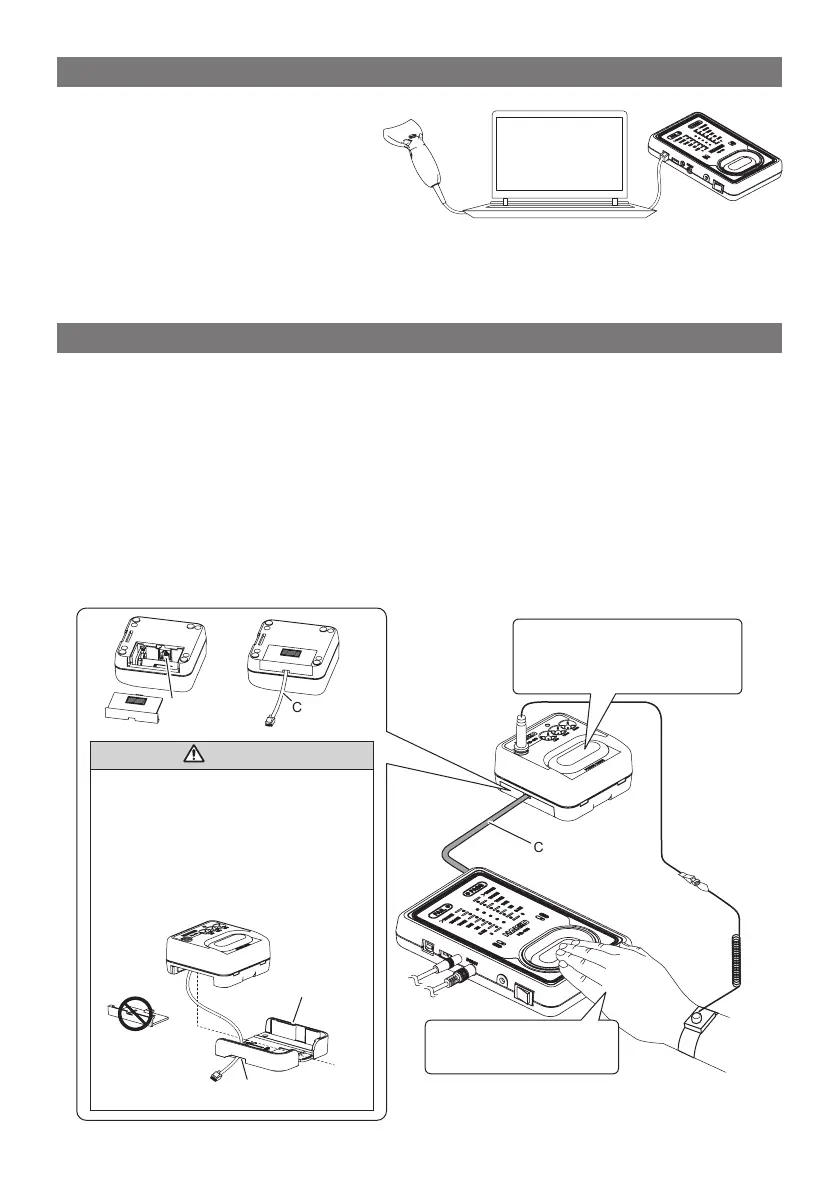
Interlocking operation of the wrist strap tester HAKKO FG-470
The anti-static footwear and wrist strap can be evaluated in a single measurement by connecting the
FG-465 and FG-470 by the exclusive connecting cable (optional).
• Remove the dust cover at the top side of the FG-465. (See "4. Names of Parts.")
• After connecting the FG-470, turn the FG-465 ON.
When these are connected correctly, the buzzer sounds twice. When the power is turned ON on just
the FG-465, the buzzer sounds once.
• During measurement, the LED on the FG-470 changes state. This is not an abnormality.
• Remove the battery for the FG-470 before use.
• There is no need to press the pad on the FG-470.
• Both the FG-465 and FG-470 can be attached to the "stand" (optional) by using the optional "unit
integration base." (See "8. Parts List.")
CAUTION
• Before connecting the connecting
cable, be sure to remove the battery.
• Remove the blue seal placed
over the connection port for the
connecting cable.
• Fit into the mounting holder with the
battery cover removed.
Connecting cable
(option)
Mounting holder
Thru hole
The FG-470 pass range indicator
lights when your hand is placed
over the pad of the FG-465.
Keep your hand held down
until the result is output.
Connecting
cable
Connection port for
connecting cable



 To Next Page