9
Setting up Wi-Fi communications
Wi-Fi communications can be enabled using
NSP in the Wi-Fi Module Settings.
When disabled, the module is held in an OFF
state and is completely inactive.
To set up your Wi-Fi connection follow these
steps:
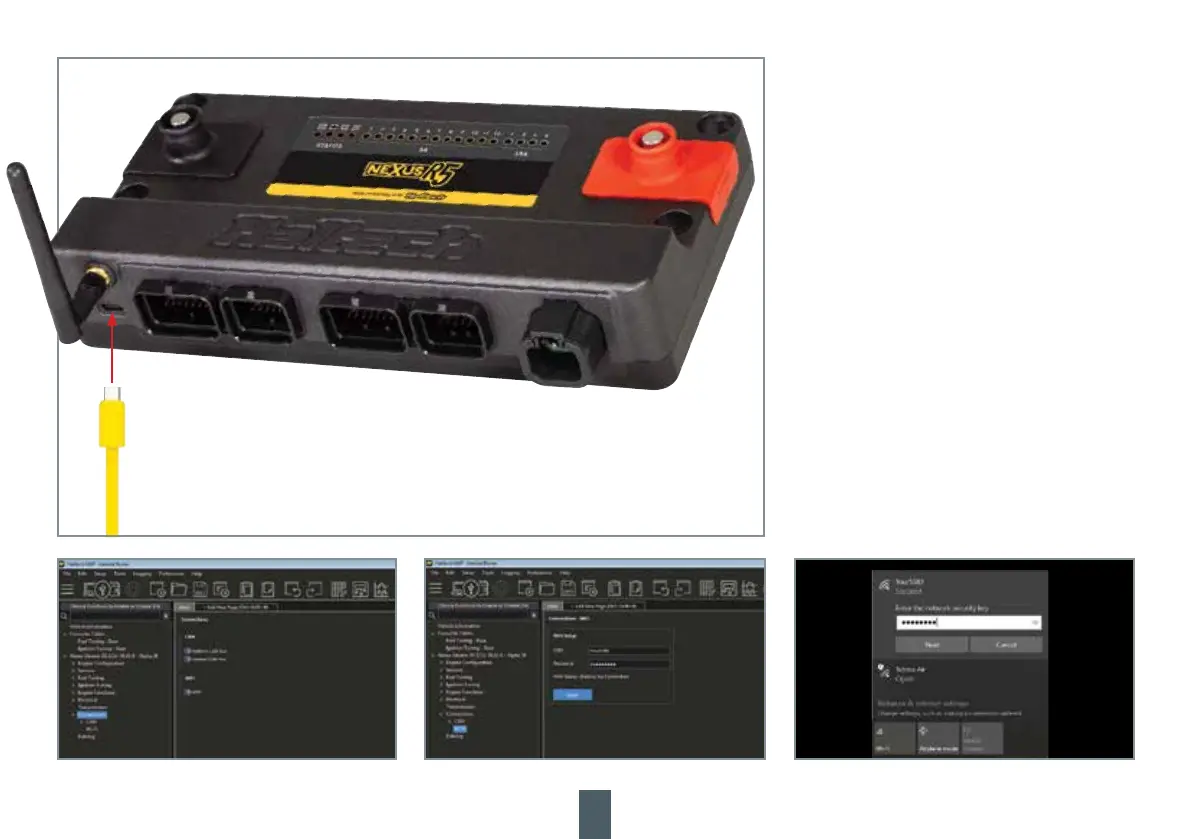
1. Open NSP and connect to your NEXUS R5 via
the supplied USB-C cable.
2. Click on Connections in the feature tree and
enable the Wi-Fi module setting.
3. Under Connections click on Wi-Fi to setup
your SSID and password. Your SSID must be at
least 1 character and your password must be at
least 8 characters.
4. Press Apply.
5. With the ECU powered up on main power
go to your computer’s Network settings and
connect to your NEXUS R5 by selecting your
chosen SSID and typing in your password.
NOTE: The ECU must be powered on main
power for Wi-Fi communication. Up to two
computers may be connected to an ECU over
Wi-Fi and one over USB-C at any one time.



 To Next Page