MFJ-413/417 Instruction Manual Pocket Morse Code Tutor
6
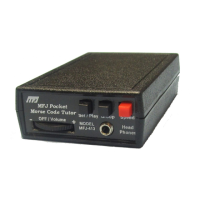
• Group button Repeats previous character group, word, or QSO.
• Set/Play button Sends next character group, word, or QSO.
Instant Play
For MFJ-413
. Press and hold only the Set/Play button while turning the power
on starts a new session using the default settings listed below. The Tutor
acknowledges with a beep and starts playback when the button is released.
• Farnsworth mode Off
• Interactive mode Off
• Combine mode On
• Speed 13 WPM
• Group 5-character per group
• Set All Beginner sets
For MFJ-417
. Press and hold only the Set/Play button while turning the power
on starts a new session using the previous settings. The Tutor acknowledges
with a beep and starts playback when the button is released. This allows you to
start playing without re-setting all the modes.
Recall Settings
For MFJ-413
. Press and hold both the Group and the Set/Play buttons while
turning the power on resets the Tutor to the default settings except the set
parameter. It resets to the first character set, allowing you to select another set
for practice using the default settings. This allows you to start a new session
with a different set, without adjusting the code speed and group length. The
Farnsworth and interactive modes are disabled; the code speed and the group
length can be increased starting with the default settings listed below.
• Farnsworth mode Off
• Interactive mode Off
• Combine mode Off
• Speed 13 WPM
• Group 5-character per group
• Set First character set (EISHTMO)
For MFJ-417
. Press and hold both the Group and the Set/Play buttons while
turning the power on recalls all previous settings except the set parameter. It
resets to the first character set, allowing you to select another set for practice
without re-setting the other modes. This allows you to start a new session with a
different set, without adjusting the code speed and group length again from the
beginning. The Farnsworth and interactive modes are the same as before; the


 To Next Page