4
•Ifthe base station still does not receive asignal from the
measuring station, press and hold the ‘CH | ’button
(10) for approx. 3seconds to start the manual search for
the signal.
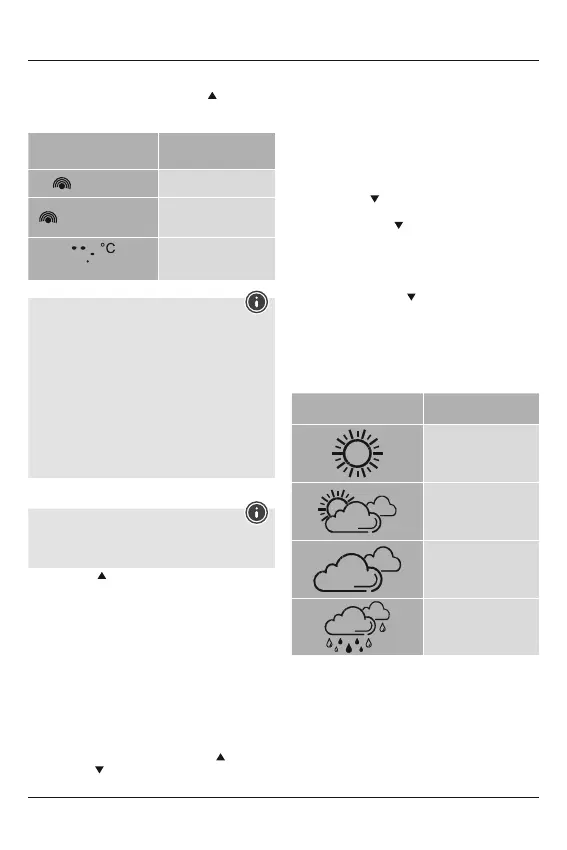
Display
Search for asignal from the
measuring station
Display ashing
Active
Displayed continuously
Successful –
signal is being received
Displayed continuously
Inactive –
no signal reception
Note –Faulty transfer of measured values
•Inisolated cases, interference -e.g. from aWLAN
network, acomputer or atelevision set -can cause the
transfer of measured values between the measuring
station and the base station to fail.
•Inthis case, you must resynchronise the stations by
brieyremoving the batteries from both stations and
reinserting them.
•Ifthe measured values arenot transferred again once
the batteries areinserted, replace the batteries with
new ones.
•Ifnecessary,select anew location for the base station in
order to avoid possible interference in the future.
6.2 Selecting the channel/other measuring stations
Note
•You can install two moremeasuring stations in addition to
the included measuring station. Ensurethat the base and
measuring stations areset to the same channel.
•Press the ‘CH | ’button (10) to set the channel to that
set on the respective measuring station. Channel 1, 2or3
is displayed
6.3Basic and manual settings
Manually setting the date/time
•Press and hold the ‘C/F |SET’button (11) for approximately
3seconds to make the following settings one after the other.
•Year
•Month
•Day
•12/24-hour format
•Hour
•Minute
•Toselect the individual values, press the ‘CH | ’button (10)
or the ‘MEM | ’button (12) and conrm each selection by
pressing the ‘C/F |SET’ button (11).
•Press the ‘C/F |SET’button (11) to adopt the set value
displayed and to skip.
•Ifyou do not make an entry for 8seconds, you automatically
exit Settings mode.
6.4 Celsius/Fahrenheit
•Press the ‘C/F |SET’ button (11) when in any mode to choose
between °C (Celsius) and °F (Fahrenheit).
6.5 Temperature measurement, maximum/minimum
•Press the ‘MEM | ’button (12) to display the maximum or
minimum values for temperatureand humidity recording.
•Ifyou press the ‘MEM | ’button (12) once, the maximum
temperatureand humidity values aredisplayed. When
you press the button once more, the minimum values are
displayed.
6.6
Resetting data
•Press and hold the ‘MEM | ’button (12) for approximately
3seconds to reset the stored maximum and minimum values
for indoor temperature(2), room humidity (3), outdoor
temperature(2) and outdoor humidity (3).
6.7 Weather forecast
•The weather station shows the trend of the weather for the
next 8hours using the following weather symbols:
Symbol Weather
Sunny
Slightly cloudy
Cloudy
Rainy
7. Care and Maintenance
Only clean this product with aslightly damp, lint-free cloth and
do not use aggressive cleaning agents. Make surethat water
does not get into the product.
8. Warranty Disclaimer
Hama GmbH &CoKG assumes no liability and provides no
warranty for damage resulting from improper installation/
mounting, improper use of the product or from failureto
observe the operating instructions and/or safety notes.


 To Next Page