12
• Position the drone directly in front of you so that its
fuselage points away from you and in the desired ight
direction.
• Hold the remote control such that it points to the rear
part of the drone in adirect line.
• Launch the drone and y it at asteady altitude.
• Press the Actual Direction mode button (7) during the
ight to activate the Actual Direction mode.
• The Actual Direction mode is conrmed through two
signal tones and fast ashing of the drone’sLED
indicator (5).
• If you press the Actual Direction mode button (7) again,
the mode is deactivated. Asignal tone will sound and
the LED indicator (5) of the drone is now constantly lit.
7.5 Speed levels
Note
• When you switch on the product, the drone is in low
speed mode.
• Experienced pilots can increase the drone’sspeed by
setting the top speed mode.
• Press the [H] button (3) to increase the drone’sspeed to
the highest speed.
• Twosignal tones conrm the highest setting.
• Press the [L] button (5) to limit the drone’sspeed to the
lowest speed.
• Asignal tone conrms the lowest setting.
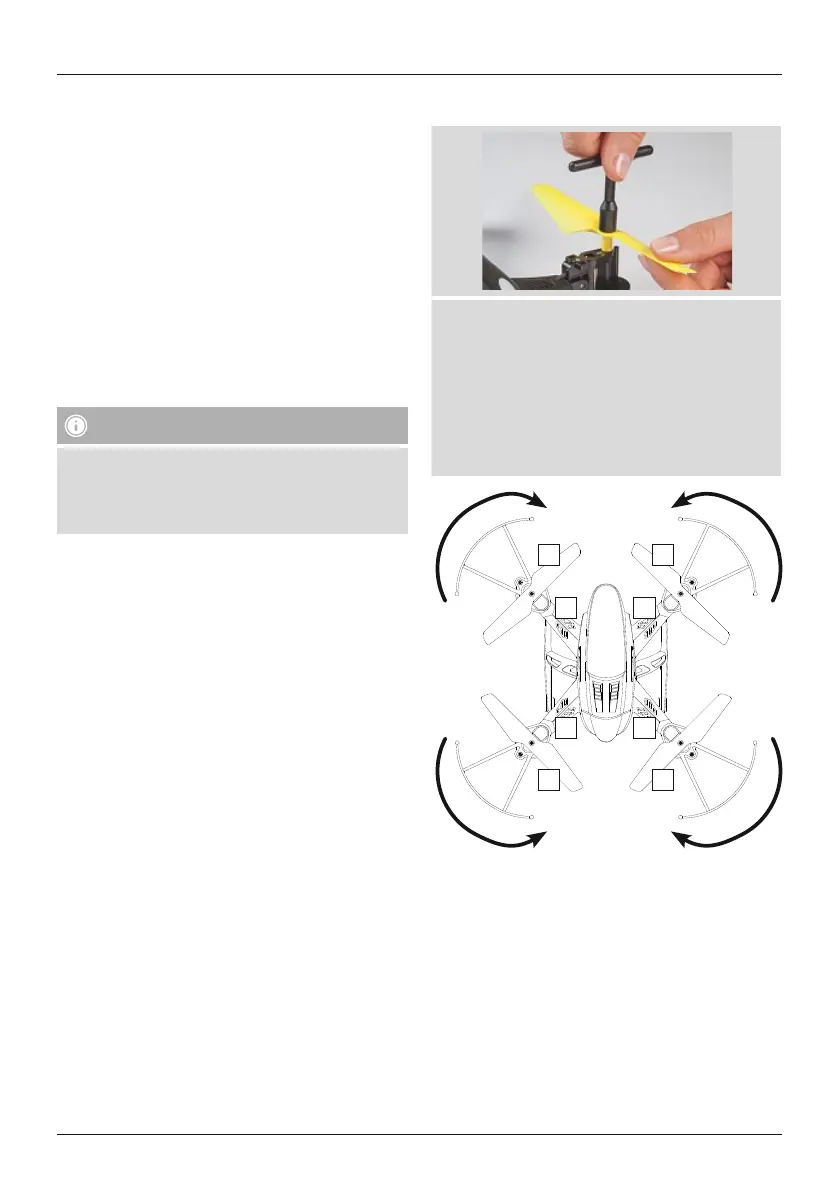
7.6 Changing the rotor blades
• Undo the screw of the rotor blade with the included
screwdriver.
• Remove the existing rotor blade.
• Place the new rotor blade on the motor shaft. Make
surethat the rotor blades aremounted as shown in
the diagram, as otherwise the rotation direction will
not be correct and no drive is generated.
• Securethe rotor blade using the included screwdriver.
1
A2
B1
B2
A1
3
2
4
7.7 Switching off the drone
• Land the drone.
• Move the slide switch (7) on the drone to the OFF
position.
• Press the on/off switch (12) to switch off the remote
control.


 To Next Page