EasyManua.ls Logo

Hama Pen - Operating Instructions; Ergonomic Information; System Requirements; Before Use

Hama Pen
Print Icon
To Next Page IconTo Next Page
To Previous Page IconTo Previous Page
Loading...
Operating
Instruction
Important
Ergonomic
Information
Some
experts
believe
that
using
high
level
volume
sound
for
long
time
may
cause
serious
injury
to
hearing.
If
you
feel
pain,
dizzy,
or
headache,
see
a
qualified
health
professional.
System
Requirement
Compatible
Bluetooth
v3.0
and
under
Bluetooth
Mobile
Phone
/
PC
/
Notebook
and
Pads
Before
you
begin
e
Keep
this
installation
guide
for
future
reference!
It
contains
Important
Troubleshooting
Information.
e
Please
recharge
the
Bluetooth
Pen
headset
before
using
Getting
Started
The
BTST30_B09
is
Touch
Pen
type,
Bluetooth®
v3.0
headset.
Via
wireless
connection,
the
BTST30_B09
supports
Bluetooth-
enabled
PC
or
mobile
phone.
The
BTST30_B09
is
a
Cerelmatic
Touch
Pen
with
Bluetooth
Headset
function,
user
can
use
it
on
the
Apple
iPhone®,
Apple
iPad®
or
other
Smart
Phone
/
Pad
as
touch
pen.
User
can
also
use
it
as
Bluetooth
Headset,
play
music
or
answer
phone
call
via
BTST30_B09.
While
incoming
call,
the
intrgrated
Vibration
Motor
can
indicator
user
incoming
call.
The
BTST30_B09
also
supports
standard
USB
interface
to
a
PC
host
for
battery
charging.
The
operation
characteristics
meets
USB
specification
version
1.1
in
USB
mode.
Also
it
is
compatible
with
low
power
USB
interface
requirements
for
a
PC
host.
Pairing
the
Bluetooth-Headset
„Pen”
Before
using
the
Bluetooth-Headset
,,Pen”
headset
for
the
first
time,
you
must
pair
the
headset
with
your
Bluetooth-
enabled
mobile
phone.
„Pairing”
means
setting
up
a
wireless
connection
between
two
Bluetooth-enabled
devices
so
that
these
devices
can
communicate
with
one
another.
Package
Contains
Your
BTST30_B09
Bluetooth
Touch
Pen
package
includes
the
following:
e
Touch
Pen
Bluetooth
Headsets
(Touch
Pen
Header
&
Bluetooth
Headset
body)
x
Ipcs
e
User's
Manual
x
1pcs
e
USB
Charging
Cable
x
Ipcs
Note:
If
any
part
is
missing,
please
contact
your
dealer
for
a
replacement
immediately.
00115038man
de
en
fr
nl
ru.indd
6-7
Precaution
e
This
pen
is
only
available
in
written
form,
such
as
iPad™
/
iPhone™
and
other
capacitive
touch
screen,
cannot
be
used
in
other
technologies
touch
screen
or
other
material
surface.
e
Do
not
use
other
parts
than
the
touch
pen
to
touch
the
iPad™
/
iPhone™
to
avoid
damage
to
the
screen.
e
Written
contact
with
the
touch
screen
surface,
may
have
the
sound
while
written
e
When
the
touch
pen
head
is
damage
or
deterioration,
please
do
not
use
it
e
Please
take
care
not
to
let
young
children
use
this
products
e
Use
this
product
caused
the
loss
of
body
and
machine
failure,
data
loss
and
other
damage,
this
product
does
not
take
charge
of
responsibility.
The
article
quoted
the
trade
marks
and
product
names
belong
to
their
legal
registration
of
the
company,
this
article
describes
the
use
of
references
is
purely,
no
infringement
intended.
Overview
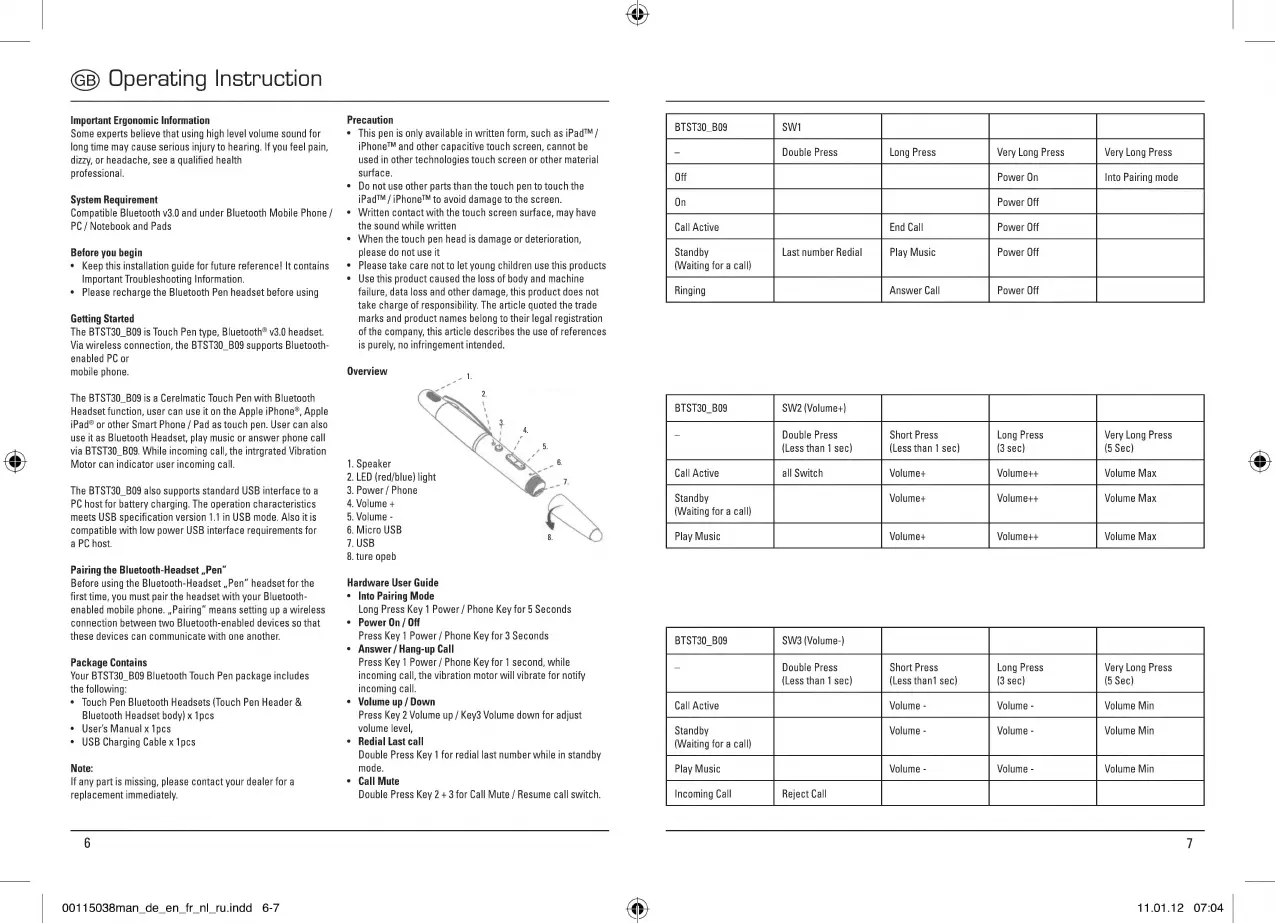
1.
Speaker
8
=
2.
LED
(red/blue)
light
N
`
E
3.
Power
/
Phone
Ф
и
4,
Volume
+
5.
Volume
-
6.
Micro
USB
Б"
7.
USB
las
8.
ture
opeb
Hardware
User
Guide
Into
Pairing
Mode
Long
Press
Key
1
Power
/
Phone
Key
for
5
Seconds
e
Power
Оп
/
Off
Press
Key
1
Power
/
Phone
Key
for
3
Seconds
e
Answer
/
Hang-up
Call
Press
Key
1
Power
/
Phone
Key
for
1
second,
while
incoming
call,
the
vibration
motor
will
vibrate
for
notify
incoming
call.
¢
Volume
up
/
Down
Press
Key
2
Volume
up
/
Key3
Volume
down
for
adjust
volume
level,
e
Redial
Last
call
Double
Press
Key
1
for
redial
last
number
while
in
standby
mode.
e
Call
Mute
Double
Press
Key
2
+
3
for
Call
Mute
/
Resume
call
switch.
EN
NC
CT
w
ern
a
m
aan
ООО
СИ
Е
Standby
Last
number
Redial
Play
Music
Power
Off
(Waiting
for
a
call)
Double
Press
Short
Press
Long
Press
Very Long
Press
(Less
than
1
sec)
(Less
than
1
sec)
(3
sec)
(5
Sec)
Standby
Volume+
Volume++
Volume
Max
(Waiting
for
a
call)
Play
Music
Volume+
Volume++
Volume
Max
Double
Press
Short
Press
Long
Press
Very
Long
Press
(Less
than
1
sec)
(Less
than]
sec)
(3
sec)
(5
Sec)
Standby
Volume
-
Volume
-
Volume
Min
(Waiting
for
a
call)
11.01.12
07:04
|

Related product manuals