3
Warning -Batteries
• Immediately remove and dispose of dead
batteries from the product.
• Only use batteries (or rechargeable batteries)
that match the specied type.
• Do not mix old and new batteries or batteries
of adifferent type or make.
• When inserting batteries, note the correct
polarity (+ and -markings) and insert the
batteries accordingly.Failure to do so could
result in the batteries leaking or exploding.
• Do not overcharge batteries.
• Keep batteries out of the reach of children.
• Do not short circuit the batteries/
rechargeable batteries and keep them away
from uncoated metal objects.
4. Getting Started
• Open the battery compartment (7), remove
the contact breaker and then close the battery
compartment (7).
5. Operation
5.1. Automatic date/time setting using the
DCF signal
• Once you have inserted the battery,the display
is switched on, an acoustic signal sounds and
the alarm clock automatically starts searching
for aDCF signal. During the search, the wireless
symbol
will ash. This process can take 3
to 5minutes.
• When the wireless signal is received, the date
and time areautomatically set.
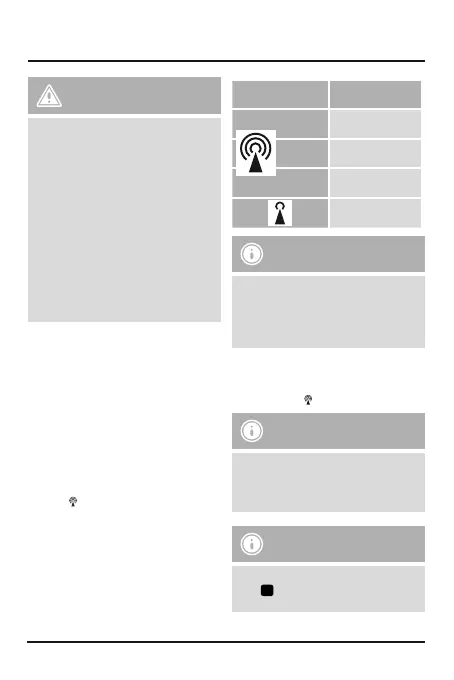
Display
Searching for the
DCF signal
Flashing
display
Active
Constant
display
Successful –signal is
being received
No display
Error –signal search
ended
Weak signal
reception
Note
The clock automatically searches for the DCF
signal once an hour to ensurethat the time
is correct. If the search fails, it ends and is
repeated at the next clock hour.The wireless
symbol will go out.
• If the station still does not receive asignal, press
the wave button (5) for approx. 3seconds to
start the manual search for the DCF signal. The
wireless symbol
will start to ash.
Note
The manual search takes about 3to5
minutes. If the search fails, it ends and is
repeated at the next clock hour.The wireless
symbol will go out.
Note –Summer time
The clock automatically switches to summer
time.
S
appears on the display as long as
summer time is activated.


 To Next Page