If the previously described method for integrating the air purier does not work, thereisthe
option of connecting the device via access point (AP) mode.
•In the rst step, the WiFi indicator on the air purier display must ash slowly.Ifthis is not the case,
repeatedly for about 5seconds until it ashes slowly.
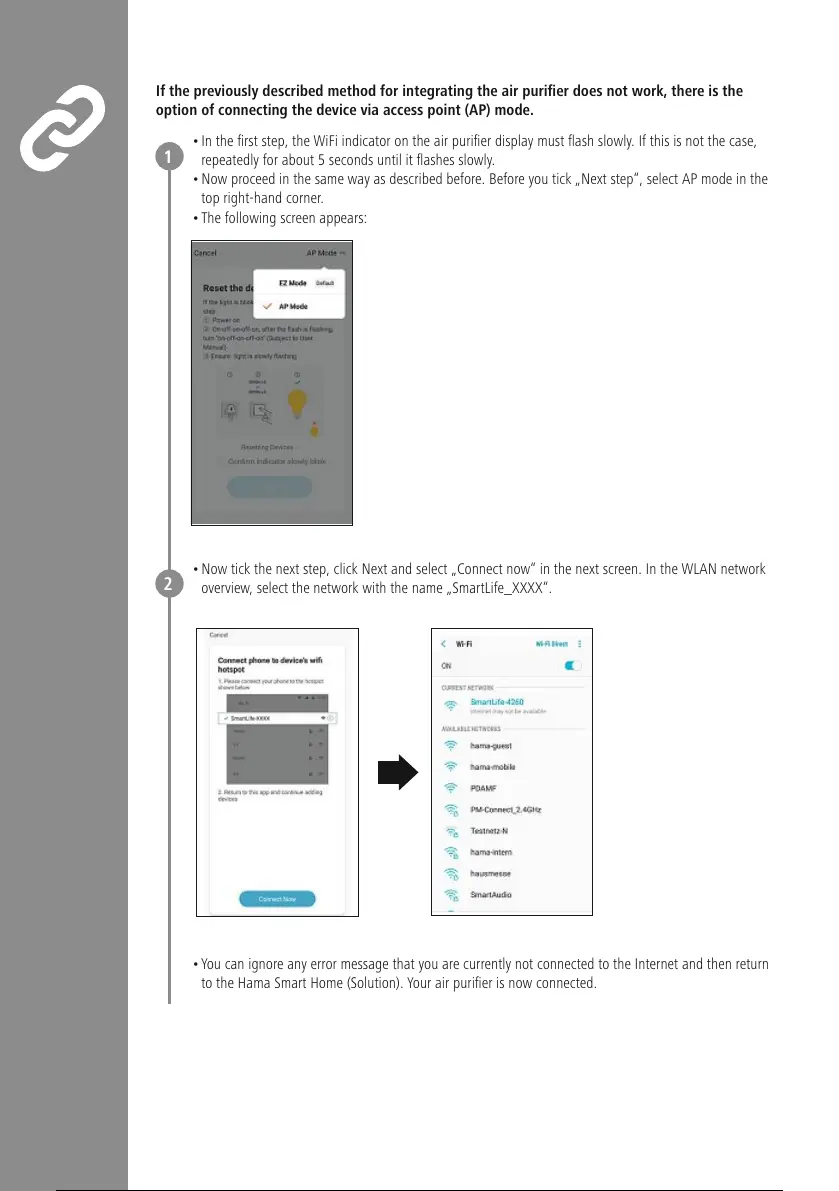
•Now proceed in the same way as described before. Beforeyou tick „Next step“, select AP mode in the
top right-hand corner.
•The following screen appears:
•Now tick the next step, click Next and select „Connect now“ in the next screen. In the WLAN network
overview,select the network with the name „SmartLife_XXXX“.
•Youcan ignoreany error message that you arecurrently not connected to the Internet and then return
to the Hama Smart Home (Solution). Your air purier is now connected.
1
2


 To Next Page