4
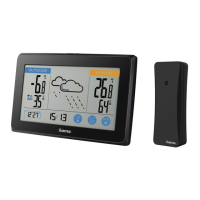
6.1. Connection to the measuring station
•After you insert the batteries, the base station automatically
searches for aconnection to the measuring station and
performs initial setup.
Note
•Initial setup takes approx. 2minutes.
•During connection, the wireless symbol on the measuring
station will ash (4).
•Donot press any buttons during setup. Otherwise, values
may not be transmitted correctly and thereisarisk of
value errors and inaccuracies.
•The setup process is completed when the indoor (7/8) and
outdoor (2/3) measurement data is displayed.
•The measured value is automatically updated by the base
device about every 45 seconds.
•Ifthe temperatureisoutside of the measuring range,
--.- (lower than minimum temperature) or --.- (higher than
maximum temperature) wil lappear on the temperature
display.
•Ifthe base station still does not receive asignal from the
measuring station, press and hold the ‘CH | ’button
(12) for approx. 3seconds to start the manual search for
the signal.
Display
Search for asignal from the
measuring station
Display ashing
Active
Displayed continuously
Successful –
signal is being received
Displayed continuously
Inactive –
no signal reception
Note –Faulty transfer of measured values
•Inisolated cases, interference -e.g. from aWLAN
network, acomputer or atelevision set -can cause the
transfer of measured values between the measuring
station and the base station to fail.
•Inthis case, you must resynchronise the stations by
brieyremoving the batteries from both stations and
reinserting them.
•Ifthe measured values arenot transferred again once
the batteries areinserted, replace the batteries with
new ones.
•Ifnecessary,select anew location for the base station in
order to avoid possible interference in the future.
6.2 Selecting the channel/other measuring stations
Note
•You can install two moremeasuring stations in addition to
the included measuring station. Ensurethat the base and
measuring stations areset to the same channel.
•Press the ‘CH | ’button (12) to set the channel to that
set on the respective measuring station. Channel 1, 2or3
is displayed
6.3Basic and manual settings
Automatic setting using the DCF signal
After the rst time the base station is switched on and
successful transmission is established between the base station
and the measuring station, the clock will automatically search
for aDCF signal. During the search, the wireless symbol (15)
will ash.
When the radio signal is received, the date and time are
automatically set.
Radio icon Signal strength
No symbol No reception
Poor
Excellent
Radio icon
Searching for the
DCF signal
Flashing display Active
Constant display
Successful –signal is being
received
No display Error –signal search ended


 To Next Page