5
Note –Time settings
•If, during initial setup of the device, aDCF radio signal
is not received within the rst few minutes, the search is
aborted. The radio symbol disappears.
•Ifthereare reception problems, we recommend leaving
the clock to sit overnight, since interference is generally
less at night.
•Inthe meantime, you can start amanual search for the
DCF radio signal at another location or you can manually
set the time and date.
•The clock automatically continues to search for the DCF
radio signal on adaily basis (1:00 a.m., 2:00 a.m. and
3:00 p.m.). If the signal is received successfully,the
manually set time and date areoverwritten.
•Press and hold the LIGHT button (1) to start the manual
search for the DCF radio signal.
•Press the LIGHT button (1) again to interrupt the manual
search for the DCF radio signal.
Manually setting the date/time
•Press and hold the ‘C/F |SET’button (13) for approximately
3seconds to make the following settings one after the other.
•Time zone
•Year
•‘Day/Month’ or ‘Month/Day’ display
•Month
•Day
•12/24-hour format
•Hour
•Minute
•Toselect the individual values, press the ‘CH |
’button (12)
or the ‘MEM | ’button (14) and conrm each selection by
pressing the ‘C/F |SET’ button (13).
•Press the ‘C/F |SET’button (13) to adopt the set value
displayed and to skip.
•Ifyou do not make an entry for 20 seconds, you
automatically exit Settings mode.
Note –Time zone
•The DCF signal can be received over long distances, but
always transmits the current Central European Time in
Germany.Make sureyou account for the time difference
in countries with another time zone.
•Ifyou areinMoscow,the time is 3hours later than in
Germany.This means that you should set +3 for the
time zone. The clock then automatically sets the time to
3hours after the DCF signal received or relative to the
manually set time.
6.4 Celsius/Fahrenheit
•Press the ‘C/F |SET’ button (13) when in any mode to choose
between °C (Celsius) and °F (Fahrenheit).
6.5. Maximum and minimum temperature and humidity
values
•The base station automatically stores the maximum and
minimum indoor/outdoor temperatureand humidity values.
•Repeatedly press the ‘MEM |
’button (14) to switch
between the current temperatureand humidity,minimum
temperatureand humidity (MIN) and maximum temperature
and humidity (MAX).
•The maximum and minimum values aredisplayed for 10
seconds.
•Press and hold the ‘MEM | ’button (14) to reset the stored
maximum and minimum values.
6.6 Weather forecast
•Based on changes in the atmospheric pressureand the data
saved, the base station is able to make weather forecasts for
the next 12 to 24 hours.
Note –Weather forecast
The weather forecast function is not available during the
rst few hours of operation because it requires data that is
collected during operation.
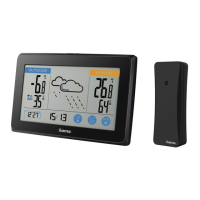
•The weather station shows the trend of the weather for the
next 12 to 24 hours using the following weather symbols:
Symbol Weather
Sunny
Slightly cloudy
Cloudy
Rainy
6.7. Backlight
Note –Backlight
•Ifyou press the
LIGHT
button (1), the display will light up
for approx. 20 seconds.


 To Next Page